
ThumbType: Typing Trainer
Telchar Studio Tools In-app purchases Contains ads
Touchscreen typing trainer with thumb drills, WPM tests and stats.
- Downloads
- 44+
- on Google Play
- Price
- Free
- In-app purchases
- Updated
- Sep 12
- 2026 · v1.0.0
Screenshots
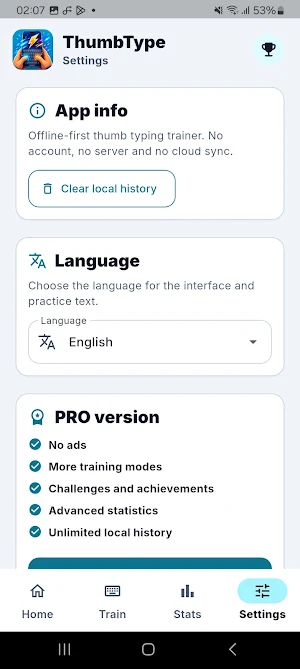
About ThumbType: Typing Trainer
ThumbType is a mobile typing trainer built for touchscreen keyboards. Practice typing with your thumbs, improve your WPM, reduce mistakes, and build better typing habits for messages, emails, work notes, URLs, numbers, symbols, and everyday mobile writing.
Unlike generic keyboard speed tests, ThumbType focuses on real smartphone typing. Sessions are short, fast, and designed for daily practice, so you can train whenever you have a few minutes.
What you can practice:
• Speed Test
Train with 30, 60, and 120 second typing tests.
• Accuracy Mode
Focus on clean typing and fewer mistakes instead of only typing faster.
• Endless Words
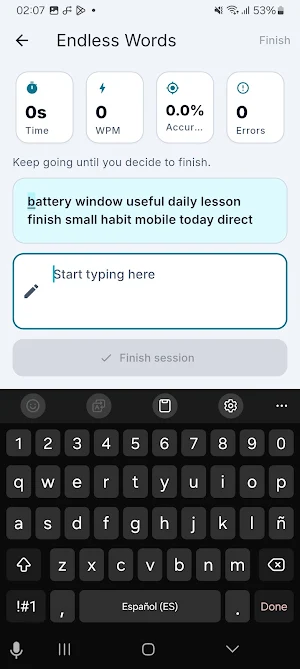
Keep typing, extend your run, and build consistency.
• Survival Mode
Mistakes reduce your health, so accuracy matters.
• Real Conversations
Practice WhatsApp-style messages, everyday phrases, and realistic mobile text.
• Numbers
Train phone numbers, IDs, codes, and numeric typing.
• Symbols
Practice common symbols such as @, #, %, &, brackets, slashes, and more.
• Email Practice
Improve typing for email addresses and work communication.
• URL Practice
Train web addresses, domains, links, and mobile browsing text.
• Programming Mode
Practice camelCase, snake_case, JSON, URLs, and short code-style snippets.
• Memory Typing
Read a sentence, remember it, and type it after it disappears.
• Correction Mode
Rewrite incorrect sentences correctly and learn from the solution.
• Left Thumb, Right Thumb, and Two Thumbs
Train one-handed and two-thumb typing with targeted drills.
• Daily Challenge
Complete a daily local challenge and keep your typing routine active.
Progress and stats:
• WPM tracking
• CPM tracking
• Accuracy percentage
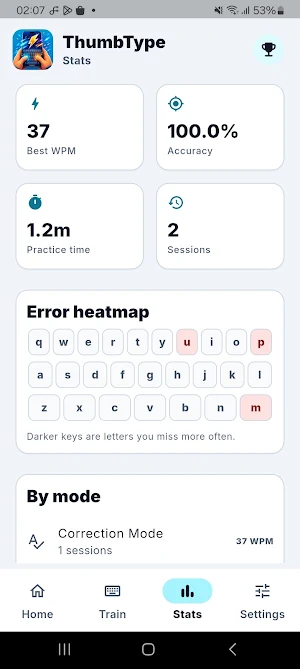
• Error tracking
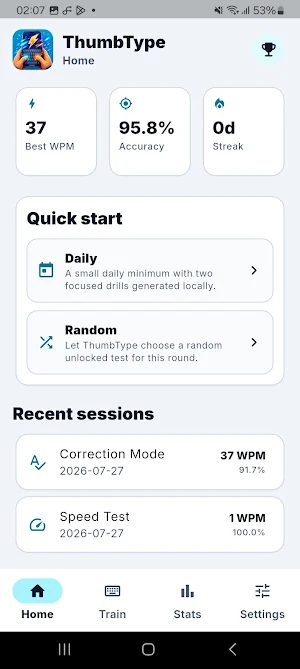
• Personal bests
• Streaks
• Mode-by-mode statistics
• Local history
• Achievements and challenges
• Advanced progress insights with Pro
Privacy and offline-first design:
ThumbType is built to work offline. There are no accounts, no login, no cloud sync, and no subscription required. Your typing practice and statistics stay on your device.
Why use ThumbType?
Most typing tests are designed for physical keyboards. ThumbType is designed for the way people actually type on phones: with thumbs, on touchscreen keyboards, in short sessions throughout the day.
Use ThumbType to improve:
• Phone typing speed
• Touchscreen keyboard accuracy
• Thumb typing confidence
• Message typing
• Email typing
• Number and code typing
• URL typing
• Everyday mobile writing
ThumbType helps you type faster, make fewer mistakes, and feel more comfortable writing on your smartphone.
Unlike generic keyboard speed tests, ThumbType focuses on real smartphone typing. Sessions are short, fast, and designed for daily practice, so you can train whenever you have a few minutes.
What you can practice:
• Speed Test
Train with 30, 60, and 120 second typing tests.
• Accuracy Mode
Focus on clean typing and fewer mistakes instead of only typing faster.
• Endless Words
Keep typing, extend your run, and build consistency.
• Survival Mode
Mistakes reduce your health, so accuracy matters.
• Real Conversations
Practice WhatsApp-style messages, everyday phrases, and realistic mobile text.
• Numbers
Train phone numbers, IDs, codes, and numeric typing.
• Symbols
Practice common symbols such as @, #, %, &, brackets, slashes, and more.
• Email Practice
Improve typing for email addresses and work communication.
• URL Practice
Train web addresses, domains, links, and mobile browsing text.
• Programming Mode
Practice camelCase, snake_case, JSON, URLs, and short code-style snippets.
• Memory Typing
Read a sentence, remember it, and type it after it disappears.
• Correction Mode
Rewrite incorrect sentences correctly and learn from the solution.
• Left Thumb, Right Thumb, and Two Thumbs
Train one-handed and two-thumb typing with targeted drills.
• Daily Challenge
Complete a daily local challenge and keep your typing routine active.
Progress and stats:
• WPM tracking
• CPM tracking
• Accuracy percentage
• Error tracking
• Personal bests
• Streaks
• Mode-by-mode statistics
• Local history
• Achievements and challenges
• Advanced progress insights with Pro
Privacy and offline-first design:
ThumbType is built to work offline. There are no accounts, no login, no cloud sync, and no subscription required. Your typing practice and statistics stay on your device.
Why use ThumbType?
Most typing tests are designed for physical keyboards. ThumbType is designed for the way people actually type on phones: with thumbs, on touchscreen keyboards, in short sessions throughout the day.
Use ThumbType to improve:
• Phone typing speed
• Touchscreen keyboard accuracy
• Thumb typing confidence
• Message typing
• Email typing
• Number and code typing
• URL typing
• Everyday mobile writing
ThumbType helps you type faster, make fewer mistakes, and feel more comfortable writing on your smartphone.
Alternatives to ThumbType: Typing Trainer
Looking for apps like ThumbType: Typing Trainer? Here are 6 similar Android apps on Google Play. All of them are free to download.
-
Match the Frequency
-
Match the Color
-
Gloopkin: Monster Clicker
-
Family Roots: Family Tree
-
Where Did I Park my car?
-
My Subscriptions & Bills
| App | Rating | Price | Installs | Last updated | Compare |
|---|---|---|---|---|---|
| ThumbType: Typing Trainer | – | Free | 10+ | Sep 12, 2026 | |
| Match the Frequency | – | Free | 10+ | Sep 12, 2026 | Compare |
| Match the Color | – | Free | 1+ | Sep 12, 2026 | Compare |
| Gloopkin: Monster Clicker | – | Free | 10+ | Sep 12, 2026 | Compare |
| Family Roots: Family Tree | – | Free | 100+ | – | Compare |
| Where Did I Park my car? | – | Free | 10+ | – | Compare |
| My Subscriptions & Bills | – | Free | 1+ | – | Compare |
Similar apps on Google Play
- Match the Frequency
- Match the Color
- Gloopkin: Monster Clicker
- Family Roots: Family Tree
- Where Did I Park my car?
- My Subscriptions & Bills
- CleanShare Photo Privacy
- FocusReflex: Eye Training
- MathRush: Mental Math Games
- RapidLector: Speed Reading
- MindRecall: Memory Games
- MTG Life Tracker
- Tier List Maker: Rank Anything
- Quick RPG Dice Roller
- Easy Teleprompter
- Sound Meter dB
- LED Banner and Text Scroller
- San Juan en Soria
- My Financial Calculator
- Billionaire Money Simulator
- CollectShelf: My Collections
- Chrono Chess: Chess Clock
- Beer Me! - Buscador de bares
- Eggfinity: Egg Clicker
- Camel calculator