
Where Did I Park my car?
Telchar Studio Auto & Vehicles In-app purchases Contains ads
Save where you parked and walk back with map, photos and parking timer.
- Downloads
- 63+
- on Google Play
- Price
- Free
- In-app purchases
- Updated
- Sep 12
- 2026 · v1.0.0
Screenshots


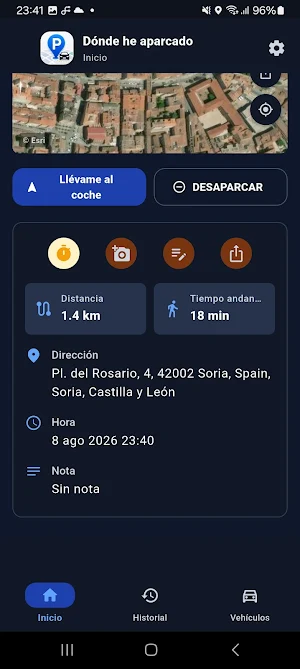


About Where Did I Park my car?
Where Did I Park helps you save your vehicle’s location and get back to it without hassle.
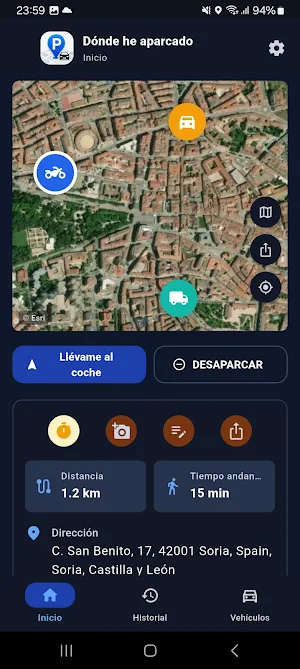
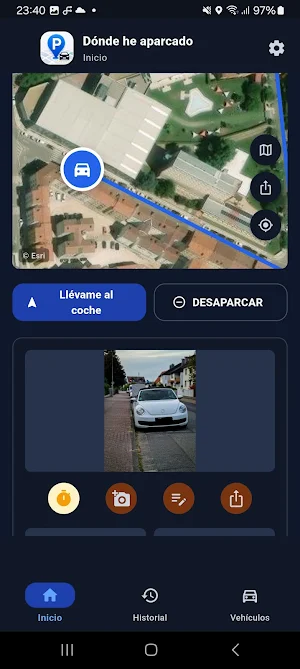
Open the app, tap “I parked here” and your parking spot is saved with date, time, approximate address and selected vehicle. You can also add a photo, write a note, or manually mark the spot on the map if you remembered later.
Main features:
• Save your car, motorcycle or van location.
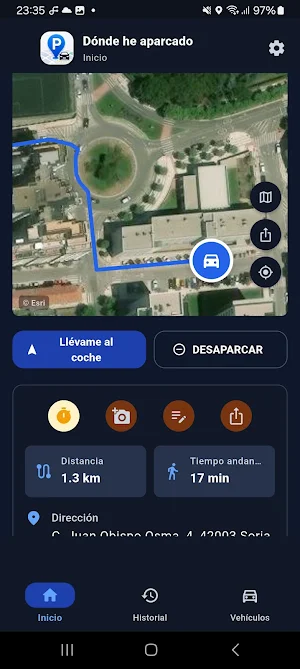
• Walk back with a route to your vehicle.
• Check distance, walking time, address and parking time.
• Add photos and notes, for example: “Level -2, space B37”.
• Start a parking timer for paid zones or time-limited parking.
• Get reminders before your parking time expires.
• Review your previous parking history.
• Use street map or satellite view.
• Share your vehicle location.
The app is designed to be fast:
open, save parking, close.
Later, open and walk back to your vehicle.
The free version includes parking saving, routes, photos, notes, timer, limited history and one vehicle.
PRO unlocks:
• No ads.
• Unlimited history.
• Unlimited vehicles.
Privacy:
Parking spots, notes and photos are stored on your device. Location is used to show where you are, save the parking spot and calculate the route back to your vehicle.
Open the app, tap “I parked here” and your parking spot is saved with date, time, approximate address and selected vehicle. You can also add a photo, write a note, or manually mark the spot on the map if you remembered later.
Main features:
• Save your car, motorcycle or van location.
• Walk back with a route to your vehicle.
• Check distance, walking time, address and parking time.
• Add photos and notes, for example: “Level -2, space B37”.
• Start a parking timer for paid zones or time-limited parking.
• Get reminders before your parking time expires.
• Review your previous parking history.
• Use street map or satellite view.
• Share your vehicle location.
The app is designed to be fast:
open, save parking, close.
Later, open and walk back to your vehicle.
The free version includes parking saving, routes, photos, notes, timer, limited history and one vehicle.
PRO unlocks:
• No ads.
• Unlimited history.
• Unlimited vehicles.
Privacy:
Parking spots, notes and photos are stored on your device. Location is used to show where you are, save the parking spot and calculate the route back to your vehicle.
What’s new
Version 1.0.0 · Updated September 12, 2026
minor bug fixes
Alternatives to Where Did I Park my car?
Looking for apps like Where Did I Park my car?? Here are 6 similar Android apps on Google Play. All of them are free to download.
-
Match the Frequency
-
Match the Color
-
Gloopkin: Monster Clicker
-
Family Roots: Family Tree
-
My Subscriptions & Bills
-
CleanShare Photo Privacy
| App | Rating | Price | Installs | Last updated | Compare |
|---|---|---|---|---|---|
| Where Did I Park my car? | – | Free | 50+ | Sep 12, 2026 | |
| Match the Frequency | – | Free | 10+ | Sep 12, 2026 | Compare |
| Match the Color | – | Free | 1+ | – | Compare |
| Gloopkin: Monster Clicker | – | Free | 10+ | Sep 12, 2026 | Compare |
| Family Roots: Family Tree | – | Free | 100+ | – | Compare |
| My Subscriptions & Bills | – | Free | 5+ | Sep 12, 2026 | Compare |
| CleanShare Photo Privacy | – | Free | 5+ | – | Compare |
Similar apps on Google Play
- Match the Frequency
- Match the Color
- Gloopkin: Monster Clicker
- Family Roots: Family Tree
- My Subscriptions & Bills
- CleanShare Photo Privacy
- FocusReflex: Eye Training
- MathRush: Mental Math Games
- RapidLector: Speed Reading
- MindRecall: Memory Games
- ThumbType: Typing Trainer
- MTG Life Tracker
- Tier List Maker: Rank Anything
- Quick RPG Dice Roller
- Easy Teleprompter
- Sound Meter dB
- LED Banner and Text Scroller
- San Juan en Soria
- My Financial Calculator
- Billionaire Money Simulator
- CollectShelf: My Collections
- Chrono Chess: Chess Clock
- Beer Me! - Buscador de bares
- Eggfinity: Egg Clicker
- Camel calculator