
CleanShare Photo Privacy
Telchar Studio Photography In-app purchases Contains ads
Clean metadata, hide private details, and export safer photo copies
- Downloads
- 6+
- on Google Play
- Price
- Free
- In-app purchases
- Updated
- Sep 12
- 2026 · v1.0.1
Screenshots
About CleanShare Photo Privacy
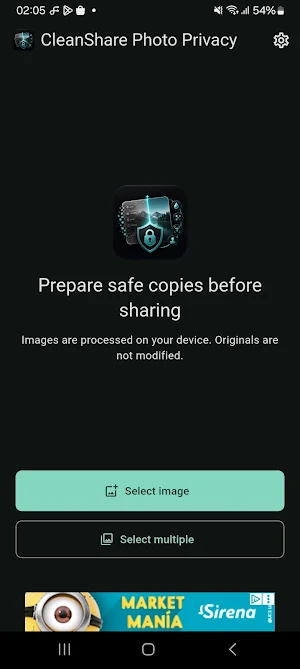
CleanShare Photo Privacy is a photo privacy tool designed to help you prepare safer image copies before sharing them through messaging apps, social media, email, or any other platform.
The app helps you review, clean, hide, and export photos directly on your device. Your original images are not modified. CleanShare Photo Privacy creates a new edited copy so you can share the safer version while keeping the original file unchanged.
Main features:
Select one photo or multiple photos.
Preview the image before exporting.
Export safe copies without changing the original file.
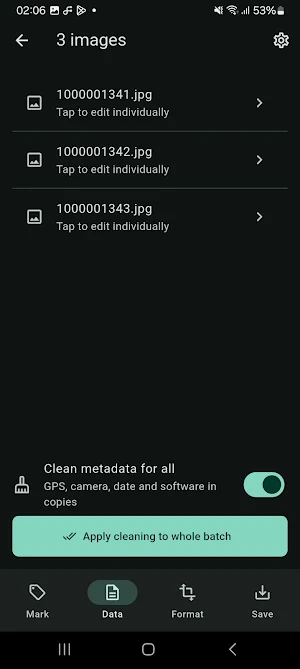
Remove hidden metadata from exported copies.
Review detected metadata such as GPS, date, device, camera, software, and available EXIF tags.
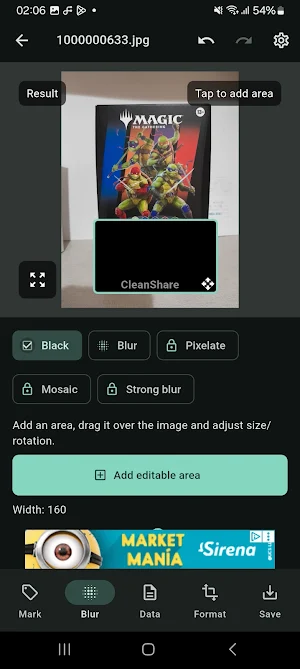
Hide sensitive areas in a photo.
Use black redaction to cover private information.
Use blur to obscure parts of an image.
Use strong blur for more intense hiding.
Use pixelation and mosaic effects to make selected areas unreadable.
Move, resize, and rotate hidden areas.
Zoom into the preview to check details before saving.
Add a default CleanShare watermark.
Configure watermark style and position.
Export a single image.
Export multiple images in a batch.
Apply global settings to all selected images.
Override settings for individual images inside a batch.
Export as JPG, PNG, or WebP.
Use a portrait-only interface for a stable editing experience.
Available languages: English, Spanish, French, Portuguese, Italian, and German.
CleanShare Photo Privacy is useful when photos may contain private or hidden information, such as:
Documents with personal details.
Screenshots with names, numbers, addresses, or account information.
Photos with GPS location metadata.
Images that include camera, device, date, or software metadata.
Pictures you want to share without exposing hidden EXIF data.
Multiple images that need to be prepared at once.
Privacy-focused workflow:
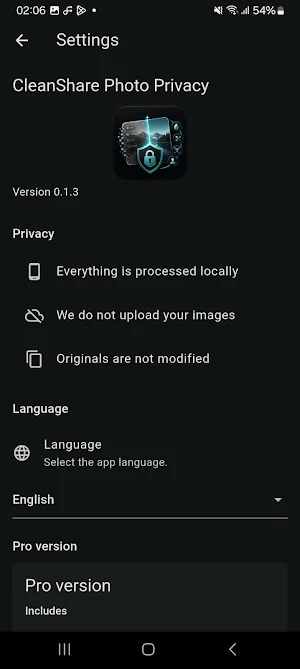
Images are processed on your device.
Original files are not modified.
Metadata cleaning is applied to the exported copy.
Hidden areas are applied to the exported copy.
The app is designed to help you create safer versions of photos before sharing.
CleanShare Photo Privacy combines metadata cleaning, visual redaction, blur, pixelation, watermarking, and batch export in one simple tool for safer photo sharing.
The app helps you review, clean, hide, and export photos directly on your device. Your original images are not modified. CleanShare Photo Privacy creates a new edited copy so you can share the safer version while keeping the original file unchanged.
Main features:
Select one photo or multiple photos.
Preview the image before exporting.
Export safe copies without changing the original file.
Remove hidden metadata from exported copies.
Review detected metadata such as GPS, date, device, camera, software, and available EXIF tags.
Hide sensitive areas in a photo.
Use black redaction to cover private information.
Use blur to obscure parts of an image.
Use strong blur for more intense hiding.
Use pixelation and mosaic effects to make selected areas unreadable.
Move, resize, and rotate hidden areas.
Zoom into the preview to check details before saving.
Add a default CleanShare watermark.
Configure watermark style and position.
Export a single image.
Export multiple images in a batch.
Apply global settings to all selected images.
Override settings for individual images inside a batch.
Export as JPG, PNG, or WebP.
Use a portrait-only interface for a stable editing experience.
Available languages: English, Spanish, French, Portuguese, Italian, and German.
CleanShare Photo Privacy is useful when photos may contain private or hidden information, such as:
Documents with personal details.
Screenshots with names, numbers, addresses, or account information.
Photos with GPS location metadata.
Images that include camera, device, date, or software metadata.
Pictures you want to share without exposing hidden EXIF data.
Multiple images that need to be prepared at once.
Privacy-focused workflow:
Images are processed on your device.
Original files are not modified.
Metadata cleaning is applied to the exported copy.
Hidden areas are applied to the exported copy.
The app is designed to help you create safer versions of photos before sharing.
CleanShare Photo Privacy combines metadata cleaning, visual redaction, blur, pixelation, watermarking, and batch export in one simple tool for safer photo sharing.
Alternatives to CleanShare Photo Privacy
Looking for apps like CleanShare Photo Privacy? Here are 6 similar Android apps on Google Play. All of them are free to download.
-
Match the Frequency
-
Match the Color
-
Gloopkin: Monster Clicker
-
Family Roots: Family Tree
-
Where Did I Park my car?
-
My Subscriptions & Bills
| App | Rating | Price | Installs | Last updated | Compare |
|---|---|---|---|---|---|
| CleanShare Photo Privacy | – | Free | 5+ | Sep 12, 2026 | |
| Match the Frequency | – | Free | 10+ | Sep 12, 2026 | Compare |
| Match the Color | – | Free | 1+ | Sep 12, 2026 | Compare |
| Gloopkin: Monster Clicker | – | Free | 10+ | Sep 12, 2026 | Compare |
| Family Roots: Family Tree | – | Free | 100+ | – | Compare |
| Where Did I Park my car? | – | Free | 10+ | – | Compare |
| My Subscriptions & Bills | – | Free | 1+ | – | Compare |
Similar apps on Google Play
- Match the Frequency
- Match the Color
- Gloopkin: Monster Clicker
- Family Roots: Family Tree
- Where Did I Park my car?
- My Subscriptions & Bills
- FocusReflex: Eye Training
- MathRush: Mental Math Games
- RapidLector: Speed Reading
- MindRecall: Memory Games
- ThumbType: Typing Trainer
- MTG Life Tracker
- Tier List Maker: Rank Anything
- Quick RPG Dice Roller
- Easy Teleprompter
- Sound Meter dB
- LED Banner and Text Scroller
- San Juan en Soria
- My Financial Calculator
- Billionaire Money Simulator
- CollectShelf: My Collections
- Chrono Chess: Chess Clock
- Beer Me! - Buscador de bares
- Eggfinity: Egg Clicker
- Camel calculator