
Date Wheel - Date Calculator
tim_barker Productivity In-app purchases
Create a project Schedule or calculate days between set dates
- Downloads
- 200+
- on Google Play
- Price
- Free
- In-app purchases
- Updated
- Apr 23
- 2026 · v1.0.29
Screenshots
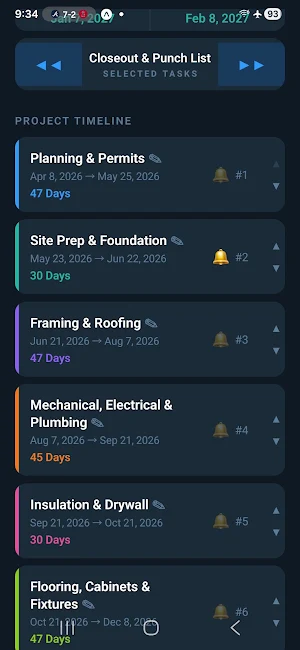


About Date Wheel - Date Calculator
Full description:
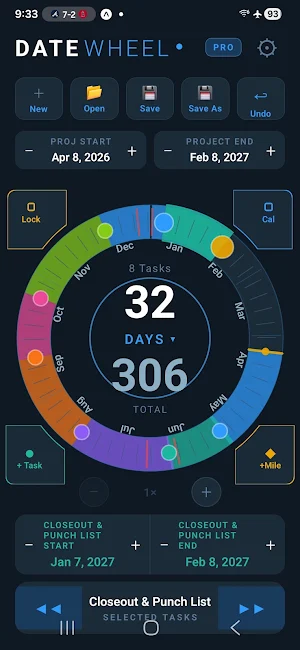
See your entire project timeline at a glance — Date Wheel maps your tasks, milestones, and deadlines onto a stunning circular 365-day calendar. No more staring at spreadsheets. Just drag, drop, and plan.
Why Date Wheel?
Traditional project planning tools show you a list or a bar chart. Date Wheel gives you something different — a circular year view that instantly shows you where your project sits in the calendar year, how much time you have left, and how your tasks relate to each other.
Core Features:
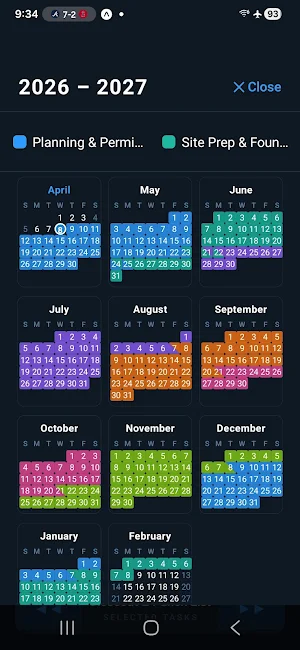
🔵 Visual Year Wheel — See your full project timeline on a circular 365-day calendar. Tasks appear as colored arcs that are instantly readable at a glance. Pinch to zoom in on any section for week and day level detail.
📊 Gantt Chart View — Switch to a traditional Gantt chart for detailed timeline analysis. Export to Excel with color-coded, professionally formatted spreadsheets including a Gantt sheet.
◆ Milestones — Mark key dates as diamond markers on the wheel. Deadlines, reviews, and launch dates are always visible on both the wheel and timeline.
⚡ Smart Overlap Detection — Date Wheel automatically detects when tasks overlap or leave gaps when you edit dates manually. Choose to shift following tasks forward, or set a lead/lag relationship that is maintained as your schedule evolves.
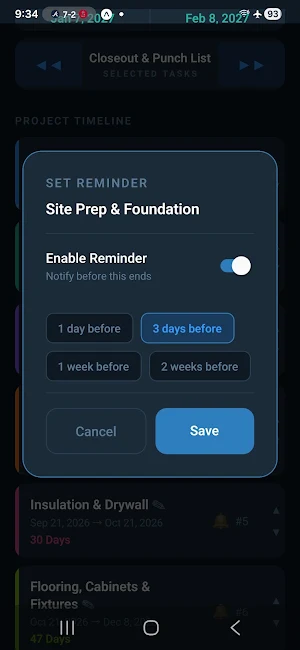
🔔 Reminders — Set per-task and per-milestone reminders. Get notified 1 day, 3 days, 1 week, or 2 weeks before any deadline.
📤 Export Everywhere — Export your project to Excel (.xlsx), PDF, iCal (.ics), or CSV. Import directly into Google Calendar, Outlook, Apple Calendar, Excel, or MS Project.
🏖️ Holiday Awareness — Enable public holidays for the US, Canada, Mexico, or China. End dates automatically adjust to account for non-working days — every holiday adds one additional day to your schedule.
🔍 Pinch to Zoom — Zoom into any part of the wheel to see week and day tick marks. Pan freely to focus on the dates that matter most.
📂 Projects & Templates — Save projects with real dates to continue later, or save as reusable templates for recurring project types. Lock and shift your entire timeline with a single drag gesture.
🔗 Lead/Lag Relationships — Set overlap or gap relationships between tasks that are maintained as your schedule shifts. Edit from both the wheel and the project timeline.
Pro Features (one-time purchase):
Unlimited tasks per project
Holiday awareness
All export formats
Templates and project saving
Free includes:
Full wheel visualization
Up to 1 stored task
PDF and CSV export
Reminders and milestones
Date Wheel is perfect for construction project managers, product teams, event planners, home renovators, or anyone who thinks visually about time.
See your entire project timeline at a glance — Date Wheel maps your tasks, milestones, and deadlines onto a stunning circular 365-day calendar. No more staring at spreadsheets. Just drag, drop, and plan.
Why Date Wheel?
Traditional project planning tools show you a list or a bar chart. Date Wheel gives you something different — a circular year view that instantly shows you where your project sits in the calendar year, how much time you have left, and how your tasks relate to each other.
Core Features:
🔵 Visual Year Wheel — See your full project timeline on a circular 365-day calendar. Tasks appear as colored arcs that are instantly readable at a glance. Pinch to zoom in on any section for week and day level detail.
📊 Gantt Chart View — Switch to a traditional Gantt chart for detailed timeline analysis. Export to Excel with color-coded, professionally formatted spreadsheets including a Gantt sheet.
◆ Milestones — Mark key dates as diamond markers on the wheel. Deadlines, reviews, and launch dates are always visible on both the wheel and timeline.
⚡ Smart Overlap Detection — Date Wheel automatically detects when tasks overlap or leave gaps when you edit dates manually. Choose to shift following tasks forward, or set a lead/lag relationship that is maintained as your schedule evolves.
🔔 Reminders — Set per-task and per-milestone reminders. Get notified 1 day, 3 days, 1 week, or 2 weeks before any deadline.
📤 Export Everywhere — Export your project to Excel (.xlsx), PDF, iCal (.ics), or CSV. Import directly into Google Calendar, Outlook, Apple Calendar, Excel, or MS Project.
🏖️ Holiday Awareness — Enable public holidays for the US, Canada, Mexico, or China. End dates automatically adjust to account for non-working days — every holiday adds one additional day to your schedule.
🔍 Pinch to Zoom — Zoom into any part of the wheel to see week and day tick marks. Pan freely to focus on the dates that matter most.
📂 Projects & Templates — Save projects with real dates to continue later, or save as reusable templates for recurring project types. Lock and shift your entire timeline with a single drag gesture.
🔗 Lead/Lag Relationships — Set overlap or gap relationships between tasks that are maintained as your schedule shifts. Edit from both the wheel and the project timeline.
Pro Features (one-time purchase):
Unlimited tasks per project
Holiday awareness
All export formats
Templates and project saving
Free includes:
Full wheel visualization
Up to 1 stored task
PDF and CSV export
Reminders and milestones
Date Wheel is perfect for construction project managers, product teams, event planners, home renovators, or anyone who thinks visually about time.
What’s new
Version 1.0.29 · Updated April 23, 2026
Welcome to Date Wheel! Date Wheel is a visual project planning app that maps your tasks, milestones, and deadlines onto a circular 365-day calendar — giving you a unique bird's-eye view of your entire project timeline. Pro upgrade available — unlock unlimited tasks, all export formats, holiday awareness, and project saving with a one-time purchase.
Alternatives to Date Wheel - Date Calculator
Looking for apps like Date Wheel - Date Calculator? Here are 6 similar Android apps on Google Play. All of them are free to download.
-
Pdf & Image to Excel Converter
-
Trackr - FedEx Package Tracker
-
CSV Viewer & Editor - Fast
-
WTD for HGV
-
Smart Farming
-
Loteria
| App | Rating | Price | Installs | Last updated | Compare |
|---|---|---|---|---|---|
| Date Wheel - Date Calculator | – | Free | 100+ | Apr 23, 2026 | |
| Pdf & Image to Excel Converter | – | Free | 100+ | Apr 20, 2026 | Compare |
| Trackr - FedEx Package Tracker | – | Free | 1,000+ | – | Compare |
| CSV Viewer & Editor - Fast | – | Free | 10,000+ | Oct 23, 2026 | Compare |
| WTD for HGV | – | Free | 100+ | Sep 30, 2026 | Compare |
| Smart Farming | – | Free | 50+ | May 24, 2026 | Compare |
| Loteria | – | Free | 50+ | Oct 28, 2025 | Compare |
Similar apps on Google Play
- Pdf & Image to Excel Converter
- Trackr - FedEx Package Tracker
- CSV Viewer & Editor - Fast
- WTD for HGV
- Smart Farming
- Loteria
- DarkPad V2 - Dark Notes
- Flowstack – Agile Backlog
- ACE Wizard TM44 AC Inspections
- Payevo
- MiGPT - Microtech Chatbot
- Vault — Save Links for Later
- Stackt: Build Habits Together
- SpaceByte Cloud
- Tiny Repeat Reminder
- aeroPDF — PDF Viewer & Editor
- Indicator
- ProjectWorx
- TAG App 2.0
- Do More.
- iCloud Login Android Help
- SIGA-MEX 2.0
- Mindraft: Smart AI Notes
- Lume Auth
- Stock Count: Barcode Counter