

DarkPad V2 - Dark Notes
De Millennial Productivity In-app purchases
Dark notes app with OLED theme, biometric lock, rich text & zero tracking.
- Downloads
- 1K+
- on Google Play
- Price
- Free
- In-app purchases
- Updated
- Apr 14
- 2026 · v2.2.0
Screenshots


About DarkPad V2 - Dark Notes
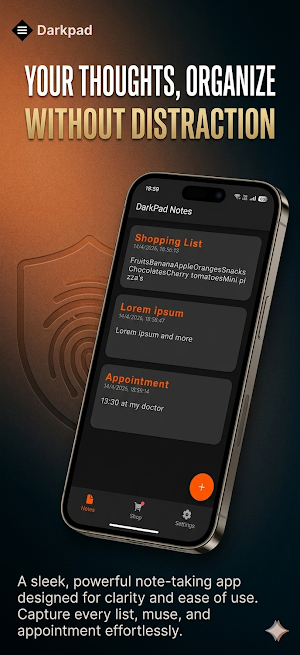
Write dark notes, black notes, and private notes in a sleek, distraction-free interface built for focus and privacy. DarkPad is the ultimate dark notes app — optimized for OLED and AMOLED screens, completely offline, and 100% free of ads and trackers.
Whether you're jotting down quick thoughts, organizing ideas, or writing longer notes, DarkPad gives you a clean, fast, and beautiful experience every single time.
─────────────────────────────
🆕 WHAT'S NEW IN DARKPAD V2
─────────────────────────────
11+ Dark & Light Themes
Choose from over 11 dark and light themes to personalize your note-taking experience. From true pitch black to softer light alternatives — there's a look for every preference and screen.
PIN Lock & Biometric Security
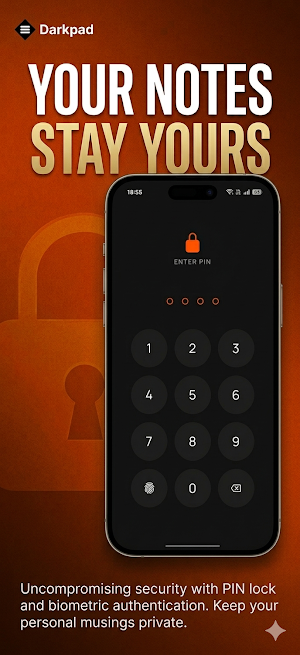
Keep your notes private with PIN protection and biometric authentication (fingerprint & face unlock). Your dark notes stay yours — and only yours.
Rich Text Editor
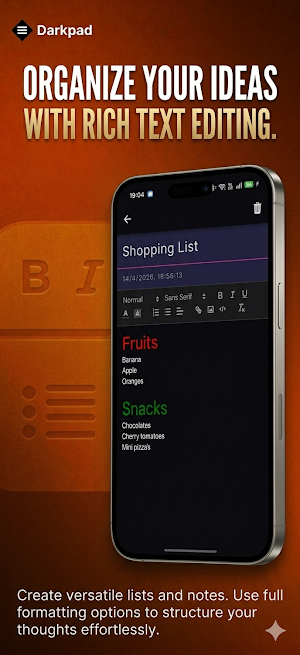
Format your notes the way you want. Bold, italic, underline, bullet points, numbered lists and more — all inside a clean dark interface.
Import & Export Notes
Back up your notes or move them between devices with ease. Full control over your own data.
─────────────────────────────
⚡ KEY FEATURES
─────────────────────────────
🖤 True Black OLED Theme
DarkPad's signature black theme uses pure #000000 backgrounds, purpose-built for AMOLED and OLED screens. Save battery, cut glare, and write comfortably in any lighting condition — especially at night.
🎨 11+ Dark & Light Themes
Pick from over 11 carefully crafted themes — deep blacks, charcoal grays, and light alternatives — to match your mood, setup, or time of day.
🔒 PIN Lock & Biometric Authentication
Protect your notes with a PIN code or biometric lock (fingerprint / face ID). Perfect for private journaling, sensitive ideas, or confidential work notes.
✏️ Rich Text Formatting
Go beyond plain text. Use bold, italic, bullet points, headings, and more to organize your dark notes exactly how you like.
📤 Import & Export
Easily back up your notes or transfer them to another device. Your data, your control.
📋 List, Card & Grid View
Display your notes the way that works for you — switch between list, card, and grid layouts with a tap.
📵 No Ads. Ever.
DarkPad is completely ad-free. No banners, no popups, no interruptions — just you and your notes.
🔕 No Tracking. No Data Collection.
We do not collect, share, or sell your data. DarkPad works fully offline and never phones home.
📱 Offline Notes
All your dark notes are stored locally on your device. No account needed. No cloud required. Works anywhere, anytime.
🧘 Minimalist Interface
A clean, clutter-free design that keeps the focus on your writing — not the app.
─────────────────────────────
💡 WHY DARKPAD?
─────────────────────────────
Most note apps are built for the cloud — DarkPad is built for you. If you're looking for a private dark notes app, a black notes app for OLED screens, or simply a distraction-free place to write, DarkPad delivers everything you need with nothing you don't.
Perfect for:
- Night-time note-taking
- Private journaling
- Quick ideas and reminders
- Focused writing sessions
- Users who care about battery life and privacy
Download DarkPad V2 today and experience dark notes done right.
What’s new
Version 2.2.0 · Updated April 14, 2026
Welcome to DarkPad V2 — the dark notes app built for focus, privacy, and style. This update brings 3 stunning new themes to personalize your dark note-taking experience, plus PIN lock with biometric authentication to keep your notes secure. Also includes rich text formatting, customizable themes, and import/export support. No ads. No tracking. Just a clean, fast dark notes app that respects your privacy.
User reviews

Perfect. Black pad white Notes. just notes. TY developer. 🏆
Alternatives to DarkPad V2 - Dark Notes
Looking for apps like DarkPad V2 - Dark Notes? Here are 3 similar Android apps on Google Play. The highest rated is OneClock Pro (4.3/5), and 2 of the 3 are free to download.
| App | Rating | Price | Installs | Last updated | Compare |
|---|---|---|---|---|---|
| DarkPad V2 - Dark Notes | – | Free | 1,000+ | Apr 14, 2026 | |
| DarkPad Classic | 4.2 / 5 | Free | 10,000+ | Jan 27, 2022 | Compare |
| Set multiple alarms - OneClock | 3.9 / 5 | Free | 10,000+ | Feb 10, 2021 | Compare |
| OneClock Pro | 4.3 / 5 | 0.49 USD | 100+ | Feb 10, 2021 | Compare |