
About FotoVia
FotoVia turns the photos you take on a trip into an organized map of places.
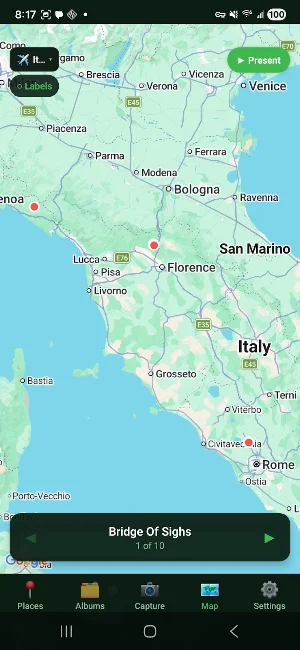
Import your travel photos and FotoVia's AI recognizes the exact spot each one was taken — not just the city, but the landmark, museum, restaurant, or street. Your pictures are automatically grouped by place and pinned to a map, so reliving a trip is as easy as tapping a location.
WHAT FOTOVIA DOES
• Automatic place labeling — AI identifies landmarks, artwork, and venues in your photos
• Map view — every photo dropped on the map exactly where it was taken
• Trips — group a whole vacation's photos together with one tap
• Share — send a beautiful album or slideshow link to family and friends, no app required
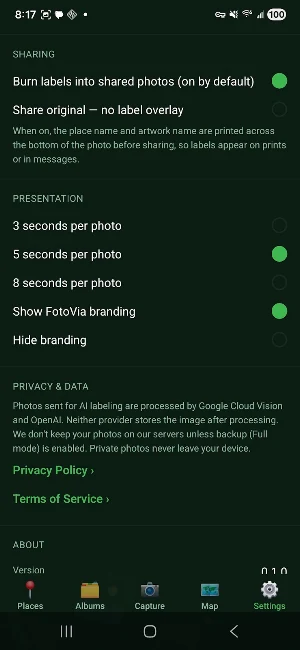
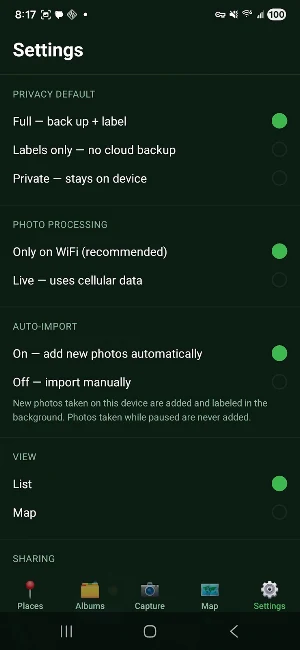
• Your choice of privacy — keep photos fully private on your device, get AI labels only, or back everything up to the cloud with a free account
YOU STAY IN CONTROL
FotoVia never deletes photos from your phone. A Pause button stops capture any time, and your photos are only backed up to the cloud if you choose "Full" mode. You can delete your account and all backed-up data at any time, right from Settings.
PERFECT FOR
• Travelers who want their memories organized by place, automatically
• Anyone tired of scrolling endlessly to find "that one photo from the trip"
• Families who want to share a trip without handing over their whole camera roll
Start a trip, take photos like you always do, and let FotoVia map your journey.
FotoVia details
FotoVia is a free Photography app for Android with 10+ installs on Google Play. It was released on June 10, 2026 and last updated on June 10, 2026. It requires Android 7.0 or later.
- Category
- Photography
- Installs
- 10+
- Price
- Free
- In-app purchases
- No
- Ads
- No ads
- Current version
- 0.1.38
- Requires Android
- 7.0
- Content rating
- Everyone
- Released
- June 10, 2026
- Last updated
- June 10, 2026
What’s new in FotoVia
Put your photos on the map automatically using AI, organize them by place, and share trip albums. This release adds first-launch and new-trip location tips, secure account-backed cloud backup, cleaner map pins, reliability fixes, and privacy/security hardening.
Version 0.1.38 · Updated June 10, 2026
