

Win Dicer
Zikvert Tools
Win Dicer - Roll animated dice, see totals, and save your last 30 rolls.
- Price
- Free
- No in-app purchases
- Updated
- Aug 6
- 2026 · v1.0
Screenshots


About Win Dicer
Win Dicer is a simple dice roller made for quick decisions, tabletop games, and everyday moments when you need a fair random result. Tap ROLL, watch the cubes spin, and get a clear total in seconds. Win Dicer keeps things focused — no clutter and no extra steps between you and your result.
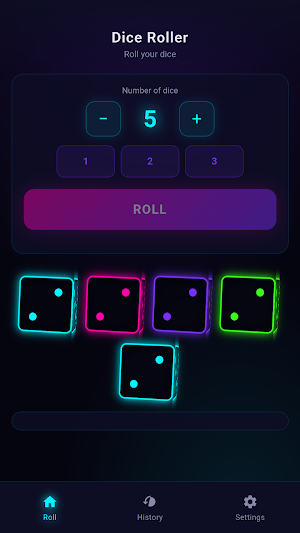
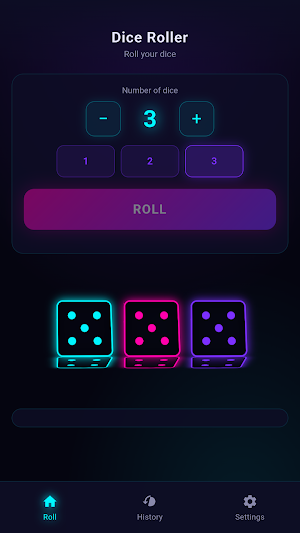
ROLL ONE TO SIX DICE Before each throw, choose how many dice you want. Use the plus and minus buttons to fine-tune the count, or tap a quick preset for one, two, or three dice. Win Dicer supports up to six standard six-sided dice per roll, which covers most board games, party games, and casual setups where you need several cubes at once.
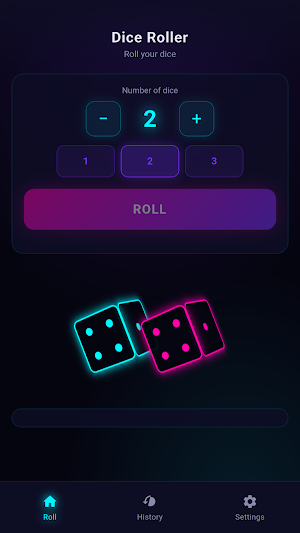
ANIMATED DICE WITH A CLEAR RESULT Every roll in Win Dicer includes a smooth tumbling animation. Each die appears as a colorful cube with classic dot faces from one through six. When the animation finishes, the dice land on their final values so you can read the outcome right away. Whether you roll one die or six, the screen stays easy to follow.
TOTALS AND INDIVIDUAL VALUES After each roll, Win Dicer shows the combined total in large, readable type. In Settings, you can turn on a breakdown that lists each die beneath the sum — for example, showing how a total of nine was made from three, four, and two. Turn the breakdown off anytime if you only want the final number.
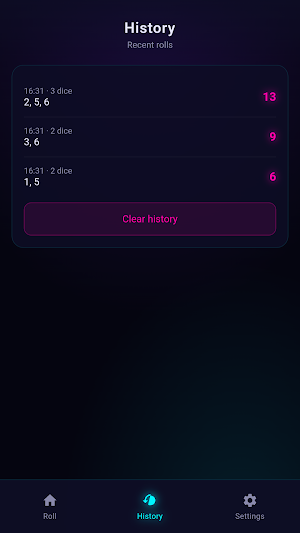
HISTORY OF YOUR LAST THIRTY ROLLS Win Dicer automatically saves recent rolls on your device. Open the History tab to see the time of each throw, how many dice were used, each individual value, and the total sum. When you are ready to start over, clear the full list with one tap.
SETTINGS THAT MATCH YOUR ROUTINE Set a default dice count from one to six so Win Dicer opens the way you usually play. Turn on auto-roll at launch if you want an immediate throw as soon as the app starts. Choose whether to show individual values under the total, and Win Dicer remembers your choices the next time you open it.
SIMPLE THREE-SCREEN LAYOUT Everything is organized into three easy sections. Roll is your main screen for picking dice and throwing them. History holds your saved results. Settings is where you adjust defaults and display options. A bottom navigation bar with large buttons makes switching between screens quick on any phone.
A BRIGHT, EASY-TO-READ DESIGN The app uses a dark background with vivid accent colors so dice, totals, and buttons stand out clearly. Text sizes and tap areas are sized for comfortable one-handed use. The overall look is clean and modern, with just enough visual flair to make each roll feel lively without distracting from the numbers.
GREAT FOR GAMES AND EVERYDAY CHOICES Use Win Dicer when playing board games, running party games, practicing simple math with children, or picking a random option among friends. It is also handy for small daily decisions — who goes first, which snack to choose, or how many steps to take in a homemade game. Open Win Dicer, set your dice, tap ROLL, and keep playing.
ROLL ONE TO SIX DICE Before each throw, choose how many dice you want. Use the plus and minus buttons to fine-tune the count, or tap a quick preset for one, two, or three dice. Win Dicer supports up to six standard six-sided dice per roll, which covers most board games, party games, and casual setups where you need several cubes at once.
ANIMATED DICE WITH A CLEAR RESULT Every roll in Win Dicer includes a smooth tumbling animation. Each die appears as a colorful cube with classic dot faces from one through six. When the animation finishes, the dice land on their final values so you can read the outcome right away. Whether you roll one die or six, the screen stays easy to follow.
TOTALS AND INDIVIDUAL VALUES After each roll, Win Dicer shows the combined total in large, readable type. In Settings, you can turn on a breakdown that lists each die beneath the sum — for example, showing how a total of nine was made from three, four, and two. Turn the breakdown off anytime if you only want the final number.
HISTORY OF YOUR LAST THIRTY ROLLS Win Dicer automatically saves recent rolls on your device. Open the History tab to see the time of each throw, how many dice were used, each individual value, and the total sum. When you are ready to start over, clear the full list with one tap.
SETTINGS THAT MATCH YOUR ROUTINE Set a default dice count from one to six so Win Dicer opens the way you usually play. Turn on auto-roll at launch if you want an immediate throw as soon as the app starts. Choose whether to show individual values under the total, and Win Dicer remembers your choices the next time you open it.
SIMPLE THREE-SCREEN LAYOUT Everything is organized into three easy sections. Roll is your main screen for picking dice and throwing them. History holds your saved results. Settings is where you adjust defaults and display options. A bottom navigation bar with large buttons makes switching between screens quick on any phone.
A BRIGHT, EASY-TO-READ DESIGN The app uses a dark background with vivid accent colors so dice, totals, and buttons stand out clearly. Text sizes and tap areas are sized for comfortable one-handed use. The overall look is clean and modern, with just enough visual flair to make each roll feel lively without distracting from the numbers.
GREAT FOR GAMES AND EVERYDAY CHOICES Use Win Dicer when playing board games, running party games, practicing simple math with children, or picking a random option among friends. It is also handy for small daily decisions — who goes first, which snack to choose, or how many steps to take in a homemade game. Open Win Dicer, set your dice, tap ROLL, and keep playing.
Alternatives to Win Dicer
Looking for apps like Win Dicer? Here are 6 similar Android apps on Google Play. All of them are free to download.






| App | Rating | Price | Installs | Last updated | Compare |
|---|---|---|---|---|---|
| Win Dicer | – | Free | 0+ | Aug 6, 2026 | |
| BetPawa | – | Free | 0+ | Aug 6, 2026 | Compare |
| Win Pain | – | Free | 0+ | Aug 14, 2026 | Compare |
| Casinia | – | Free | 0+ | Aug 14, 2026 | Compare |
| Win Goal | – | Free | 0+ | Aug 14, 2026 | Compare |
| Win Maths | – | Free | 0+ | Aug 14, 2026 | Compare |
| Win Seconds | – | Free | 0+ | Aug 13, 2026 | Compare |
Compare Win Dicer with the top alternatives: ratings, updates, ASO score and keyword gaps →