

Win Pain
Zikvert Art & Design
Win Pain - neon drawing with glow, symmetry, and a private gallery
- Price
- Free
- No in-app purchases
- Updated
- Aug 14
- 2026 · v1.0
Screenshots


About Win Pain
Win Pain is a neon drawing studio for your phone. You draw on a dark board with glowing lines, then keep the pieces you like in a private gallery. There is no account to create and no public feed. Open Win Pain, pick a tool, and start a line.
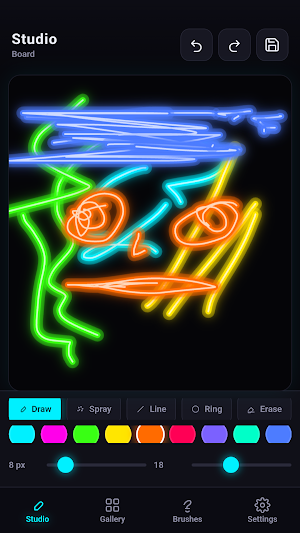
The first screen is Studio. This is the board where every drawing in Win Pain begins. Tap Draw to sketch freehand with your finger. Use Spray for a dotted, scattered mark. Stretch a straight line from one point to another. Pull a Ring to place a glowing circle. Switch to Erase when a stroke goes the wrong way.
A row of colors sits under the tools. The palette is built for a neon look: cyan, magenta, lime, yellow, orange, red, violet, mint, blue, and white. If none of those fit, you can pick any other color. Two sliders sit under the palette. One sets how thick the stroke is. The other sets how strong the glow is.
Undo and Redo sit at the top of Studio, so a missed stroke is easy to take back. When a piece feels finished, tap Save, give it a title, and store it on the device. If you leave the board and come back later, Win Pain still holds the current drawing so you can continue.
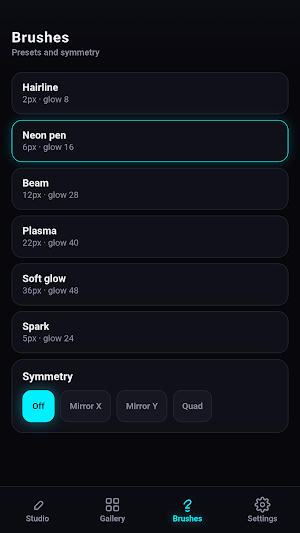
The Brushes section of Win Pain stores ready stroke styles. Hairline is a thin, careful mark. Neon pen is a balanced everyday stroke. The beam is thicker and brighter. Plasma is wide and intense. Soft glow is the largest, with the strongest halo. Spark uses the spray tool for a scatter of light. Tap a style and the size, glow, and tool update at once. You can still move the sliders after that.
Symmetry lives on the same screen. Leave it off for a normal drawing. Mirror X copies every stroke to the other side of the board. Mirror Y copies up and down. Quad repeats a stroke in four directions. These modes work with Draw, Spray, Line, Ring, and Erase.
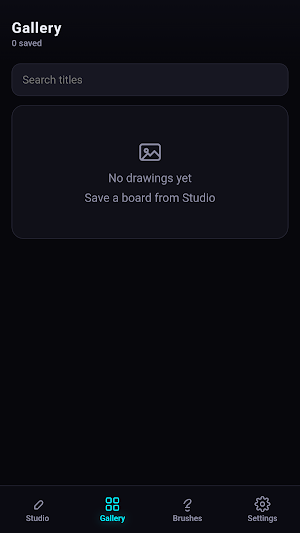
Saved work lives in Gallery. Each piece shows a preview and the title you gave it. Search titles when the list grows. Open a drawing to bring it back to Studio and keep working. Delete one piece when you no longer need it. A Show more button loads the next group of saved items. Everything in Gallery stays on your device.
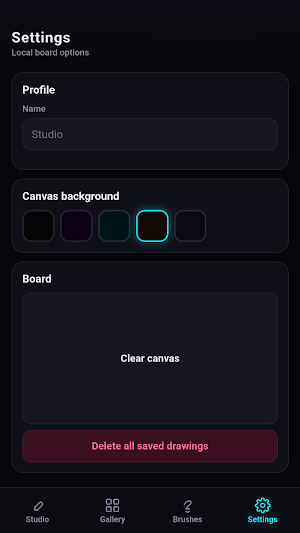
Settings in Win Pain is a small set of board options. You can set a name that appears under the Studio title. You can change the board background among five dark tones, from near-black to deep purple, teal, warm brown, and cool gray. Clear canvas empties the current board after a confirmation step. Delete all saved drawings removes the Gallery collection after another confirmation step. Both actions ask first, so a stray tap does not wipe your work.
How to use Win Pain in a few steps. Stay on Studio. Choose Draw, Spray, Line, Ring, or Erase. Pick a color. Set size and glow, or tap a brush style. Turn on a mirror mode if you want a balanced pattern. Draw with your finger. Undo if needed. Save with a title when you want to keep the piece. Open Gallery to look through past work, search a title, or return a drawing to the board.
Win Pain is built for short sessions and longer ones. Sketch a mark while you wait. Build a full neon piece when you have time. The screens are Studio, Gallery, Brushes, and Settings.
The first screen is Studio. This is the board where every drawing in Win Pain begins. Tap Draw to sketch freehand with your finger. Use Spray for a dotted, scattered mark. Stretch a straight line from one point to another. Pull a Ring to place a glowing circle. Switch to Erase when a stroke goes the wrong way.
A row of colors sits under the tools. The palette is built for a neon look: cyan, magenta, lime, yellow, orange, red, violet, mint, blue, and white. If none of those fit, you can pick any other color. Two sliders sit under the palette. One sets how thick the stroke is. The other sets how strong the glow is.
Undo and Redo sit at the top of Studio, so a missed stroke is easy to take back. When a piece feels finished, tap Save, give it a title, and store it on the device. If you leave the board and come back later, Win Pain still holds the current drawing so you can continue.
The Brushes section of Win Pain stores ready stroke styles. Hairline is a thin, careful mark. Neon pen is a balanced everyday stroke. The beam is thicker and brighter. Plasma is wide and intense. Soft glow is the largest, with the strongest halo. Spark uses the spray tool for a scatter of light. Tap a style and the size, glow, and tool update at once. You can still move the sliders after that.
Symmetry lives on the same screen. Leave it off for a normal drawing. Mirror X copies every stroke to the other side of the board. Mirror Y copies up and down. Quad repeats a stroke in four directions. These modes work with Draw, Spray, Line, Ring, and Erase.
Saved work lives in Gallery. Each piece shows a preview and the title you gave it. Search titles when the list grows. Open a drawing to bring it back to Studio and keep working. Delete one piece when you no longer need it. A Show more button loads the next group of saved items. Everything in Gallery stays on your device.
Settings in Win Pain is a small set of board options. You can set a name that appears under the Studio title. You can change the board background among five dark tones, from near-black to deep purple, teal, warm brown, and cool gray. Clear canvas empties the current board after a confirmation step. Delete all saved drawings removes the Gallery collection after another confirmation step. Both actions ask first, so a stray tap does not wipe your work.
How to use Win Pain in a few steps. Stay on Studio. Choose Draw, Spray, Line, Ring, or Erase. Pick a color. Set size and glow, or tap a brush style. Turn on a mirror mode if you want a balanced pattern. Draw with your finger. Undo if needed. Save with a title when you want to keep the piece. Open Gallery to look through past work, search a title, or return a drawing to the board.
Win Pain is built for short sessions and longer ones. Sketch a mark while you wait. Build a full neon piece when you have time. The screens are Studio, Gallery, Brushes, and Settings.
Alternatives to Win Pain
Looking for apps like Win Pain? Here are 6 similar Android apps on Google Play. All of them are free to download.




| App | Rating | Price | Installs | Last updated | Compare |
|---|---|---|---|---|---|
| Win Pain | – | Free | 0+ | Aug 14, 2026 | |
| BetPawa | – | Free | 0+ | Aug 6, 2026 | Compare |
| Casinia | – | Free | 0+ | Aug 14, 2026 | Compare |
| Win Goal | – | Free | 0+ | Aug 14, 2026 | Compare |
| Win Maths | – | Free | 0+ | Aug 14, 2026 | Compare |
| Win Seconds | – | Free | 0+ | Aug 13, 2026 | Compare |
| Win Chats | – | Free | 0+ | Aug 13, 2026 | Compare |
Compare Win Pain with the top alternatives: ratings, updates, ASO score and keyword gaps →