

Win Chase
Zikvert Puzzle
Win Chase - 10×10 checkers vs AI. Easy, Medium, Hard.
- Price
- Free
- No in-app purchases
- Updated
- Aug 13
- 2026 · v1.0
Screenshots


About Win Chase
Win Chase is a checkers game with one clear setup: a full 10 by 10 board, international-style rules, and a match against the computer. You choose a level, start a new game, and play on your phone.
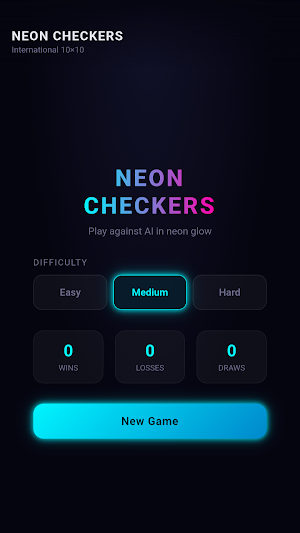
What you do in Win Chase Open Win Chase and you see a simple menu. Pick Easy, Medium, or Hard. The app remembers the last level you used, so the next session starts the same way. The menu also shows three numbers that belong to you: wins, losses, and draws. Those counts stay on your device and change after every finished match.
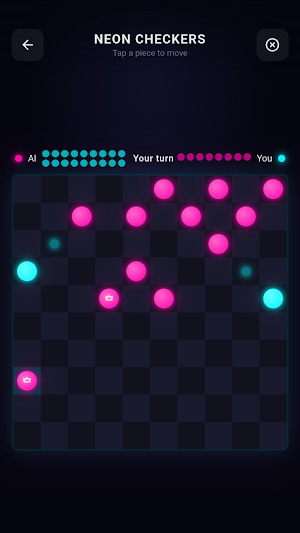
Tap New Game and the board fills. You control the bright cyan pieces and move first. The computer plays the magenta side. The board is ten squares by ten squares. Pieces sit on the dark squares, four rows for you and four rows for the computer.
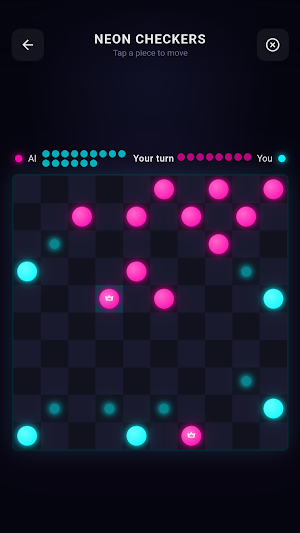
How a turn works When it's your turn, Win Chase says so at the top of the screen. Tap one of your pieces. If that piece can move, the legal squares light up. Tap a highlighted square to go there. If the piece has nowhere to go, a short message tells you.
Ordinary pieces step forward on the diagonal. When a piece reaches the far row, it becomes a king and shows a crown. Kings can travel further along empty diagonals. If a capture is available, you must take it. If several captures are possible, you must take the longest sequence. After a capture, if the same piece can be taken again, Win Chase keeps that piece selected and asks you to continue. The screen reads Continue capture so you know the turn is not over yet.
Taken pieces appear as small dots beside each side. You can see who is ahead without counting every piece on the board. After you move, the computer thinks and then replies. The status line shows that the other side is working, then it is your turn again.
Playing the computer Easy, Medium, and Hard change how strongly the computer plays. Easy is for a relaxed match. Medium is the usual starting point. Hard takes more care before it answers. You always play against the computer on this device.
You can resign if you want to stop a losing position. Win Chase asks you to confirm before it counts the game as a loss. If you try to leave a live match for the menu, you get a confirmation as well, so a tap on the back control does not throw away a game by accident.
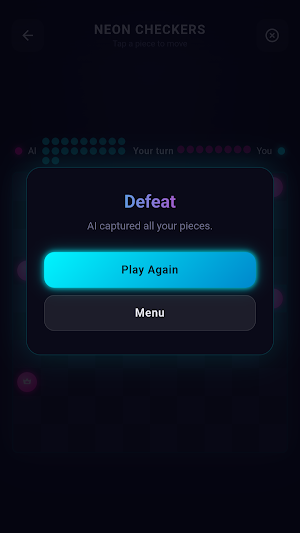
How a match ends A game in Win Chase ends when one side has no pieces left, when one side has no legal move, or when you resign. Victory appears when you take every computer piece or the computer has no legal move. Defeat appears when your pieces are gone, when you have no legal move, or when you resign. From that screen you can play again on the same level or return to the menu. Play Again starts a fresh 10 by 10 setup at once.
The look of Win Chase The board uses a dark neon look: cyan for you, magenta for the computer, a glow on the piece you selected and on capture squares. The last landing square stays marked so you can follow the computer move. None of this changes the rules. It only makes the board easier to read on a phone.
What you do in Win Chase Open Win Chase and you see a simple menu. Pick Easy, Medium, or Hard. The app remembers the last level you used, so the next session starts the same way. The menu also shows three numbers that belong to you: wins, losses, and draws. Those counts stay on your device and change after every finished match.
Tap New Game and the board fills. You control the bright cyan pieces and move first. The computer plays the magenta side. The board is ten squares by ten squares. Pieces sit on the dark squares, four rows for you and four rows for the computer.
How a turn works When it's your turn, Win Chase says so at the top of the screen. Tap one of your pieces. If that piece can move, the legal squares light up. Tap a highlighted square to go there. If the piece has nowhere to go, a short message tells you.
Ordinary pieces step forward on the diagonal. When a piece reaches the far row, it becomes a king and shows a crown. Kings can travel further along empty diagonals. If a capture is available, you must take it. If several captures are possible, you must take the longest sequence. After a capture, if the same piece can be taken again, Win Chase keeps that piece selected and asks you to continue. The screen reads Continue capture so you know the turn is not over yet.
Taken pieces appear as small dots beside each side. You can see who is ahead without counting every piece on the board. After you move, the computer thinks and then replies. The status line shows that the other side is working, then it is your turn again.
Playing the computer Easy, Medium, and Hard change how strongly the computer plays. Easy is for a relaxed match. Medium is the usual starting point. Hard takes more care before it answers. You always play against the computer on this device.
You can resign if you want to stop a losing position. Win Chase asks you to confirm before it counts the game as a loss. If you try to leave a live match for the menu, you get a confirmation as well, so a tap on the back control does not throw away a game by accident.
How a match ends A game in Win Chase ends when one side has no pieces left, when one side has no legal move, or when you resign. Victory appears when you take every computer piece or the computer has no legal move. Defeat appears when your pieces are gone, when you have no legal move, or when you resign. From that screen you can play again on the same level or return to the menu. Play Again starts a fresh 10 by 10 setup at once.
The look of Win Chase The board uses a dark neon look: cyan for you, magenta for the computer, a glow on the piece you selected and on capture squares. The last landing square stays marked so you can follow the computer move. None of this changes the rules. It only makes the board easier to read on a phone.
Alternatives to Win Chase
Looking for apps like Win Chase? Here are 6 similar Android apps on Google Play. All of them are free to download.






| App | Rating | Price | Installs | Last updated | Compare |
|---|---|---|---|---|---|
| Win Chase | – | Free | 0+ | Aug 13, 2026 | |
| BetPawa | – | Free | 0+ | Aug 6, 2026 | Compare |
| Win Pain | – | Free | 0+ | Aug 14, 2026 | Compare |
| Casinia | – | Free | 0+ | Aug 14, 2026 | Compare |
| Win Goal | – | Free | 0+ | Aug 14, 2026 | Compare |
| Win Maths | – | Free | 0+ | Aug 14, 2026 | Compare |
| Win Seconds | – | Free | 0+ | Aug 13, 2026 | Compare |
Compare Win Chase with the top alternatives: ratings, updates, ASO score and keyword gaps →