
Mouse & Keyboard - PC Remote
tanzsoft Tools Contains ads
PC Remote: Use your phone as a wireless mouse and keyboard via Wi-Fi or Bluetoot
- Downloads
- 1.8K+
- on Google Play
- Price
- Free
- No in-app purchases
- Updated
- Nov 4
- 2026 · v1.6.2
Screenshots


About Mouse & Keyboard - PC Remote
Your phone becomes a wireless mouse and keyboard for your computer.
TWO WAYS TO CONNECT — PICK WHAT SUITS YOU
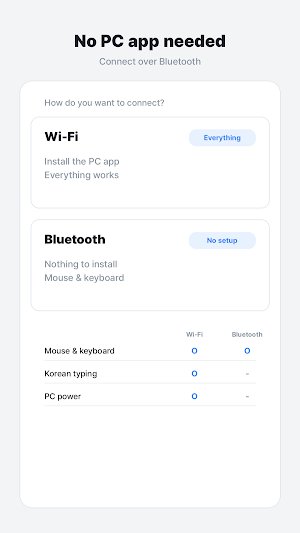
• Bluetooth — nothing to install on the PC. Your phone appears as a wireless mouse and keyboard. Also works with smart TVs and consoles.
• Wi-Fi — install the small free PC app and everything works, including typing in your own language and shutting the PC down.
TOUCHPAD THAT FEELS RIGHT
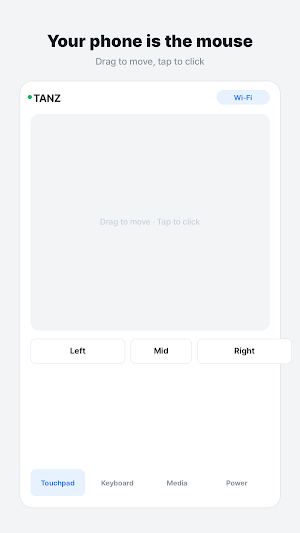
• Drag to move the cursor, tap to click
• Two-finger tap for right click, three fingers for middle click
• Two-finger drag to scroll
• Tap then drag, or press and hold, to drag windows and select text
• Adjustable pointer speed from 30% to 300%
KEYBOARD
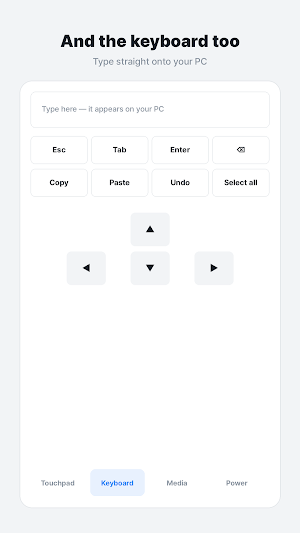
• Type on your phone and it appears on your PC
• Esc, Tab, Enter, Backspace, arrow keys
• Copy, paste, undo, select all
• Start menu, Alt+Tab, Alt+F4, screenshot
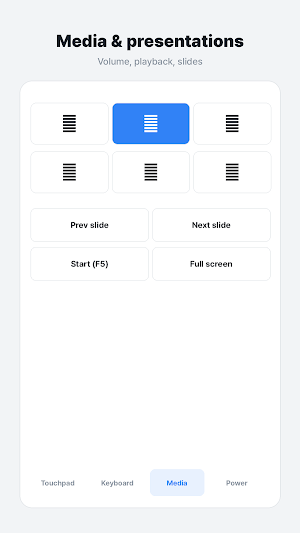
MEDIA AND PRESENTATIONS
• Play/pause, previous and next track
• Volume up, down and mute
• Previous and next slide, F5 to start a slideshow, full screen
PC POWER (WI-FI METHOD)
• Lock the screen, sleep, sign out, restart or shut down
• Everything except lock asks for confirmation first
• You can switch power control off entirely from the PC tray menu
STAYS ON YOUR OWN NETWORK
Your phone talks to your PC directly. Nothing goes through our servers — we cannot see your screen or what you type. The PC app refuses connections from the internet, and the first connection must be approved on the PC itself.
FREE
Supported by a small banner ad. No time limits, no sign-up, no account.
GET THE PC APP
Open tanzsoft.com/pcremote on your PC and run the downloaded file. There is no installer — just run it.
NOTES
• Bluetooth cannot control PC power, and typing non-Latin text over Bluetooth depends on your PC's input method.
• Some phone makers remove the Bluetooth keyboard/mouse feature from their firmware. If that happens the app tells you and you can use the Wi-Fi method instead.
• Phone and PC must be on the same Wi-Fi for the Wi-Fi method. Guest networks often block devices from reaching each other.
Who is this for?
• People who want a wireless touchpad and keyboard for their computer.
• Users looking to control media, volume, and presentation slides remotely.
• Anyone needing a way to restart or shut down their PC from a phone.
• Users who want a remote mouse that also works with consoles and smart TVs.
Common Questions
• How do I connect? You can use Bluetooth for a quick setup or Wi-Fi by installing the free PC app.
• Is my data safe? All communication stays on your local network; nothing is sent to external servers.
• Is it free? Yes, the app is free and supported by a small banner ad with no account required.
• What if Bluetooth doesn't work? If your phone firmware lacks Bluetooth support, you can switch to the Wi-Fi method.
TWO WAYS TO CONNECT — PICK WHAT SUITS YOU
• Bluetooth — nothing to install on the PC. Your phone appears as a wireless mouse and keyboard. Also works with smart TVs and consoles.
• Wi-Fi — install the small free PC app and everything works, including typing in your own language and shutting the PC down.
TOUCHPAD THAT FEELS RIGHT
• Drag to move the cursor, tap to click
• Two-finger tap for right click, three fingers for middle click
• Two-finger drag to scroll
• Tap then drag, or press and hold, to drag windows and select text
• Adjustable pointer speed from 30% to 300%
KEYBOARD
• Type on your phone and it appears on your PC
• Esc, Tab, Enter, Backspace, arrow keys
• Copy, paste, undo, select all
• Start menu, Alt+Tab, Alt+F4, screenshot
MEDIA AND PRESENTATIONS
• Play/pause, previous and next track
• Volume up, down and mute
• Previous and next slide, F5 to start a slideshow, full screen
PC POWER (WI-FI METHOD)
• Lock the screen, sleep, sign out, restart or shut down
• Everything except lock asks for confirmation first
• You can switch power control off entirely from the PC tray menu
STAYS ON YOUR OWN NETWORK
Your phone talks to your PC directly. Nothing goes through our servers — we cannot see your screen or what you type. The PC app refuses connections from the internet, and the first connection must be approved on the PC itself.
FREE
Supported by a small banner ad. No time limits, no sign-up, no account.
GET THE PC APP
Open tanzsoft.com/pcremote on your PC and run the downloaded file. There is no installer — just run it.
NOTES
• Bluetooth cannot control PC power, and typing non-Latin text over Bluetooth depends on your PC's input method.
• Some phone makers remove the Bluetooth keyboard/mouse feature from their firmware. If that happens the app tells you and you can use the Wi-Fi method instead.
• Phone and PC must be on the same Wi-Fi for the Wi-Fi method. Guest networks often block devices from reaching each other.
Who is this for?
• People who want a wireless touchpad and keyboard for their computer.
• Users looking to control media, volume, and presentation slides remotely.
• Anyone needing a way to restart or shut down their PC from a phone.
• Users who want a remote mouse that also works with consoles and smart TVs.
Common Questions
• How do I connect? You can use Bluetooth for a quick setup or Wi-Fi by installing the free PC app.
• Is my data safe? All communication stays on your local network; nothing is sent to external servers.
• Is it free? Yes, the app is free and supported by a small banner ad with no account required.
• What if Bluetooth doesn't work? If your phone firmware lacks Bluetooth support, you can switch to the Wi-Fi method.
What’s new
Version 1.6.2 · Updated November 4, 2026
• The start screen now lists everything Wi-Fi mode can do, including viewing the PC screen. • The notification permission is asked only when you actually connect to a PC, not on first launch.
Alternatives to Mouse & Keyboard - PC Remote
Looking for apps like Mouse & Keyboard - PC Remote? Here are 6 similar Android apps on Google Play. All of them are free to download.
-
Surveys & Rewards - Bonusboy
-
Long Screenshot - Seamshot
-
Beauty Camera - MakeUpick
-
Home Security Cam - SpareCCTV
-
Floor Plan 3D - Homedoodle
-
VR Player DLNA Vault - LockVR
| App | Rating | Price | Installs | Last updated | Compare |
|---|---|---|---|---|---|
| Mouse & Keyboard - PC Remote | – | Free | 1,000+ | Nov 4, 2026 | |
| Surveys & Rewards - Bonusboy | – | Free | 1,000+ | Oct 30, 2026 | Compare |
| Long Screenshot - Seamshot | – | Free | 1,000+ | Oct 22, 2026 | Compare |
| Beauty Camera - MakeUpick | – | Free | 100+ | Oct 9, 2026 | Compare |
| Home Security Cam - SpareCCTV | – | Free | 500+ | Oct 29, 2026 | Compare |
| Floor Plan 3D - Homedoodle | – | Free | 1,000+ | Oct 21, 2026 | Compare |
| VR Player DLNA Vault - LockVR | – | Free | 100+ | Oct 27, 2026 | Compare |
Similar apps on Google Play
- Surveys & Rewards - Bonusboy
- Long Screenshot - Seamshot
- Beauty Camera - MakeUpick
- Home Security Cam - SpareCCTV
- Floor Plan 3D - Homedoodle
- VR Player DLNA Vault - LockVR
- Food Expiry Tracker - Fridgeon
- Passport Photo - IDPhotoPass
- Star Map Night Sky - SpaceUtil
- Auto Clicker Tapper - Clickpus
- Screen Recorder - Record King
- AI Language Tutor - idontspeak
- GPS Speedometer - SportsUtil
- AI Quiz Maker & Test - Odabi
- Universal TV Remote - Tellyza
- Family Locator GPS - MyPingr
- Good Morning Alarm Clock
- Learn Piano Lessons - Freano
- PDF Doc Scanner - PDF Angel
- QR Code Scanner - QR Doctor
- Photo Recovery - RecoverHelper
- Trip Planner - World by City