Passport Photo - IDPhotoPass
IDPhotoPass: Create passport, visa, and ID photos from selfies on your device.
About Passport Photo - IDPhotoPass
Turn a selfie or any photo from your gallery into a passport, ID card, visa or resume photo. Pick the format you need, drop in a photo, and the app finds the face, crops it to the required size and sets the head height and eye line to the rules for that document.
Your photo never leaves your phone
Everything is done on the device. Nothing is uploaded to a server, and the app works with no internet connection at all.
What you can do
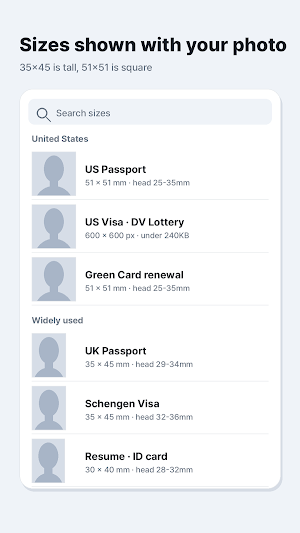
• 132 formats from 80 countries — US passport, visa and DV lottery, UK, Canada, Australia, Schengen, Japan, China, Korea and more
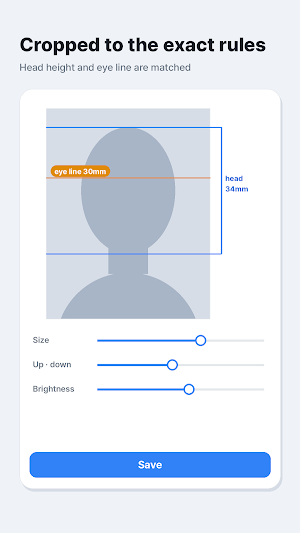
• Automatic face detection and cropping to the exact format
• Head size and eye line matched to the official measurements
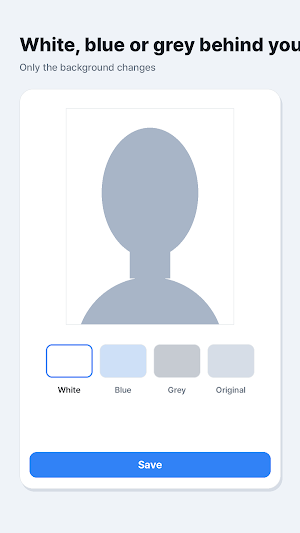
• Background changed to white, light blue or light grey, or kept as it is
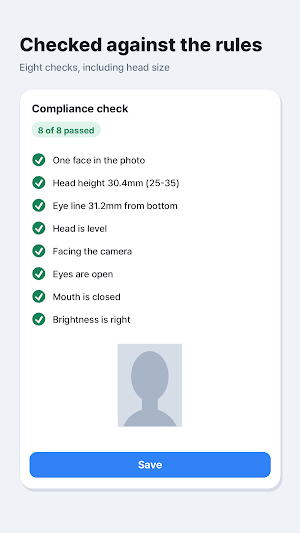
• 8-point compliance check — one face, head size, eye height, head level, facing the camera, eyes open, neutral expression, brightness
• Saved at 300 dpi so prints stay sharp
• 4×6 inch print sheet with 6 photos and cutting guides, ready for a photo shop or a self-service kiosk
• Online submission formats — exact pixel size and file size limits (for example 600×600 and 240 KB). File size is met by adjusting JPEG quality, never by shrinking the pixels
• Build your own format — enter the size the office gave you in mm or px, plus head height %, file size limit and background colour (up to 30 saved)
• Formats for your own country appear at the top of the list
• Recent photos kept for reuse and sharing
When to use it
• Applying for or renewing a passport
• Visa paperwork
• Resumes and job applications
• Online application forms with fixed pixel and file size rules
• When you need a photo right now and there is no time for a studio
The app is free and shows a banner ad at the bottom of the screen.
If the format you need is not on the list, enter the measurements yourself and save it as your own.
Who is this app for?
• People applying for or renewing passports and visas
• Job seekers needing a professional resume photo
• Anyone filling out online forms with strict pixel and file size requirements
• Users who need a compliant ID photo quickly without visiting a studio
Why choose IDPhotoPass?
• Privacy first: All processing happens on your phone with no internet needed and no server uploads
• Global coverage: Supports 132 formats across 80 countries, including the US, UK, Canada, and more
• Professional quality: High 300 dpi resolution and 4x6 inch print sheets with cutting guides
• Precision tools: Automatic face detection and an 8-point compliance check for official measurements
• Customization: Ability to change backgrounds to white, light blue, or grey, or create your own custom format
Similar Apps

Surveys & Rewards - Bonusboy
Answer short paid surveys and cash out as gift cards, PayPal or a prepaid Visa.
Long Screenshot - Seamshot
Seamshot: Stitch screenshots into long images, capture scrolls and export PDFs.

Beauty Camera - MakeUpick
Beauty camera: skin retouch, makeup looks, 30 filters, background blur, stickers

Home Security Cam - SpareCCTV
SpareCCTV: Turn old Android phones into home security cams or baby monitors.

Floor Plan 3D - Homedoodle
Homedoodle: Create 3D floor plans, design interiors, and measure room areas.

VR Player DLNA Vault - LockVR
LockVR: VR video player for Gear VR and Cardboard with DLNA and private vault.
