

Auto Clicker Tapper - Clickpus
tanzsoft Tools Contains ads
Clickpus: Auto clicker for multi-point tapping, swipe gestures, and presets.
- Downloads
- 100+
- on Google Play
- Price
- Free
- No in-app purchases
- Updated
- Sep 22
- 2026 · v1.2.3
Screenshots

About Auto Clicker Tapper - Clickpus
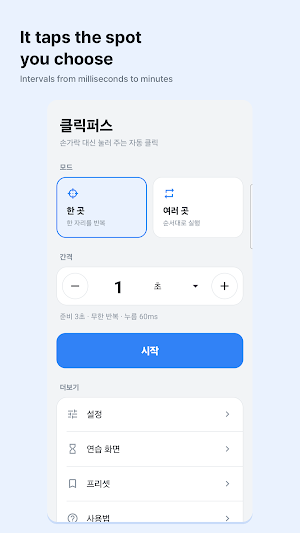
Clickpus taps the exact spots you place on your screen, at the interval you choose.
Give your finger a rest when something needs the same tap hundreds of times.
WHAT YOU CAN DO
• Single point — repeat a tap on one spot at your interval
• Multiple points — place several targets and tap them in order
• Swipe — turn a point into a drag gesture instead of a tap
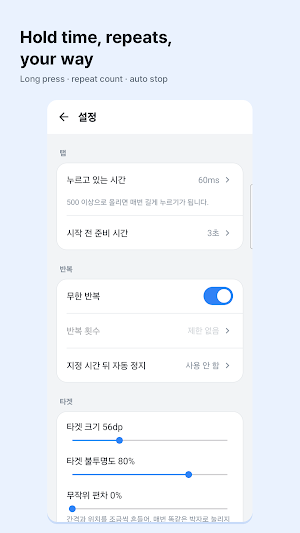
• Intervals from milliseconds to minutes, and your own press-and-hold time
• Limit the number of repeats, or stop automatically after a set time
• Save a whole setup as a preset and switch between them
• Random deviation — nudge the timing and position so it is not perfectly even
A PRACTICE SCREEN INSIDE THE APP
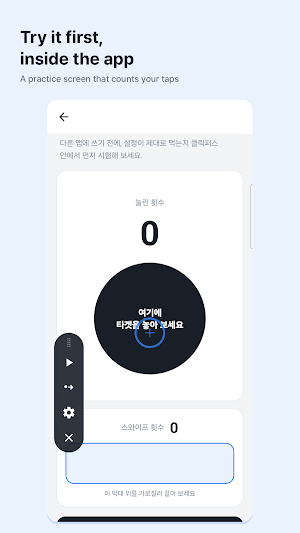
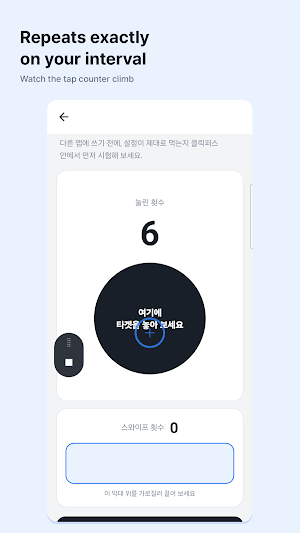
Before you use it anywhere else, try your settings inside Clickpus. The practice screen counts the taps and swipes it receives, so you can see exactly what your settings do.
WHY IT USES THE ACCESSIBILITY SERVICE
Android only lets an app tap the screen for you through the accessibility service. Clickpus uses that permission for one thing only: dispatching the taps and swipes you set up.
• It does not read the contents of your screen
• It does not record what you type
• It cannot tell which app you are using
• It never decides anything on its own — it repeats the positions and timing you set
PRIVACY
Your settings and presets stay on your device and are never sent to any server. There is no sign-up.
FREE
Clickpus is free, supported by a small banner ad.
NOTES
• You can turn the accessibility service off at any time in Settings.
• Some apps and secure screens do not receive injected taps — that is an Android policy we cannot bypass.
Who is this for?
• People who want to automate repetitive tapping to give their fingers a rest.
• Users needing a customizable auto tapper with adjustable intervals and press-and-hold times.
• Anyone looking for a tool that supports both single-point clicks and multi-target sequences.
Common Questions
• How do I know if my settings work? You can use the built-in practice screen to count taps and swipes before using the app elsewhere.
• Is my data safe? Your presets are stored locally on your device, there is no sign-up, and the app does not read your screen or record typing.
• Why is the accessibility service required? This permission is used exclusively to perform the taps and swipes you configure.
• Is the app free? Yes, it is free and supported by a small banner ad.
Give your finger a rest when something needs the same tap hundreds of times.
WHAT YOU CAN DO
• Single point — repeat a tap on one spot at your interval
• Multiple points — place several targets and tap them in order
• Swipe — turn a point into a drag gesture instead of a tap
• Intervals from milliseconds to minutes, and your own press-and-hold time
• Limit the number of repeats, or stop automatically after a set time
• Save a whole setup as a preset and switch between them
• Random deviation — nudge the timing and position so it is not perfectly even
A PRACTICE SCREEN INSIDE THE APP
Before you use it anywhere else, try your settings inside Clickpus. The practice screen counts the taps and swipes it receives, so you can see exactly what your settings do.
WHY IT USES THE ACCESSIBILITY SERVICE
Android only lets an app tap the screen for you through the accessibility service. Clickpus uses that permission for one thing only: dispatching the taps and swipes you set up.
• It does not read the contents of your screen
• It does not record what you type
• It cannot tell which app you are using
• It never decides anything on its own — it repeats the positions and timing you set
PRIVACY
Your settings and presets stay on your device and are never sent to any server. There is no sign-up.
FREE
Clickpus is free, supported by a small banner ad.
NOTES
• You can turn the accessibility service off at any time in Settings.
• Some apps and secure screens do not receive injected taps — that is an Android policy we cannot bypass.
Who is this for?
• People who want to automate repetitive tapping to give their fingers a rest.
• Users needing a customizable auto tapper with adjustable intervals and press-and-hold times.
• Anyone looking for a tool that supports both single-point clicks and multi-target sequences.
Common Questions
• How do I know if my settings work? You can use the built-in practice screen to count taps and swipes before using the app elsewhere.
• Is my data safe? Your presets are stored locally on your device, there is no sign-up, and the app does not read your screen or record typing.
• Why is the accessibility service required? This permission is used exclusively to perform the taps and swipes you configure.
• Is the app free? Yes, it is free and supported by a small banner ad.
What’s new
Version 1.2.3 · Updated September 22, 2026
Smaller, faster app, plus an ad consent flow and an "Ad privacy options" entry in Settings.
Alternatives to Auto Clicker Tapper - Clickpus
Looking for apps like Auto Clicker Tapper - Clickpus? Here are 6 similar Android apps on Google Play. All of them are free to download.
-
Surveys & Rewards - Bonusboy
-
Long Screenshot - Seamshot
-
Beauty Camera - MakeUpick
-
Home Security Cam - SpareCCTV
-
Floor Plan 3D - Homedoodle
-
VR Player DLNA Vault - LockVR
| App | Rating | Price | Installs | Last updated | Compare |
|---|---|---|---|---|---|
| Auto Clicker Tapper - Clickpus | – | Free | 100+ | Sep 22, 2026 | |
| Surveys & Rewards - Bonusboy | – | Free | 10+ | – | Compare |
| Long Screenshot - Seamshot | – | Free | 1,000+ | Oct 22, 2026 | Compare |
| Beauty Camera - MakeUpick | – | Free | 100+ | Oct 9, 2026 | Compare |
| Home Security Cam - SpareCCTV | – | Free | 100+ | – | Compare |
| Floor Plan 3D - Homedoodle | – | Free | 1,000+ | Oct 21, 2026 | Compare |
| VR Player DLNA Vault - LockVR | – | Free | 100+ | Oct 27, 2026 | Compare |
Similar apps on Google Play
- Surveys & Rewards - Bonusboy
- Long Screenshot - Seamshot
- Beauty Camera - MakeUpick
- Home Security Cam - SpareCCTV
- Floor Plan 3D - Homedoodle
- VR Player DLNA Vault - LockVR
- Food Expiry Tracker - Fridgeon
- Passport Photo - IDPhotoPass
- Star Map Night Sky - SpaceUtil
- Mouse & Keyboard - PC Remote
- Screen Recorder - Record King
- AI Language Tutor - idontspeak
- GPS Speedometer - SportsUtil
- AI Quiz Maker & Test - Odabi
- Universal TV Remote - Tellyza
- Family Locator GPS - MyPingr
- Good Morning Alarm Clock
- Learn Piano Lessons - Freano
- PDF Doc Scanner - PDF Angel
- QR Code Scanner - QR Doctor
- Photo Recovery - RecoverHelper
- Trip Planner - World by City