
Tattoo Stencil Maker: Print
Syanac Art & Design In-app purchases
Turn photos into clean tattoo stencils, retouch lines, size, tile and print.
- Downloads
- 157+
- on Google Play
- Price
- Free
- In-app purchases
- Updated
- Aug 22
- 2026 · v1.0.0
Screenshots


About Tattoo Stencil Maker: Print
Tattoo Stencil Maker: Print turns reference photos, sketches and authorized artwork into clean, editable stencil linework on your phone or tablet.
LOCAL PHOTO AND FILE IMPORT
Choose an owned or authorized reference from Photos or Files. The app copies it into local project storage, respects its orientation and keeps the original available beside the stencil.
A guided sample is ready for learning the controls, while a personal project begins with the reference the artist deliberately selects.
Crop and orientation information stay with the local project so the source can be reopened without repeating the setup.
THREE STENCIL STYLES
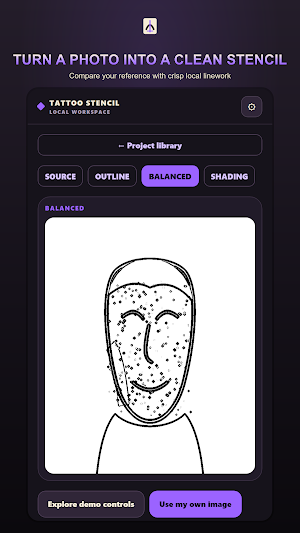
Preview Outline, Balanced and Shading treatments from the same reference. Outline reduces tonal fields, Balanced keeps major shade boundaries and Shading adds deterministic stipple and hatching.
Switch styles before committing changes to compare clean contour work with a treatment that preserves more tonal structure.
The preview and export use the same saved controls so the chosen treatment remains recognizable at output time.
CONTROL EVERY LINE
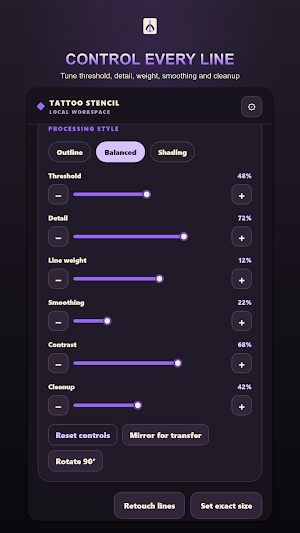
Adjust threshold, detail, line weight, smoothing, contrast and cleanup while watching the linework respond. Fine controls help preserve important edges without filling the page with noise.
Threshold separates the marks that remain from the background, while detail and smoothing tune small features and rough texture.
Line weight and cleanup make it possible to prepare a clearer transfer without losing the contours the artist wants to keep.
Hold or split comparison keeps the reference close while settings are refined.
MANUAL RETOUCH
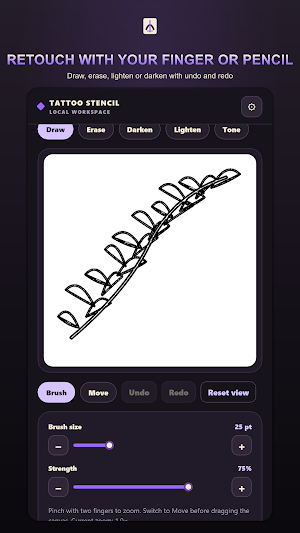
Refine the stencil by hand with draw, erase, darken and lighten tools. Change brush size, zoom into small details and undo or redo edits without altering the copied source.
Non-destructive edit history supports close cleanup work and lets the artist reverse a stroke before saving.
Finger and stylus input use the same retouch tools for direct control over small breaks, marks and shaded areas.
CROP ROTATE AND MIRROR
Crop the working area, rotate the reference into the needed orientation and mirror the finished linework for transfer-paper preparation. Compare the source before committing the transform.
EXACT PHYSICAL SIZE
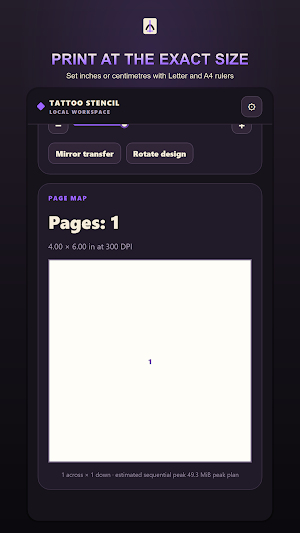
Set the intended stencil width or height in inches or centimetres and preview the measured result. A calibration ruler supports a practical check before using valuable transfer material.
LETTER AND A4 PAGE SETUP
Prepare the stencil on Letter or A4 pages with measured margins and portrait or landscape orientation. Page geometry is calculated from the selected size before output.
MULTI-PAGE TILING
Preview a large stencil divided across several pages, including page count, overlap and crop marks. Assemble the printed sheets while preserving the intended overall size.
PRINT PDF PNG AND SHARE
Open the system print sheet, create a measured PDF, export a PNG or use the system share sheet. The print-ready artwork stays clean and the selected action can be cancelled safely.
LOCAL PROJECT FOLDERS
Keep projects, client labels, notes, measurements and edit history organized in local folders. Search recent work, duplicate a treatment and reopen the saved state after a restart.
ON-DEVICE PRIVACY
References, edits, client labels and project files are processed and stored on the device. Output leaves the app only when the user chooses Photos, Files, Print or the system share sheet.
INTERFACE LANGUAGES
Use the interface in English, German, French, Spanish, Italian, Brazilian Portuguese, Dutch, Polish, Russian, Turkish, Japanese, Korean, Simplified Chinese, Traditional Chinese, Hindi, Thai, Vietnamese or Swedish.
WORK WITH AUTHORIZED ARTWORK
Import only a photo, sketch or design that you own or are authorized to use. Tattoo Stencil Maker supplies preparation tools while the artist remains responsible for the source artwork.
LOCAL PHOTO AND FILE IMPORT
Choose an owned or authorized reference from Photos or Files. The app copies it into local project storage, respects its orientation and keeps the original available beside the stencil.
A guided sample is ready for learning the controls, while a personal project begins with the reference the artist deliberately selects.
Crop and orientation information stay with the local project so the source can be reopened without repeating the setup.
THREE STENCIL STYLES
Preview Outline, Balanced and Shading treatments from the same reference. Outline reduces tonal fields, Balanced keeps major shade boundaries and Shading adds deterministic stipple and hatching.
Switch styles before committing changes to compare clean contour work with a treatment that preserves more tonal structure.
The preview and export use the same saved controls so the chosen treatment remains recognizable at output time.
CONTROL EVERY LINE
Adjust threshold, detail, line weight, smoothing, contrast and cleanup while watching the linework respond. Fine controls help preserve important edges without filling the page with noise.
Threshold separates the marks that remain from the background, while detail and smoothing tune small features and rough texture.
Line weight and cleanup make it possible to prepare a clearer transfer without losing the contours the artist wants to keep.
Hold or split comparison keeps the reference close while settings are refined.
MANUAL RETOUCH
Refine the stencil by hand with draw, erase, darken and lighten tools. Change brush size, zoom into small details and undo or redo edits without altering the copied source.
Non-destructive edit history supports close cleanup work and lets the artist reverse a stroke before saving.
Finger and stylus input use the same retouch tools for direct control over small breaks, marks and shaded areas.
CROP ROTATE AND MIRROR
Crop the working area, rotate the reference into the needed orientation and mirror the finished linework for transfer-paper preparation. Compare the source before committing the transform.
EXACT PHYSICAL SIZE
Set the intended stencil width or height in inches or centimetres and preview the measured result. A calibration ruler supports a practical check before using valuable transfer material.
LETTER AND A4 PAGE SETUP
Prepare the stencil on Letter or A4 pages with measured margins and portrait or landscape orientation. Page geometry is calculated from the selected size before output.
MULTI-PAGE TILING
Preview a large stencil divided across several pages, including page count, overlap and crop marks. Assemble the printed sheets while preserving the intended overall size.
PRINT PDF PNG AND SHARE
Open the system print sheet, create a measured PDF, export a PNG or use the system share sheet. The print-ready artwork stays clean and the selected action can be cancelled safely.
LOCAL PROJECT FOLDERS
Keep projects, client labels, notes, measurements and edit history organized in local folders. Search recent work, duplicate a treatment and reopen the saved state after a restart.
ON-DEVICE PRIVACY
References, edits, client labels and project files are processed and stored on the device. Output leaves the app only when the user chooses Photos, Files, Print or the system share sheet.
INTERFACE LANGUAGES
Use the interface in English, German, French, Spanish, Italian, Brazilian Portuguese, Dutch, Polish, Russian, Turkish, Japanese, Korean, Simplified Chinese, Traditional Chinese, Hindi, Thai, Vietnamese or Swedish.
WORK WITH AUTHORIZED ARTWORK
Import only a photo, sketch or design that you own or are authorized to use. Tattoo Stencil Maker supplies preparation tools while the artist remains responsible for the source artwork.
What’s new
Version 1.0.0 · Updated August 22, 2026
First release. Turn reference photos, sketches and authorized artwork into clean, editable tattoo stencils on your device. Compare three linework styles, retouch by hand, mirror and crop, set true physical size, tile Letter or A4 pages, and export PDF or PNG through system print and share. Projects stay on the device; no account or cloud upload is required.
Alternatives to Tattoo Stencil Maker: Print
Looking for apps like Tattoo Stencil Maker: Print? Here are 6 similar Android apps on Google Play. All of them are free to download.
-
Salary Calculator: US Paycheck
-
EPA 608 Practice Test: HVAC
-
CDL Practice Test 2026: Prep
-
Weight Tracker: Daily Weigh In
-
Embroidery Batch Card
-
Homeschool Hours & Attendance
| App | Rating | Price | Installs | Last updated | Compare |
|---|---|---|---|---|---|
| Tattoo Stencil Maker: Print | – | Free | 100+ | Aug 22, 2026 | |
| Salary Calculator: US Paycheck | – | Free | 5+ | – | Compare |
| EPA 608 Practice Test: HVAC | – | Free | 10+ | Aug 21, 2026 | Compare |
| CDL Practice Test 2026: Prep | – | Free | 10+ | – | Compare |
| Weight Tracker: Daily Weigh In | – | Free | 50+ | – | Compare |
| Embroidery Batch Card | – | Free | 1+ | – | Compare |
| Homeschool Hours & Attendance | – | Free | 1+ | Aug 31, 2026 | Compare |
Similar apps on Google Play
- Salary Calculator: US Paycheck
- EPA 608 Practice Test: HVAC
- CDL Practice Test 2026: Prep
- Weight Tracker: Daily Weigh In
- Embroidery Batch Card
- Homeschool Hours & Attendance
- Wedding Seating Chart: Compare
- Constellation Finder & Planner
- Financial Calculator: TVM Pro
- Photo Booth: Event Kiosk
- Praxis Practice Test 2026
- Life & Health License Prep
- Bar Exam Prep: MBE Questions
- CPA Exam Prep: Practice Test
- Journeyman Electrician Exam 26
- Private Pilot Test Prep: FAA
- Series 7 & SIE Exam Prep 2026
- Real Estate Exam Prep 2026
- BP Log: Blood Pressure Diary
- Chore Chart: Kids & Allowance
- Telling Time for Kids: Learn
- Spelling Test: Practice Words
- Sight Words: Flash Card Games
- Dive Log: Scuba Logbook
- Hive Log: Beekeeping Tracker
- ACLS Practice Test: Exam Prep
- Phlebotomy Practice Test: CPT
- Drone License: Part 107 Prep
- Sodium Tracker: Salt Counter
- Esthetician State Board Exam
- Tip Tracker: Server Income
- Car Maintenance Tracker: Log
- Menopause Tracker & Journal
- Food Handler & ServSafe Prep
- Fishing Log & Catch Tracker
- CNA Practice Test 2026: Prep
- ASVAB Practice Test Prep 2026
- EMT Practice Test: NREMT Prep
- Fraction Calculator: Feet Inch
- Packing List: Trip Checklist
- Times Tables: Math Games Kids
- Contractor Invoice Maker
- Word Search: Large Print
- Baby Tracker: Nursing & Sleep
- Pet Medical Records & Vaccines
- Spin the Wheel: Random Picker
- Diary: One Line a Day Journal
- DMV Permit Practice Test 2026
- US Citizenship Test 2026 Study
- Warranty Tracker & Receipts
- Learn Cantonese: Speak & Read
- Quit Tracker: Sobriety Counter
- Idle Space Station Tycoon Game
- Habit Tracker: Routine Planner
- Fasting Timer: Intermittent
- Quiet Time: Daily Devotional
- Collection Tracker & Inventory
- Subscription Tracker: No Bank
- TEF & TCF Canada French Prep
- Idle Medieval Kingdom Builder