
Constellation Finder & Planner
Syanac Books & Reference In-app purchases
Offline telescope sky map, observer planner, equipment profiles and field log.
- Price
- Free
- In-app purchases
- Updated
- Aug 24
- 2026 · v1.0.0
Screenshots


About Constellation Finder & Planner
Constellation Finder & Planner turns an Android phone or tablet into an offline observing companion that connects a constellation finder, telescope plan, red field view, observation log and private export.
FIND A TARGET FROM THE HORIZON
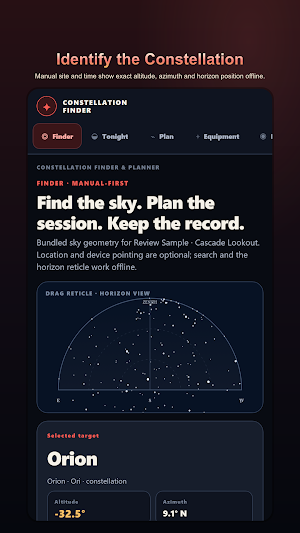
Choose a bundled constellation, bright star or planet and read its exact altitude, azimuth, horizon position and cardinal direction for the selected site and time.
The dark field plot places the target against a labelled horizon so north, east, south and west remain useful when you step outside and orient the telescope.
Search and browse controls work with manual coordinates, while optional device heading can move the reticle when that is convenient at the observing site.
Change the site, date or time and calculate the position again before saving a plan, making it easy to compare an early-evening view with a later observing window.
Bundled catalog data keeps constellation names, target details and the coordinate calculation available when a remote catalog cannot be reached.
Manual drag and search controls preserve the complete finder journey if motion access is unavailable, unsuitable for the mount or simply not wanted.
The target card keeps the chosen object name beside its numerical direction, preventing a reticle movement from separating the result from the object being planned.
A refreshed calculation replaces the displayed position only after its site and time inputs are valid, so an incomplete edit does not masquerade as a finished finder result.
PLAN THE NIGHT AT A REAL SITE
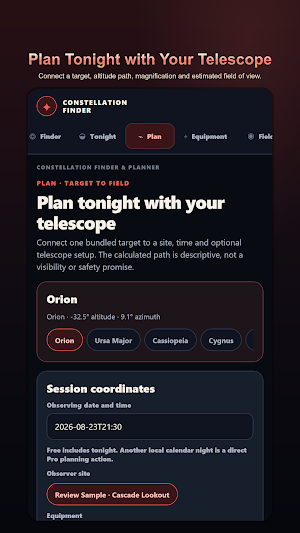
Turn a finder result into a saved observing plan with the selected target, observer site, local date, time and telescope equipment kept together.
The Tonight list helps compare bundled targets for the chosen observing window before one is carried into the detailed planner.
Inspect rise time, set time, maximum altitude and a calculated altitude path to understand when the target climbs, culminates and returns toward the horizon.
A saved plan records the inputs behind the calculation, so returning to it does not depend on remembering which site, clock time or optical setup was used.
Future-night planning uses the same local coordinate and time-zone model as the current-night finder, keeping a later session comparable with tonight.
Named observer sites make it practical to distinguish a backyard, dark-sky field or travel location without mixing their latitude, longitude and time-zone meaning.
Advanced filters can narrow the target list while the underlying position details remain visible, helping an experienced observer make a deliberate field choice.
MATCH EQUIPMENT TO THE VIEW
Create telescope and eyepiece profiles, then combine their focal lengths and apparent field to estimate magnification and the true field of view for the plan.
Use the estimate to compare a wider eyepiece with a higher-magnification setup before carrying equipment outside or changing the saved plan.
MOVE FROM PLAN TO FIELD MODE
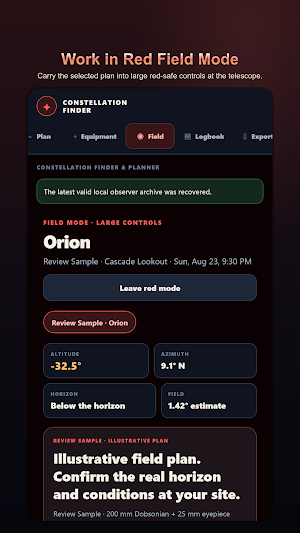
Open a saved plan in red Field Mode and carry its target, site, time, equipment and calculated direction into large controls made for a dark observing session.
KEEP A CORRECTABLE OBSERVING LOG
Record the observer, local time, site, telescope, eyepiece, sky notes and observation note as one chronological field record linked to the plan.
PREVIEW AND EXPORT THE SAME RECORD
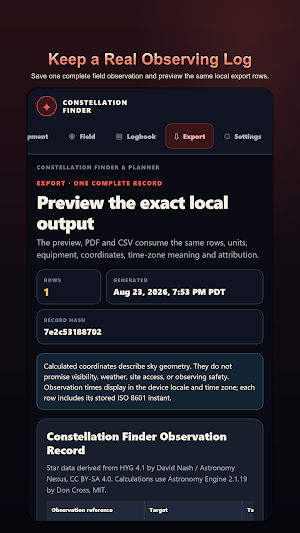
Preview the exact observation rows before creating a local PDF or CSV, with coordinates, units, equipment, time-zone meaning and attribution kept consistent.
WORK OFFLINE AND STAY IN CONTROL
Catalog data, astronomy calculations, plans and the observation archive stay on the device. No account, camera, remote catalog, weather feed or remote analytics is required.
READ CALCULATIONS AS FIELD GUIDANCE
Altitude, azimuth, rise, set, maximum altitude, timeline and field-of-view values are descriptive calculations from the entered site, time and equipment.
FIND A TARGET FROM THE HORIZON
Choose a bundled constellation, bright star or planet and read its exact altitude, azimuth, horizon position and cardinal direction for the selected site and time.
The dark field plot places the target against a labelled horizon so north, east, south and west remain useful when you step outside and orient the telescope.
Search and browse controls work with manual coordinates, while optional device heading can move the reticle when that is convenient at the observing site.
Change the site, date or time and calculate the position again before saving a plan, making it easy to compare an early-evening view with a later observing window.
Bundled catalog data keeps constellation names, target details and the coordinate calculation available when a remote catalog cannot be reached.
Manual drag and search controls preserve the complete finder journey if motion access is unavailable, unsuitable for the mount or simply not wanted.
The target card keeps the chosen object name beside its numerical direction, preventing a reticle movement from separating the result from the object being planned.
A refreshed calculation replaces the displayed position only after its site and time inputs are valid, so an incomplete edit does not masquerade as a finished finder result.
PLAN THE NIGHT AT A REAL SITE
Turn a finder result into a saved observing plan with the selected target, observer site, local date, time and telescope equipment kept together.
The Tonight list helps compare bundled targets for the chosen observing window before one is carried into the detailed planner.
Inspect rise time, set time, maximum altitude and a calculated altitude path to understand when the target climbs, culminates and returns toward the horizon.
A saved plan records the inputs behind the calculation, so returning to it does not depend on remembering which site, clock time or optical setup was used.
Future-night planning uses the same local coordinate and time-zone model as the current-night finder, keeping a later session comparable with tonight.
Named observer sites make it practical to distinguish a backyard, dark-sky field or travel location without mixing their latitude, longitude and time-zone meaning.
Advanced filters can narrow the target list while the underlying position details remain visible, helping an experienced observer make a deliberate field choice.
MATCH EQUIPMENT TO THE VIEW
Create telescope and eyepiece profiles, then combine their focal lengths and apparent field to estimate magnification and the true field of view for the plan.
Use the estimate to compare a wider eyepiece with a higher-magnification setup before carrying equipment outside or changing the saved plan.
MOVE FROM PLAN TO FIELD MODE
Open a saved plan in red Field Mode and carry its target, site, time, equipment and calculated direction into large controls made for a dark observing session.
KEEP A CORRECTABLE OBSERVING LOG
Record the observer, local time, site, telescope, eyepiece, sky notes and observation note as one chronological field record linked to the plan.
PREVIEW AND EXPORT THE SAME RECORD
Preview the exact observation rows before creating a local PDF or CSV, with coordinates, units, equipment, time-zone meaning and attribution kept consistent.
WORK OFFLINE AND STAY IN CONTROL
Catalog data, astronomy calculations, plans and the observation archive stay on the device. No account, camera, remote catalog, weather feed or remote analytics is required.
READ CALCULATIONS AS FIELD GUIDANCE
Altitude, azimuth, rise, set, maximum altitude, timeline and field-of-view values are descriptive calculations from the entered site, time and equipment.
What’s new
Version 1.0.0 · Updated August 24, 2026
First release. Find bundled constellations, bright stars and planets; plan with a telescope and estimated field of view; use red Field Mode; keep a local observation log; and create complete PDF or CSV records. No account, camera, weather feed, advertising or remote analytics is required.
Alternatives to Constellation Finder & Planner
Looking for apps like Constellation Finder & Planner? Here are 6 similar Android apps on Google Play. All of them are free to download.
-
Salary Calculator: US Paycheck
-
EPA 608 Practice Test: HVAC
-
CDL Practice Test 2026: Prep
-
Weight Tracker: Daily Weigh In
-
Embroidery Batch Card
-
Homeschool Hours & Attendance
| App | Rating | Price | Installs | Last updated | Compare |
|---|---|---|---|---|---|
| Constellation Finder & Planner | – | Free | 0+ | Aug 24, 2026 | |
| Salary Calculator: US Paycheck | – | Free | 5+ | – | Compare |
| EPA 608 Practice Test: HVAC | – | Free | 10+ | Aug 21, 2026 | Compare |
| CDL Practice Test 2026: Prep | – | Free | 10+ | – | Compare |
| Weight Tracker: Daily Weigh In | – | Free | 50+ | – | Compare |
| Embroidery Batch Card | – | Free | 1+ | – | Compare |
| Homeschool Hours & Attendance | – | Free | 1+ | Aug 31, 2026 | Compare |
Similar apps on Google Play
- Salary Calculator: US Paycheck
- EPA 608 Practice Test: HVAC
- CDL Practice Test 2026: Prep
- Weight Tracker: Daily Weigh In
- Embroidery Batch Card
- Homeschool Hours & Attendance
- Wedding Seating Chart: Compare
- Financial Calculator: TVM Pro
- Tattoo Stencil Maker: Print
- Photo Booth: Event Kiosk
- Praxis Practice Test 2026
- Life & Health License Prep
- Bar Exam Prep: MBE Questions
- CPA Exam Prep: Practice Test
- Journeyman Electrician Exam 26
- Private Pilot Test Prep: FAA
- Series 7 & SIE Exam Prep 2026
- Real Estate Exam Prep 2026
- BP Log: Blood Pressure Diary
- Chore Chart: Kids & Allowance
- Telling Time for Kids: Learn
- Spelling Test: Practice Words
- Sight Words: Flash Card Games
- Dive Log: Scuba Logbook
- Hive Log: Beekeeping Tracker
- ACLS Practice Test: Exam Prep
- Phlebotomy Practice Test: CPT
- Drone License: Part 107 Prep
- Sodium Tracker: Salt Counter
- Esthetician State Board Exam
- Tip Tracker: Server Income
- Car Maintenance Tracker: Log
- Menopause Tracker & Journal
- Food Handler & ServSafe Prep
- Fishing Log & Catch Tracker
- CNA Practice Test 2026: Prep
- ASVAB Practice Test Prep 2026
- EMT Practice Test: NREMT Prep
- Fraction Calculator: Feet Inch
- Packing List: Trip Checklist
- Times Tables: Math Games Kids
- Contractor Invoice Maker
- Word Search: Large Print
- Baby Tracker: Nursing & Sleep
- Pet Medical Records & Vaccines
- Spin the Wheel: Random Picker
- Diary: One Line a Day Journal
- DMV Permit Practice Test 2026
- US Citizenship Test 2026 Study
- Warranty Tracker & Receipts
- Learn Cantonese: Speak & Read
- Quit Tracker: Sobriety Counter
- Idle Space Station Tycoon Game
- Habit Tracker: Routine Planner
- Fasting Timer: Intermittent
- Quiet Time: Daily Devotional
- Collection Tracker & Inventory
- Subscription Tracker: No Bank
- TEF & TCF Canada French Prep
- Idle Medieval Kingdom Builder