
Dual Camera & PiP - DualView
Photography In-app purchases Contains ads
Capture front & back photos and videos with Dual Camera, PiP and split layouts.
- Downloads
- 5K+
- on Google Play
- Price
- Free
- In-app purchases
- Updated
- Oct 20
- 2026 · v1.0.18
Screenshots


About Dual Camera & PiP - DualView
Dual Camera & PiP - DualView
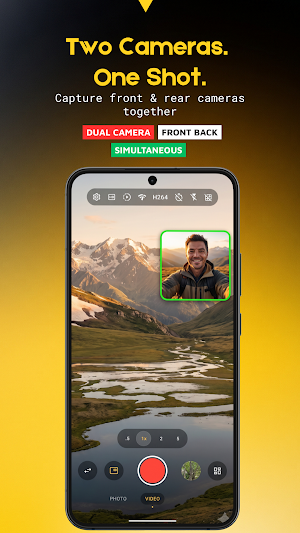
Capture photos and record videos using your device's front and rear cameras in one powerful camera app. On supported devices, Dual Camera & PiP - DualView lets you use both cameras simultaneously, making it easy to create vlogs, reaction videos, interviews, travel memories, and other creative content from multiple perspectives.
Whether you're recording for social media or capturing everyday moments, DualView provides flexible camera layouts, intuitive controls, and powerful camera tools to help you create high-quality content.
📷 Dual Camera Capture
Capture more with your front and rear cameras.
• Record dual camera videos on supported devices
• Capture photos with front and back cameras
• Real-time camera preview
• Smooth and responsive capture experience
• Quick camera controls
• Save photos and videos directly to your gallery
🎥 Picture-in-Picture (PiP)
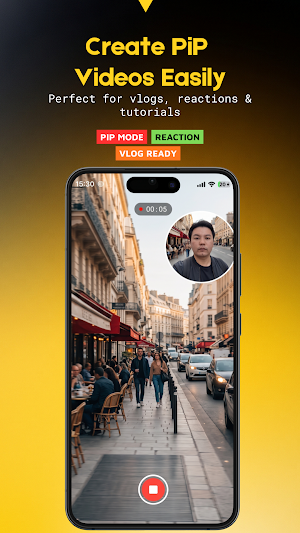
Create videos with a floating camera preview.
• Adjustable PiP window
• Drag to reposition
• Pinch to resize
• Multiple PiP styles
• Rounded and circular layouts
• Live preview while recording
PiP mode is perfect for reaction videos, tutorials, interviews, product reviews, travel content, and more.
🪟 Multiple Camera Layouts
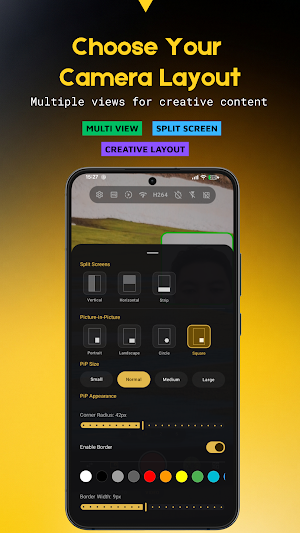
Choose the layout that best fits your content.
• Picture-in-Picture (PiP)
• Vertical Split
• Horizontal Split
• Side-by-Side
• Full Screen Preview
Easily switch between layouts before recording to match different shooting scenarios.
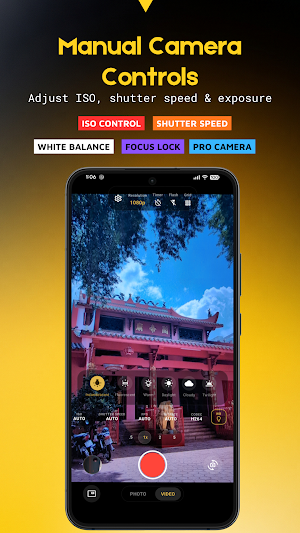
🎛 Manual Camera Controls
Take control of your camera with professional manual settings.
Available features may include:
• Resolution selection
• ISO adjustment
• Shutter Speed control
• White Balance adjustment
• Exposure Compensation
• Frame Rate (FPS) selection
• Video Bitrate adjustment
• Video Codec selection
• Focus Control
• Focus Lock (AF Lock)
• Exposure Lock (AE Lock)
• Zoom
• Flash
• Timer
• Aspect Ratio
• Grid Lines
• Mirror Front Camera
Available manual controls depend on your device hardware, Android version, Camera2 support, and manufacturer implementation.
🧭 Compass & Level Indicator
Frame your shots with helpful camera guides.
• Live compass overlay
• Real-time heading display
• Horizon level indicator
• Keep landscapes straight
• Helpful for architecture and travel photography
• Optional on-screen overlay
Compass and level accuracy may vary depending on your device's sensors.
📸 High-Quality Photo Capture
Capture clear photos with flexible camera layouts.
• High-quality image capture
• Front and rear camera support
• Instant photo preview
• Save directly to your gallery
🎬 Perfect for Every Creator
Create content for a wide range of scenarios.
• Vlogs
• Reaction videos
• Interviews
• Tutorials
• Product reviews
• Travel videos
• Behind-the-scenes content
• Educational videos
• Family moments
• Daily memories
• Outdoor adventures
🚀 Simple & Modern Interface
Designed for an enjoyable shooting experience.
• Clean and modern interface
• Quick access to camera controls
• Easy one-handed operation
• Optimized for modern Android devices
• Dark theme designed for camera use
⭐ Premium Features
Upgrade to Premium to unlock additional features.
📱 Compatibility
Some features may not be available on all devices, as they may depend on the camera's hardware or features, Android version, etc.
Please note that I haven't been able to test DualView Camera on every Android device, so please check before using DualView Camera to take photos/videos of your wedding, etc.
Available functionality may vary between devices.
⭐ Why Dual Camera & PiP - DualView?
DualView combines Dual Camera, Picture-in-Picture (PiP), multiple camera layouts, professional manual camera controls, Compass, and Level Indicator in one easy-to-use camera app.
Create unique content with front and rear cameras, customize your shots with manual settings, and capture different perspectives for vlogs, reaction videos, travel memories, and everyday moments.
Capture photos and record videos using your device's front and rear cameras in one powerful camera app. On supported devices, Dual Camera & PiP - DualView lets you use both cameras simultaneously, making it easy to create vlogs, reaction videos, interviews, travel memories, and other creative content from multiple perspectives.
Whether you're recording for social media or capturing everyday moments, DualView provides flexible camera layouts, intuitive controls, and powerful camera tools to help you create high-quality content.
📷 Dual Camera Capture
Capture more with your front and rear cameras.
• Record dual camera videos on supported devices
• Capture photos with front and back cameras
• Real-time camera preview
• Smooth and responsive capture experience
• Quick camera controls
• Save photos and videos directly to your gallery
🎥 Picture-in-Picture (PiP)
Create videos with a floating camera preview.
• Adjustable PiP window
• Drag to reposition
• Pinch to resize
• Multiple PiP styles
• Rounded and circular layouts
• Live preview while recording
PiP mode is perfect for reaction videos, tutorials, interviews, product reviews, travel content, and more.
🪟 Multiple Camera Layouts
Choose the layout that best fits your content.
• Picture-in-Picture (PiP)
• Vertical Split
• Horizontal Split
• Side-by-Side
• Full Screen Preview
Easily switch between layouts before recording to match different shooting scenarios.
🎛 Manual Camera Controls
Take control of your camera with professional manual settings.
Available features may include:
• Resolution selection
• ISO adjustment
• Shutter Speed control
• White Balance adjustment
• Exposure Compensation
• Frame Rate (FPS) selection
• Video Bitrate adjustment
• Video Codec selection
• Focus Control
• Focus Lock (AF Lock)
• Exposure Lock (AE Lock)
• Zoom
• Flash
• Timer
• Aspect Ratio
• Grid Lines
• Mirror Front Camera
Available manual controls depend on your device hardware, Android version, Camera2 support, and manufacturer implementation.
🧭 Compass & Level Indicator
Frame your shots with helpful camera guides.
• Live compass overlay
• Real-time heading display
• Horizon level indicator
• Keep landscapes straight
• Helpful for architecture and travel photography
• Optional on-screen overlay
Compass and level accuracy may vary depending on your device's sensors.
📸 High-Quality Photo Capture
Capture clear photos with flexible camera layouts.
• High-quality image capture
• Front and rear camera support
• Instant photo preview
• Save directly to your gallery
🎬 Perfect for Every Creator
Create content for a wide range of scenarios.
• Vlogs
• Reaction videos
• Interviews
• Tutorials
• Product reviews
• Travel videos
• Behind-the-scenes content
• Educational videos
• Family moments
• Daily memories
• Outdoor adventures
🚀 Simple & Modern Interface
Designed for an enjoyable shooting experience.
• Clean and modern interface
• Quick access to camera controls
• Easy one-handed operation
• Optimized for modern Android devices
• Dark theme designed for camera use
⭐ Premium Features
Upgrade to Premium to unlock additional features.
📱 Compatibility
Some features may not be available on all devices, as they may depend on the camera's hardware or features, Android version, etc.
Please note that I haven't been able to test DualView Camera on every Android device, so please check before using DualView Camera to take photos/videos of your wedding, etc.
Available functionality may vary between devices.
⭐ Why Dual Camera & PiP - DualView?
DualView combines Dual Camera, Picture-in-Picture (PiP), multiple camera layouts, professional manual camera controls, Compass, and Level Indicator in one easy-to-use camera app.
Create unique content with front and rear cameras, customize your shots with manual settings, and capture different perspectives for vlogs, reaction videos, travel memories, and everyday moments.
What’s new
Version 1.0.18 · Updated October 20, 2026
• Performance & Bug Fixes: Smoother touch response and overall UI polish.
Alternatives to Dual Camera & PiP - DualView
Looking for apps like Dual Camera & PiP - DualView? Here are 6 similar Android apps on Google Play. The highest rated is Aceable Real Estate, Insurance (4.9/5), and 5 of the 6 are free to download.
-
Later Creator: Earn via Social 4.7
-
JUST | Step Counter & Rewards 3.1
-
TypeRush(Pro)
-
Workable 3.6
-
Aceable Real Estate, Insurance 4.9
-
KOWORK - Korean Job & Visa
| App | Rating | Price | Installs | Last updated | Compare |
|---|---|---|---|---|---|
| Dual Camera & PiP - DualView | – | Free | 5,000+ | Oct 20, 2026 | |
| Later Creator: Earn via Social | 4.7 / 5 | Free | 100,000+ | Oct 22, 2026 | Compare |
| JUST | Step Counter & Rewards | 3.1 / 5 | Free | 100,000+ | – | Compare |
| TypeRush(Pro) | – | 2.99 USD | 10+ | Aug 18, 2025 | Compare |
| Workable | 3.6 / 5 | Free | 50,000+ | Oct 8, 2026 | Compare |
| Aceable Real Estate, Insurance | 4.9 / 5 | Free | 50,000+ | Oct 28, 2026 | Compare |
| KOWORK - Korean Job & Visa | – | Free | 50,000+ | Sep 21, 2026 | Compare |
Similar apps on Google Play
- Later Creator: Earn via Social
- JUST | Step Counter & Rewards
- TypeRush(Pro)
- Workable
- Aceable Real Estate, Insurance
- KOWORK - Korean Job & Visa
- Bluente - Learn Business Terms
- dub: Social Investing Unlocked
- Step: All-In-One Money App
- SurveyParty - Earn Cash Fast
- StartEngine: Pre-IPO Investing
- Zogo: Learn and Earn
- Teachable online courses
- Money Flow: Spending Tracker
- Howtotalk: Practical Parenting
- Who Do You Think You Are?
- Freelancer: Hire & Find Jobs
- GoPlaces - Job Search Abroad
- Learn Digital Marketing
- EFE
- Fergus Go
- Bartlett Arborist Supply
- Realbricks - Real Estate App
- Pemo
- Map My Ride With GPS Tracker
- Maritime Zone - Sea Jobs App
- RentCheck
- Pocket Prep Skilled Trades '26
- KnowHow
- Till: Debit Card for Kids
- Stocktwits: Trading Community
- Tellus: Earn More Daily
- Evolia - Employee Scheduling
- Zoala
- Go.Learn
- Remote Jobs Search - FlexJobs
- Norwex Consultant App
- Parqet - Portfolio Tracker
- GrabrFi: US Account
- Bark for Professionals