
Doodlecam: Pro Manual Camera
Photography Contains ads
Professional camera controls, drawn with a little personality.
- Downloads
- 172+
- on Google Play
- Price
- Free
- No in-app purchases
- Updated
- Aug 19
- 2026 · v1.0.0
Screenshots
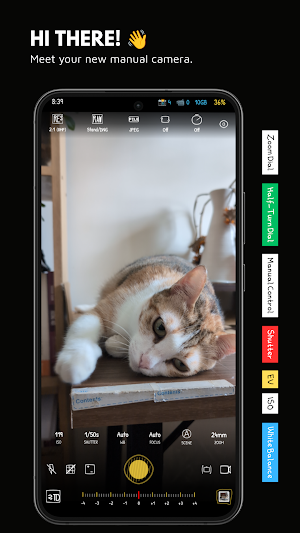
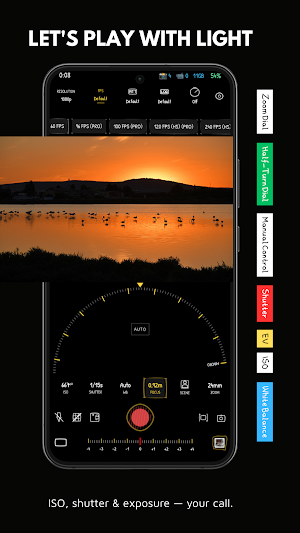
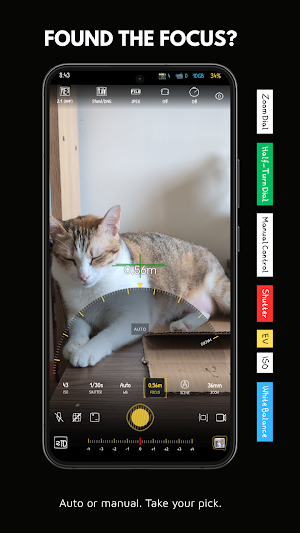


About Doodlecam: Pro Manual Camera
Doodlecam is a manual camera designed to give you more creative control without making photography complicated.
Bring familiar manual photography controls to your Android phone, including precise exposure, manual focus, white balance, RAW capture, monitoring tools and advanced video controls — all wrapped in a playful hand-drawn interface.
Camera controls with a little personality.
📸 MANUAL CAMERA CONTROLS
Take control of the settings that shape your photos:
• Manual ISO with extended range support
• Manual shutter speed from long to ultra-fast exposure
• Exposure compensation (EV)
• Manual white balance with Kelvin temperature and presets
• Manual focus with Auto and Manual modes
• Smooth zoom with precise value control
Shoot portraits, street photography, landscapes, architecture or everyday moments with the settings you choose.
🎞️ ADVANCED PHOTO MODES
Choose the right shooting mode for different scenes:
• Standard Photo
• HDR multi-exposure capture
• DRO (Dynamic Range Optimization)
• Night Mode for low-light photography
• Multi-frame Noise Reduction
• Exposure Bracketing with 3–5 frames
• Fast Burst Shooting
• Panorama with stitched wide images
🎬 MANUAL VIDEO CONTROLS
Get more control over your mobile video:
• HD, 2K, 3K and 4K* resolutions
• Adjustable video bitrate
• 24 / 30 / 60 / 120 / 240 FPS*
• Log and flat color profiles*
• REC709, sRGB, Gamma and JTLog profiles*
• Custom Gamma tuning*
• HEVC (H.265) and H.264
• Electronic video stabilization (EIS)
• Photo capture while recording
📊 MONITORING TOOLS
See more of what your camera is capturing:
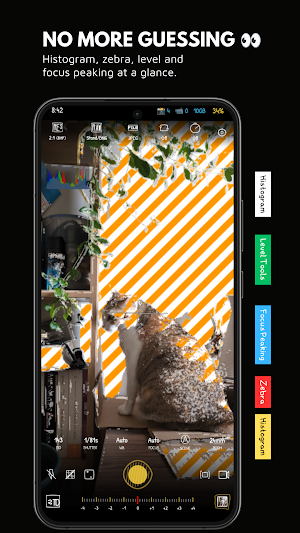
• RGB, Luminance and Value histogram
• Zebra stripes for exposure warnings
• Focus peaking with customizable colors
• Level indicator for horizon alignment
• Rule of Thirds and Golden Ratio grids
• Cinematic composition guides
📁 RAW & HIGH-QUALITY CAPTURE
Keep more flexibility for editing:
• RAW / DNG capture
• JPEG, HDR JPEG, WebP and PNG
• Adjustable image quality
• High-resolution capture
• Multiple aspect ratios
• Live Photo / pre-shot capture where supported
RAW capture can provide additional flexibility when adjusting exposure, highlights, shadows, color and white balance during post-processing.
⚙️ CAMERA SETTINGS
Customize the camera to match your workflow:
• Flash: Off, Auto, On and Torch
• Face Detection
• Auto Stabilization
• Front camera mirror control
• HDR burst optimization
• Camera2 compatibility enhancements
✏️ A CAMERA THAT LOOKS DIFFERENT
Most manual camera apps look technical.
Doodlecam takes a different approach.
The interface is inspired by hand-drawn sketches, doodles and imperfect lines. You get detailed camera controls in an interface designed to feel approachable, tactile and creative.
Serious camera controls. A playful interface.
🎨 MADE FOR CREATIVE PHOTOGRAPHY
Doodlecam is made for photographers and creators who want to:
• Take control of exposure
• Experiment with shutter speed
• Fine-tune focus manually
• Keep white balance consistent
• Capture RAW images for editing
• Monitor exposure and focus
• Compose shots with professional guides
• Record video with manual settings
• Explore the camera capabilities of their Android device
💎 SIMPLE INTERFACE. MORE CONTROL.
Doodlecam keeps the camera preview at the center while putting essential controls within easy reach.
The goal is simple: give you more control without filling the screen with unnecessary complexity.
Manual controls. RAW photography. Advanced monitoring. Manual video. Hand-drawn personality.
Your phone is already a camera. Doodlecam lets you decide how to use it.
⚠️ IMPORTANT NOTE
Available features depend on your device's camera hardware, Android version and Camera2 API implementation. Not all phones support every feature listed above.
Supported resolutions, lenses, frame rates, RAW capture, manual controls, HDR, stabilization, zoom and other capabilities may vary by device.
* Some features may not be available on every device.
Bring familiar manual photography controls to your Android phone, including precise exposure, manual focus, white balance, RAW capture, monitoring tools and advanced video controls — all wrapped in a playful hand-drawn interface.
Camera controls with a little personality.
📸 MANUAL CAMERA CONTROLS
Take control of the settings that shape your photos:
• Manual ISO with extended range support
• Manual shutter speed from long to ultra-fast exposure
• Exposure compensation (EV)
• Manual white balance with Kelvin temperature and presets
• Manual focus with Auto and Manual modes
• Smooth zoom with precise value control
Shoot portraits, street photography, landscapes, architecture or everyday moments with the settings you choose.
🎞️ ADVANCED PHOTO MODES
Choose the right shooting mode for different scenes:
• Standard Photo
• HDR multi-exposure capture
• DRO (Dynamic Range Optimization)
• Night Mode for low-light photography
• Multi-frame Noise Reduction
• Exposure Bracketing with 3–5 frames
• Fast Burst Shooting
• Panorama with stitched wide images
🎬 MANUAL VIDEO CONTROLS
Get more control over your mobile video:
• HD, 2K, 3K and 4K* resolutions
• Adjustable video bitrate
• 24 / 30 / 60 / 120 / 240 FPS*
• Log and flat color profiles*
• REC709, sRGB, Gamma and JTLog profiles*
• Custom Gamma tuning*
• HEVC (H.265) and H.264
• Electronic video stabilization (EIS)
• Photo capture while recording
📊 MONITORING TOOLS
See more of what your camera is capturing:
• RGB, Luminance and Value histogram
• Zebra stripes for exposure warnings
• Focus peaking with customizable colors
• Level indicator for horizon alignment
• Rule of Thirds and Golden Ratio grids
• Cinematic composition guides
📁 RAW & HIGH-QUALITY CAPTURE
Keep more flexibility for editing:
• RAW / DNG capture
• JPEG, HDR JPEG, WebP and PNG
• Adjustable image quality
• High-resolution capture
• Multiple aspect ratios
• Live Photo / pre-shot capture where supported
RAW capture can provide additional flexibility when adjusting exposure, highlights, shadows, color and white balance during post-processing.
⚙️ CAMERA SETTINGS
Customize the camera to match your workflow:
• Flash: Off, Auto, On and Torch
• Face Detection
• Auto Stabilization
• Front camera mirror control
• HDR burst optimization
• Camera2 compatibility enhancements
✏️ A CAMERA THAT LOOKS DIFFERENT
Most manual camera apps look technical.
Doodlecam takes a different approach.
The interface is inspired by hand-drawn sketches, doodles and imperfect lines. You get detailed camera controls in an interface designed to feel approachable, tactile and creative.
Serious camera controls. A playful interface.
🎨 MADE FOR CREATIVE PHOTOGRAPHY
Doodlecam is made for photographers and creators who want to:
• Take control of exposure
• Experiment with shutter speed
• Fine-tune focus manually
• Keep white balance consistent
• Capture RAW images for editing
• Monitor exposure and focus
• Compose shots with professional guides
• Record video with manual settings
• Explore the camera capabilities of their Android device
💎 SIMPLE INTERFACE. MORE CONTROL.
Doodlecam keeps the camera preview at the center while putting essential controls within easy reach.
The goal is simple: give you more control without filling the screen with unnecessary complexity.
Manual controls. RAW photography. Advanced monitoring. Manual video. Hand-drawn personality.
Your phone is already a camera. Doodlecam lets you decide how to use it.
⚠️ IMPORTANT NOTE
Available features depend on your device's camera hardware, Android version and Camera2 API implementation. Not all phones support every feature listed above.
Supported resolutions, lenses, frame rates, RAW capture, manual controls, HDR, stabilization, zoom and other capabilities may vary by device.
* Some features may not be available on every device.
What’s new
Version 1.0.0 · Updated August 19, 2026
- Doodlecam is a manual camera designed to give you more creative control without making photography complicated. - Bring familiar manual photography controls to your Android phone, including precise exposure, manual focus, white balance, RAW capture, monitoring tools and advanced video controls — all wrapped in a playful hand-drawn interface.
Alternatives to Doodlecam: Pro Manual Camera
Looking for apps like Doodlecam: Pro Manual Camera? Here are 6 similar Android apps on Google Play. The highest rated is InstaSize: AI Photo Editor (4.7/5), and all 6 are free to download.
-
Professional HD Camera 4.6
-
Seestar 4.0
-
InstaSize: AI Photo Editor 4.7
-
Cameringo Lite. Filters Camera 4.1
-
Lensa: photo editor & AI art 4.1
-
Framelapse 2 Time Lapse Camera 3.2
| App | Rating | Price | Installs | Last updated | Compare |
|---|---|---|---|---|---|
| Doodlecam: Pro Manual Camera | – | Free | 100+ | Aug 19, 2026 | |
| Professional HD Camera | 4.6 / 5 | Free | 10,000,000+ | Apr 27, 2026 | Compare |
| Seestar | 4.0 / 5 | Free | 100,000+ | Oct 17, 2026 | Compare |
| InstaSize: AI Photo Editor | 4.7 / 5 | Free | 50,000,000+ | – | Compare |
| Cameringo Lite. Filters Camera | 4.1 / 5 | Free | 10,000,000+ | Aug 26, 2023 | Compare |
| Lensa: photo editor & AI art | 4.1 / 5 | Free | 10,000,000+ | Oct 16, 2026 | Compare |
| Framelapse 2 Time Lapse Camera | 3.2 / 5 | Free | 5,000,000+ | Jan 12, 2025 | Compare |
Similar apps on Google Play
- Professional HD Camera
- Seestar
- InstaSize: AI Photo Editor
- Cameringo Lite. Filters Camera
- Lensa: photo editor & AI art
- Framelapse 2 Time Lapse Camera
- InFrame - Photo Editor & Frame
- YouCam Enhance: AI Photo&Video
- Sony | Imaging Edge Mobile
- HD Camera 2026 for Android
- Nice OS Camera, Beauty Camera
- Beauty Camera - Selfie Camera
- Beauty Camera X, Selfie Camera
- MiX Camera for Mi Camera
- POV – Disposable Camera Events
- PhotoPills
- Camera - Fast Snap with Filter
- Camera360 :Photo Editor&Selfie
- Manual Camera DSLR (Lite)
- IPC360 Home
- Protake - Mobile Cinema Camera
- Camera - HD Camera for Android
- celebrate: share photo & video
- PhotoSpot: For Travel Planning
- ReLens Camera-Focus &DSLR Blur
- Camera FV-5 Lite
- Presets For LR - Photo Filters
- mcpro24fps manual video camera
- Polarr: Photo Filters & Editor
- GuruShots: Photo Game
- MIX by Camera360
- LoFi Cam: Film Digital Camera
- SPYPOINT
- Candy Camera AI – Find myself
- Camera360 Lite -Stylish Filter
- FIMO - Analog Camera
- AGC ToolKit - Watermark LUT
- Sportvibez
- PicMaster - AI Photo Editor
- Timestamp Camera Pro
- LightX AI Photo Editor Retouch
- Cool S20 Camera Galaxy S20 cam
- Foodie - Filter & Film Camera
- BlackVue
- ProCam X - Lite :HD Camera Pro
- Canon Camera Connect
- Sony | Creators' App
- HD Camera
- Photone - Grow Light Meter
- NoteCam Lite - GPS memo camera
- CompanyCam
- ZUMIMALL
- Magnifier
- Secure Camera
- AmpMe - Speaker Booster
- SelfieCity
- dynamicSpot - Dynamic Island