
Recovera: File Recovery
MSTok Tools Contains ads
File recovery for accessible photos, videos, and documents—on-device.
- Downloads
- 41+
- on Google Play
- Price
- Free
- No in-app purchases
- Updated
- Aug 2
- 2026 · v1.0.0
Screenshots
About Recovera: File Recovery
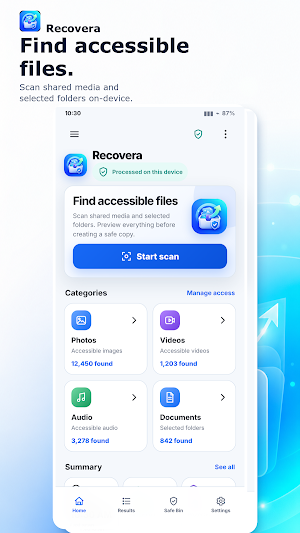
Recovera is a private, on-device file recovery assistant for photos, videos, audio, and documents that Android can still access.
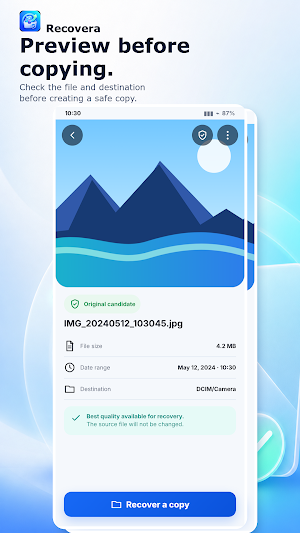
Find accessible files after accidental loss, preview them, and create a safe copy without changing the source. Recovera helps you understand what is available instead of promising a magic undelete.
What you can do
• Scan Android media collections for photos, videos, and audio.
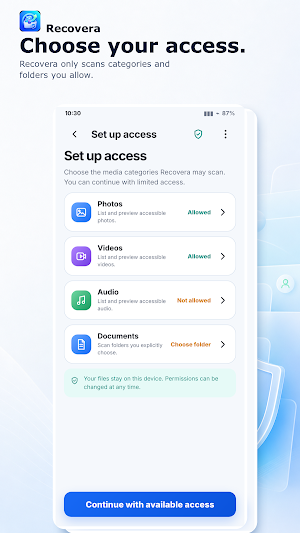
• Choose folders for document and other file scanning through Android’s folder picker.
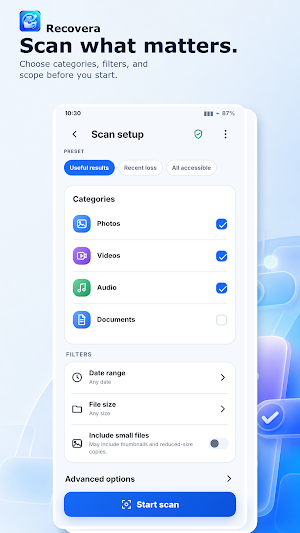
• Select the categories and scope you want: useful results, recent loss, or all accessible files.
• Filter results by date and file size, then preview a file before copying it.
• Create a verified copy to a destination you choose and track success, skipped, and failed items.
• Review local recovery history and clear it when you want.
• Protect copies you intentionally add through Safe Bin.
Private by design
• File contents stay on your device and are not uploaded.
• No account is required for the core recovery workflow.
• Scan, preview, and copy your accessible files locally, including when the core workflow is offline.
Important limits
Recovera can only work with files Android still exposes through your granted access. If a file was permanently erased, overwritten, or is no longer accessible, recovery cannot be guaranteed. Recovera is not a forensic deep-scan tool and does not intercept deletions made by other apps. Safe Bin protects copies added through Recovera; it is not a system-wide trash.
Recovera gives you a clear path from file scan to preview to safe copy—with your files kept on your device.
Find accessible files after accidental loss, preview them, and create a safe copy without changing the source. Recovera helps you understand what is available instead of promising a magic undelete.
What you can do
• Scan Android media collections for photos, videos, and audio.
• Choose folders for document and other file scanning through Android’s folder picker.
• Select the categories and scope you want: useful results, recent loss, or all accessible files.
• Filter results by date and file size, then preview a file before copying it.
• Create a verified copy to a destination you choose and track success, skipped, and failed items.
• Review local recovery history and clear it when you want.
• Protect copies you intentionally add through Safe Bin.
Private by design
• File contents stay on your device and are not uploaded.
• No account is required for the core recovery workflow.
• Scan, preview, and copy your accessible files locally, including when the core workflow is offline.
Important limits
Recovera can only work with files Android still exposes through your granted access. If a file was permanently erased, overwritten, or is no longer accessible, recovery cannot be guaranteed. Recovera is not a forensic deep-scan tool and does not intercept deletions made by other apps. Safe Bin protects copies added through Recovera; it is not a system-wide trash.
Recovera gives you a clear path from file scan to preview to safe copy—with your files kept on your device.
User reviews

I felt relieved to find a straightforward way to scan accessible files and preview them before creating a safe copy. The interface is clear, permissions are explained well, and the on-device processing provides welcome privacy. It is practical, transparent about its limitations, and easy to use. 🥰

I can see my old deleted files. can believe it that I can have it again. 😂😂

unbelieveble, i found my deleted files by this app, i cant found it when i use other paid apps

thank you very much, i can get my data back

nice app, I can bring my deleted photos of my-ex
Alternatives to Recovera: File Recovery
Looking for apps like Recovera: File Recovery? Here are 6 similar Android apps on Google Play. The highest rated is Skit Premium - apps manager (4.7/5), and 5 of the 6 are free to download.
-
Deleted Photo & Video Recovery 3.8
-
1Tap Cleaner (clear cache) 4.6
-
Restore My Old Deleted Photos 3.5
-
Skit Premium - apps manager 4.7
-
Super File Manager Explorer 4.4
-
WhatisRemoved+ 3.9
| App | Rating | Price | Installs | Last updated | Compare |
|---|---|---|---|---|---|
| Recovera: File Recovery | – | Free | 10+ | Aug 2, 2026 | |
| Deleted Photo & Video Recovery | 3.8 / 5 | Free | 1,000,000+ | Sep 5, 2026 | Compare |
| 1Tap Cleaner (clear cache) | 4.6 / 5 | Free | 10,000,000+ | Oct 12, 2026 | Compare |
| Restore My Old Deleted Photos | 3.5 / 5 | Free | 10,000,000+ | Aug 4, 2026 | Compare |
| Skit Premium - apps manager | 4.7 / 5 | 2.99 USD | 10,000+ | Oct 7, 2026 | Compare |
| Super File Manager Explorer | 4.4 / 5 | Free | 1,000,000+ | Oct 16, 2026 | Compare |
| WhatisRemoved+ | 3.9 / 5 | Free | 10,000,000+ | Aug 26, 2026 | Compare |
Similar apps on Google Play
- Deleted Photo & Video Recovery
- 1Tap Cleaner (clear cache)
- Restore My Old Deleted Photos
- Skit Premium - apps manager
- Super File Manager Explorer
- WhatisRemoved+
- UltData: Photo & Data Recovery
- PRIVARY Secure Photo Vault
- Total Drive - Cloud Storage
- Uninstaller
- Fortect Mobile Security
- ASTRO File Manager & Cleaner
- MiraClean - File Manager
- MobiDrive Cloud Storage & Sync
- Storage Analyzer & Disk Usage
- HyperClean AI
- MobiSaver: Data&Photo Recovery
- Solid Explorer File Manager
- File Manager
- Dext: Receipt Tracker
- Coolina
- FastField: Field Service Forms
- Avast Cleanup – Phone Cleaner
- Dashpivot
- Planday Employee Scheduling