
Taskagotchi
Simulation In-app purchases
Keep your Windows 98 PC alive. Manage processes, fight viruses, survive.
- Rating
- 4.6
- 10 ratings
- Downloads
- 1.4K+
- on Google Play
- Price
- Free
- In-app purchases
- Updated
- Aug 28
- 2026 · v2.2.6
Screenshots


About Taskagotchi
Your PC is alive. Can you keep it running?
Taskagotchi is a virtual pet game with a twist: instead of a cute creature, you are taking care of a Windows 98 computer. Monitor the Task Manager, kill rogue processes, delete junk files, and upgrade your hardware before the system crashes with a Blue Screen of Death.
A virtual pet game unlike any other
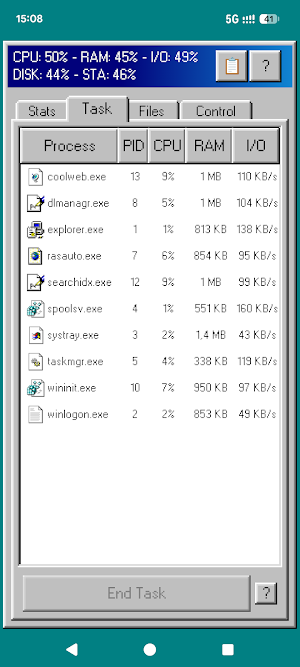
Every now and then, your PC evolves on its own. New processes appear in the Task Manager. Some are harmless. Others consume your CPU and RAM until the system overheats. A few are outright malicious: viruses and keyloggers that silently destroy your stability. Your job is to keep everything under control, even when you are away.
Manage your system resources
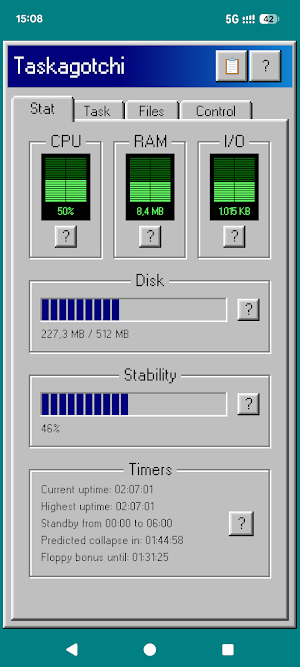
Your PC has five vital stats that you must balance at all times:
- CPU usage: too many active processes will push it to the limit
- RAM: memory-hungry programs fill it up fast
- Disk space: files pile up and orphaned data wastes storage
- Disk speed: high I/O activity slows everything down
- Stability: the heartbeat of your system; when it hits zero, it is game over
Let any resource exceed safe limits or let stability collapse, and your screen goes dark!
Take action in the Task Manager
You interact with your PC like a real power user:
- End Task to kill processes, but ending system processes hurts stability
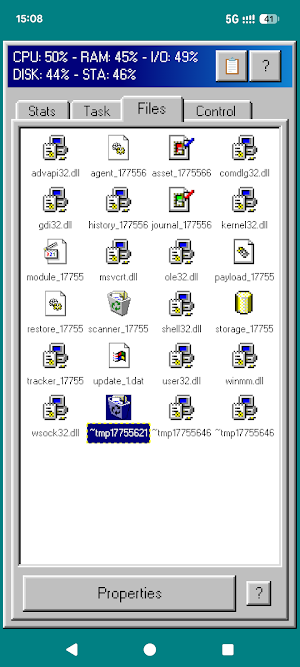
- Delete files to free space; force-deleting linked files stresses active processes
- Defrag to reduce I/O load at the cost of extra CPU
- Find orphan files left behind by terminated processes
- Run updates to improve stability through high-I/O download jobs
- Scan for viruses to reveal hidden malicious activity
Upgrade your hardware
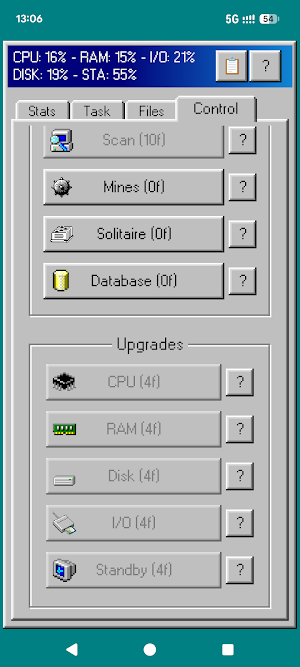
Collect coins while your system runs. Spend them to increase CPU capacity, RAM, disk size, and disk speed. Upgrade Standby duration to protect your PC while you are away, up to 8 hours. Each purchase increases future upgrade costs, so planning matters.
A retro Windows 98 atmosphere
Taskagotchi recreates the classic Windows 98 desktop feeling with retro-inspired windows, dialogs, typography, and system-style UI. It is a nostalgic management game focused on strategy, risk, and resource balance.
Play in short sessions
Taskagotchi is built for quick check-ins. Open the game, assess your system, take action, and leave it running. The world keeps progressing, and unattended systems become harder to recover.
Install Taskagotchi and keep your retro PC alive!
Taskagotchi is a virtual pet game with a twist: instead of a cute creature, you are taking care of a Windows 98 computer. Monitor the Task Manager, kill rogue processes, delete junk files, and upgrade your hardware before the system crashes with a Blue Screen of Death.
A virtual pet game unlike any other
Every now and then, your PC evolves on its own. New processes appear in the Task Manager. Some are harmless. Others consume your CPU and RAM until the system overheats. A few are outright malicious: viruses and keyloggers that silently destroy your stability. Your job is to keep everything under control, even when you are away.
Manage your system resources
Your PC has five vital stats that you must balance at all times:
- CPU usage: too many active processes will push it to the limit
- RAM: memory-hungry programs fill it up fast
- Disk space: files pile up and orphaned data wastes storage
- Disk speed: high I/O activity slows everything down
- Stability: the heartbeat of your system; when it hits zero, it is game over
Let any resource exceed safe limits or let stability collapse, and your screen goes dark!
Take action in the Task Manager
You interact with your PC like a real power user:
- End Task to kill processes, but ending system processes hurts stability
- Delete files to free space; force-deleting linked files stresses active processes
- Defrag to reduce I/O load at the cost of extra CPU
- Find orphan files left behind by terminated processes
- Run updates to improve stability through high-I/O download jobs
- Scan for viruses to reveal hidden malicious activity
Upgrade your hardware
Collect coins while your system runs. Spend them to increase CPU capacity, RAM, disk size, and disk speed. Upgrade Standby duration to protect your PC while you are away, up to 8 hours. Each purchase increases future upgrade costs, so planning matters.
A retro Windows 98 atmosphere
Taskagotchi recreates the classic Windows 98 desktop feeling with retro-inspired windows, dialogs, typography, and system-style UI. It is a nostalgic management game focused on strategy, risk, and resource balance.
Play in short sessions
Taskagotchi is built for quick check-ins. Open the game, assess your system, take action, and leave it running. The world keeps progressing, and unattended systems become harder to recover.
Install Taskagotchi and keep your retro PC alive!
What’s new
Version 2.2.6 · Updated August 28, 2026
Bugfix
User reviews

great app
Alternatives to Taskagotchi
Looking for apps like Taskagotchi? Here are 6 similar Android apps on Google Play. All of them are free to download.
-
MiuLingo - Learn hieroglyphic
-
MathZam
-
Future Inbox
-
ScreenSize
-
Widget for Renshuu
-
Diving Under It with Oma Gerio
| App | Rating | Price | Installs | Last updated | Compare |
|---|---|---|---|---|---|
| Taskagotchi | 4.6 / 5 | Free | 1,000+ | Aug 28, 2026 | |
| MiuLingo - Learn hieroglyphic | – | Free | 500+ | – | Compare |
| MathZam | – | Free | 1+ | Jun 26, 2026 | Compare |
| Future Inbox | – | Free | 10+ | – | Compare |
| ScreenSize | – | Free | 10+ | Nov 25, 2025 | Compare |
| Widget for Renshuu | – | Free | 100+ | Aug 9, 2025 | Compare |
| Diving Under It with Oma Gerio | – | Free | 10+ | Aug 14, 2023 | Compare |
Compare Taskagotchi with the top alternatives: ratings, updates, ASO score and keyword gaps →