
Vijeo Design'Air Plus
Productivity
Vijeo Design’Air Plus is Schneider Electric’s new mobile remote access feature
- Rating
- 2.7
- 13 ratings
- Downloads
- 100+
- on Google Play
- Price
- RM 101.00
- No in-app purchases
- Updated
- Dec 8
- 2020 · v1.9.2.1121
Screenshots


About Vijeo Design'Air Plus
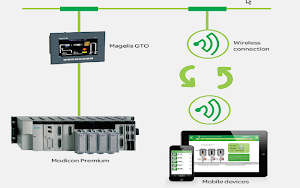
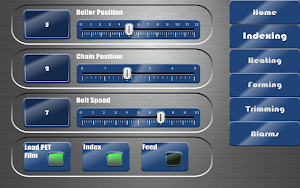
Vijeo Design’Air Plus is Schneider Electric’s new remote access feature in Vijeo Designer offered as an application for tablets and smartphones. Vijeo Design’Air Plus enables you to create a tablet/smartphone project specifically for the tablet/smartphone display size. At runtime, using this project, an operator can access the HMI to display data and control automation processes from the tablet/smartphone.
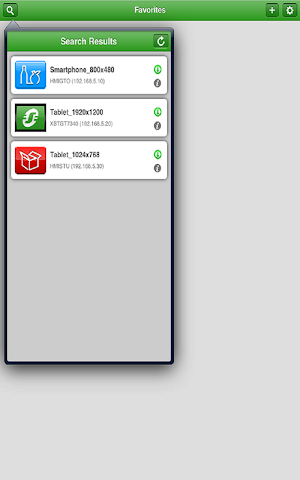
Vijeo Design’Air Plus provides operators with the capability to select a user application, and on successful login, download and launch the tablet/smartphone application. The operator can view and monitor an automation process, and for example, change values in numeric displays and string displays. In the Alarm Panel, the operator can monitor and acknowledge alarms.
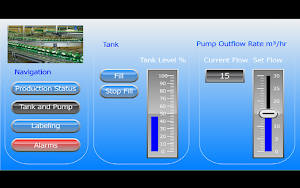
You can use Vijeo Designer’s drawing tools to create and edit a visual representation of the automation process. You can draw shapes and parts (such as rectangles, arcs, pies, numeric displays, switches, and bar graphs), use the gradient feature to enhance the color of the drawn objects, and set up an Alarm Panel for remote alarm monitoring and interaction.
Requirement:
Vijeo Design'Air Plus requires Vijeo Designer V6.2 or later on your HMI targets
Limitations
• Target families not supported: XBTGT1000 Series, XBTGC Series, HMISCU Series
TRY our free versions:
- Vijeo Design’Air Plus FREE is the full application Vijeo Design’Air Plus with the following limitations:
You can connect to an HMI for 2 minutes. After 2 minutes, the connection will close and you will be taken back to the discovery screen
After you have used the application for the time limit above, you cannot restart again for 5 minutes.
- With Vijeo Design’Air Plus DEMO, use your tablet or smartphone to simulate a connection to a Magelis HMI terminal.
The application does not require any wireless connection, the connection is totally simulated.
You will be also interested by Vijeo Design’Air, which enables you to remotely connect to a Magelis HMI terminal over a wireless network.
For any support, please contact Schneider Electric.
Vijeo Design’Air Plus provides operators with the capability to select a user application, and on successful login, download and launch the tablet/smartphone application. The operator can view and monitor an automation process, and for example, change values in numeric displays and string displays. In the Alarm Panel, the operator can monitor and acknowledge alarms.
You can use Vijeo Designer’s drawing tools to create and edit a visual representation of the automation process. You can draw shapes and parts (such as rectangles, arcs, pies, numeric displays, switches, and bar graphs), use the gradient feature to enhance the color of the drawn objects, and set up an Alarm Panel for remote alarm monitoring and interaction.
Requirement:
Vijeo Design'Air Plus requires Vijeo Designer V6.2 or later on your HMI targets
Limitations
• Target families not supported: XBTGT1000 Series, XBTGC Series, HMISCU Series
TRY our free versions:
- Vijeo Design’Air Plus FREE is the full application Vijeo Design’Air Plus with the following limitations:
You can connect to an HMI for 2 minutes. After 2 minutes, the connection will close and you will be taken back to the discovery screen
After you have used the application for the time limit above, you cannot restart again for 5 minutes.
- With Vijeo Design’Air Plus DEMO, use your tablet or smartphone to simulate a connection to a Magelis HMI terminal.
The application does not require any wireless connection, the connection is totally simulated.
You will be also interested by Vijeo Design’Air, which enables you to remotely connect to a Magelis HMI terminal over a wireless network.
For any support, please contact Schneider Electric.
What’s new
Version 1.9.2.1121 · Updated December 8, 2020
Vijeo Design'Air Plus V1.9.2 brings the following improvements: • Bug fixes
Alternatives to Vijeo Design'Air Plus
Looking for apps like Vijeo Design'Air Plus? Here are 6 similar Android apps on Google Play. The highest rated is mySchneider – Catalog, support (3.8/5), and all 6 are free to download.
-
mySchneider – Catalog, support 3.9
-
Wiser Home 1.0
-
InsightMobile SE 2.9
-
APC Home 1.9
-
EcoStruxure IT 3.3
-
Building Commission 3.2
| App | Rating | Price | Installs | Last updated | Compare |
|---|---|---|---|---|---|
| Vijeo Design'Air Plus | 2.7 / 5 | RM 101.00 | 100+ | Dec 8, 2020 | |
| mySchneider – Catalog, support | 3.8 / 5 | Free | 1,000,000+ | Oct 22, 2026 | Compare |
| Wiser Home | 1.0 / 5 | Free | 50+ | Jul 21, 2021 | Compare |
| InsightMobile SE | 2.9 / 5 | Free | 10,000+ | – | Compare |
| APC Home | 1.9 / 5 | Free | 5,000+ | Apr 16, 2019 | Compare |
| EcoStruxure IT | 3.3 / 5 | Free | 10,000+ | Aug 28, 2026 | Compare |
| Building Commission | 3.2 / 5 | Free | 10,000+ | Aug 28, 2026 | Compare |
Similar apps on Google Play
- mySchneider – Catalog, support
- Wiser Home
- InsightMobile SE
- APC Home
- EcoStruxure IT
- Building Commission
- Power Device
- EcoStruxure Power Commission
- EcoStruxure Energy Hub
- EcoStruxure Building Engage
- ArcFM Mobile
- Resource Advisor
- EcoStruxure Process Instrument
- eCommission Exiway
- IB2Diag
- Engage Enterprise
- Security Expert
- Industrial Device
- Events
- Asset Advisor
- EliwellAIR
- eConfigure Conext CL125
- Easergy Thermal Connect
- XIOT App
- Augmented Operator Advisor
- Facility Expert
- FlowExpertPro
- Motion Sizer
- EcoStruxure Manufacturing Comp
- EcoStruxure for Small Business
- Zelio NFC
- Wiser for KNX
- Centeron Encompass
- IGSS Mobile
- Wiser 2
- Vijeo Design'Air Plus FREE
- Vijeo Design'Air FREE
- Vijeo Design'Air Plus
- InSideControl
- Vijeo Design'Air
- Centeron