

GamePing: Network Simulator
REALSIGNAL PTE. LTD. Tools In-app purchases Contains ads
Simulate latency, jitter, bandwidth limits and packet loss for game testing.
- Rating
- 4.9
- 1.1K ratings
- Downloads
- 85.7K+
- on Google Play
- Price
- Free
- In-app purchases
- Updated
- Oct 7
- 2026 · v1.5.4
Screenshots

About GamePing: Network Simulator
GamePing is a professional network condition simulator for mobile game developers, QA testers, and technical teams.
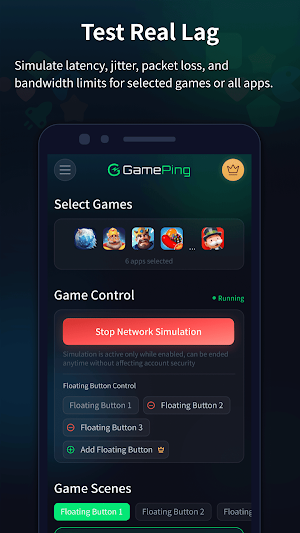
It helps you test how games and apps behave under weak or unstable network conditions by simulating latency, jitter, bandwidth limits, random packet loss, burst packet loss, and real-world network scenarios.
Key features:
Network condition simulation
Configure uplink and downlink bandwidth, latency, jitter, packet loss, and continuous loss to reproduce unstable network behavior.
Game-focused testing scenes
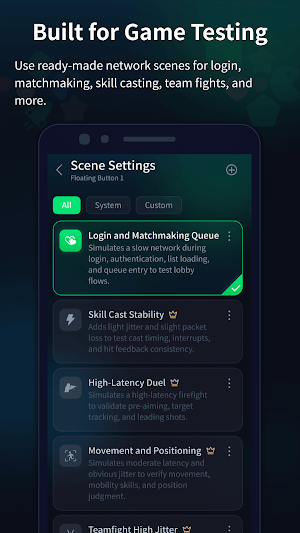
Use preset scenes for login, matchmaking, team fights, high-latency duels, movement checks, skill release stability, final-circle pressure testing, and other gameplay scenarios.
Custom test templates
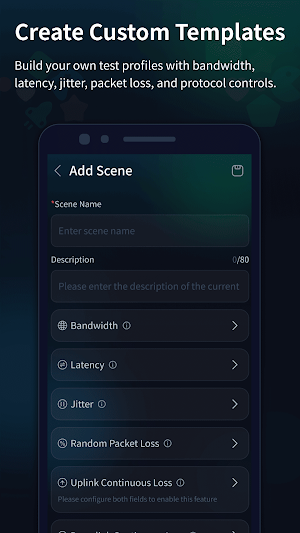
Create and save your own weak-network profiles for repeated testing across different games, apps, builds, and QA workflows.
Floating window controls
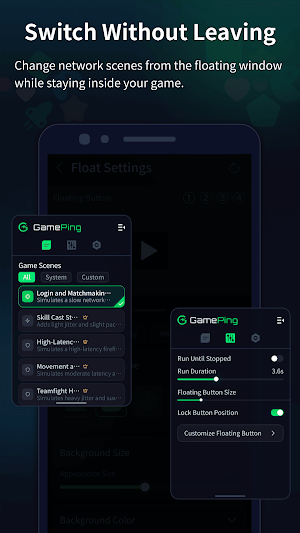
Switch network scenes while testing another app, using floating buttons designed for fast in-game or in-app scenario changes.
Quick trigger options
Use supported quick actions such as floating buttons, volume-key triggers, or shake triggers to start, stop, or switch test scenarios during active testing.
App-specific traffic simulation
Select the apps you want to test and apply network simulation to their traffic through Android VPN service routing.
AccessibilityService disclosure
GamePing offers an optional volume-key trigger feature for testers who need to switch weak-network test scenarios while another app or game is open. To support this user-selected feature, GamePing uses Android AccessibilityService API only to detect hardware volume up and volume down key presses.
When enabled by the user, this service can map volume-key single-click or double-click actions to GamePing test controls, such as starting or stopping a selected floating test button or switching a configured network simulation scene during an active test.
GamePing's AccessibilityService does not read screen content, does not retrieve window content, does not monitor text input, does not perform automated actions in other apps, and does not collect, store, sell, or share personal or sensitive data from the AccessibilityService. The service is used only for the disclosed volume-key shortcut control feature.
The volume-key trigger is optional. Users can use GamePing without enabling AccessibilityService, and they can turn the service off at any time in Android Accessibility settings.
Built for testing, not acceleration
GamePing does not boost game performance, reduce real network ping, unlock paid content, or modify game data. It is a local network testing tool designed to help teams evaluate app behavior under simulated network conditions.
VPN service disclosure
GamePing uses Android VPN service to route selected app traffic through local network simulation on your device. It is not a general VPN, privacy VPN, proxy, or game accelerator.
Who is GamePing for?
Game developers testing multiplayer stability
QA teams reproducing weak-network issues
Technical teams validating latency and packet-loss handling
App testers checking login, matchmaking, reconnection, and real-time interaction flows
Players and creators who need controlled network simulation for testing purposes
GamePing makes weak-network testing repeatable, adjustable, and easier to observe, so you can find network-related issues before users experience them.
It helps you test how games and apps behave under weak or unstable network conditions by simulating latency, jitter, bandwidth limits, random packet loss, burst packet loss, and real-world network scenarios.
Key features:
Network condition simulation
Configure uplink and downlink bandwidth, latency, jitter, packet loss, and continuous loss to reproduce unstable network behavior.
Game-focused testing scenes
Use preset scenes for login, matchmaking, team fights, high-latency duels, movement checks, skill release stability, final-circle pressure testing, and other gameplay scenarios.
Custom test templates
Create and save your own weak-network profiles for repeated testing across different games, apps, builds, and QA workflows.
Floating window controls
Switch network scenes while testing another app, using floating buttons designed for fast in-game or in-app scenario changes.
Quick trigger options
Use supported quick actions such as floating buttons, volume-key triggers, or shake triggers to start, stop, or switch test scenarios during active testing.
App-specific traffic simulation
Select the apps you want to test and apply network simulation to their traffic through Android VPN service routing.
AccessibilityService disclosure
GamePing offers an optional volume-key trigger feature for testers who need to switch weak-network test scenarios while another app or game is open. To support this user-selected feature, GamePing uses Android AccessibilityService API only to detect hardware volume up and volume down key presses.
When enabled by the user, this service can map volume-key single-click or double-click actions to GamePing test controls, such as starting or stopping a selected floating test button or switching a configured network simulation scene during an active test.
GamePing's AccessibilityService does not read screen content, does not retrieve window content, does not monitor text input, does not perform automated actions in other apps, and does not collect, store, sell, or share personal or sensitive data from the AccessibilityService. The service is used only for the disclosed volume-key shortcut control feature.
The volume-key trigger is optional. Users can use GamePing without enabling AccessibilityService, and they can turn the service off at any time in Android Accessibility settings.
Built for testing, not acceleration
GamePing does not boost game performance, reduce real network ping, unlock paid content, or modify game data. It is a local network testing tool designed to help teams evaluate app behavior under simulated network conditions.
VPN service disclosure
GamePing uses Android VPN service to route selected app traffic through local network simulation on your device. It is not a general VPN, privacy VPN, proxy, or game accelerator.
Who is GamePing for?
Game developers testing multiplayer stability
QA teams reproducing weak-network issues
Technical teams validating latency and packet-loss handling
App testers checking login, matchmaking, reconnection, and real-time interaction flows
Players and creators who need controlled network simulation for testing purposes
GamePing makes weak-network testing repeatable, adjustable, and easier to observe, so you can find network-related issues before users experience them.
What’s new
Version 1.5.4 · Updated October 7, 2026
💪 [NEW] Added access to the GamePing Discord community. 💪 [OPT] Fixed known issues and improved the overall user experience.
User reviews

👹freefire FAKE. LAG 👹

Gracias por eschucharnoa
Alternatives to GamePing: Network Simulator
Looking for apps like GamePing: Network Simulator? Here are 6 similar Android apps on Google Play. The highest rated is WiFiman (4.7/5), and all 6 are free to download.
-
Fortect Mobile Security 4.2
-
WiFi Analyzer (open-source) 4.1
-
STRNG 3.7
-
G-CPU:Monitor CPU, RAM, Widget 4.2
-
WiFiman 4.7
-
Seed4.Me VPN Proxy 4.2
| App | Rating | Price | Installs | Last updated | Compare |
|---|---|---|---|---|---|
| GamePing: Network Simulator | 4.9 / 5 | Free | 50,000+ | Oct 7, 2026 | |
| Fortect Mobile Security | 4.2 / 5 | Free | 10,000+ | Aug 17, 2026 | Compare |
| WiFi Analyzer (open-source) | 4.1 / 5 | Free | 10,000,000+ | Jul 1, 2026 | Compare |
| STRNG | 3.7 / 5 | Free | 100,000+ | Sep 18, 2026 | Compare |
| G-CPU:Monitor CPU, RAM, Widget | 4.2 / 5 | Free | 1,000,000+ | Sep 15, 2026 | Compare |
| WiFiman | 4.7 / 5 | Free | 10,000,000+ | Oct 15, 2026 | Compare |
| Seed4.Me VPN Proxy | 4.2 / 5 | Free | 1,000,000+ | Aug 24, 2026 | Compare |
Similar apps on Google Play
- Fortect Mobile Security
- WiFi Analyzer (open-source)
- STRNG
- G-CPU:Monitor CPU, RAM, Widget
- WiFiman
- Seed4.Me VPN Proxy
- UniFi
- HMA VPN Proxy & WiFi Security
- Speedtest by Ookla
- VeePN - Secure VPN & Antivirus
- OONI Probe
- PrivadoVPN - VPN App & Proxy
- Fing - Network Tools
- Control+
- Ultra VPN — Super Secure Proxy
- Quikshort: Shortcut Creator
- Ajax PRO: Tool For Engineers
- Wi-Fi Toolkit
- CPU Monitor - temperature
- Cure VPN: Private & Secure VPN
- DNSChanger for IPv4/IPv6
- AVG Secure VPN Proxy & Privacy
- NetGuard - no-root firewall
- LagoFast Game Booster: Low Lag
- NetShare+ Wifi Tether
- Ad Blocker VPN & DNS – Blokada
- Speedify: Bond Satellite + 5G
- WireGuard
- IVPN
- ASUS Router
- Opensignal - 5G, 4G Speed Test
- MEGA VPN - Privacy Online
- NetSpeed Indicator
- TTLock
- ABAX Admin
- hidemy.name VPN
- Browsec: Fast Secure VPN Proxy
- F-Secure Mobile Security
- Ruijie Reyee
- Startpage
- Private Internet Access VPN
- NETGEAR Orbi – WiFi System App
- TP-Link Omada
- WiFi Mouse Pro
- Sensi
- Unicorn HTTPS:Secure & Fast
- Bitdefender Central
- Freedom Street Garage
- F-Secure: Total Security & VPN
- xHP Flashtool
- UserLAnd - Linux on Android
- Intra
- IFSTA Essentials 8
- IronVest - Security & Privacy
- CoinAnk: Live Crypto Tracker
- Nokia WiFi
- FAST Speed Test
- AppDash: App Manager & Backup
- Nuki Smart Lock
- Castro Premium - system info
- Zerion: Crypto Wallet
- GlassWire Data Usage Monitor
- Aegis Authenticator - 2FA App