

Pxlit: Stabilized Video Editor
Video Players & Editors In-app purchases
Compose your subject once, export to all formats. Integrated anti-shake.
- Downloads
- 2.2K+
- on Google Play
- Price
- Free
- In-app purchases
- Updated
- Sep 16
- 2026 · v1.4.0
Screenshots


About Pxlit: Stabilized Video Editor
Experience the future of video workflow with Pxlit—the professional framing tool with integrated anti-shake stabilization.
Pxlit removes the complexity of social media distribution by combining video stabilization and intelligent composition into one seamless cloud-powered experience. With our patent-pending Composition technology, you can anchor the action and eliminate camera jitter without the need for a gimbal.
Why Pxlit is a game-changer for video editors:
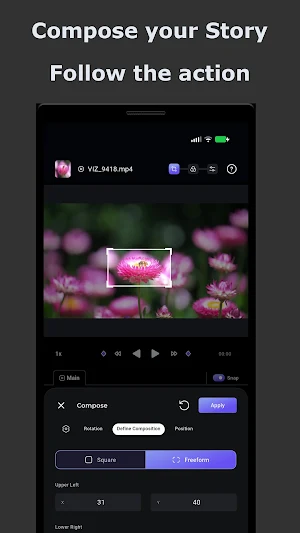
• Compose-to-Stabilize Technology: Define and follow your composition. Keep your subject anchored and stable across every frame, turning shaky handheld footage into cinematic gold.
• "Compose Once, Share Everywhere": No more re-editing for different aspect ratios. Define your hero once, and Pxlit handles the stabilization and cropping for 9:16, 4:5, and 16:9 exports.
• Smooth AI Propagation: Our smart editor calculates transitions between your edits, ensuring that zooms and pans feel natural and fluid.
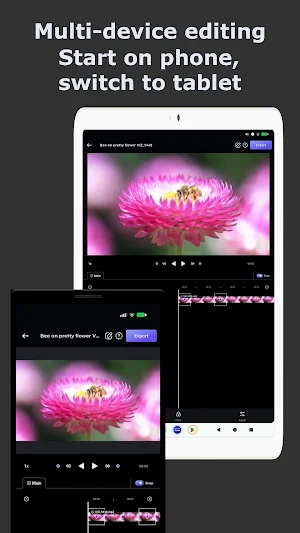
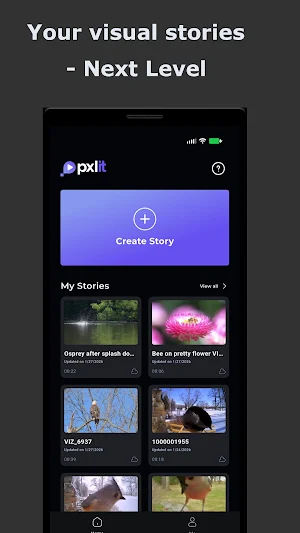
• Seamless Cloud Sync: Your video projects are stored in the Pxlit cloud. Start your edit on the go and switch to a larger device instantly without losing progress.
• Pro-Grade Multi-Device Support: Optimized for high-performance video processing across all your Android devices.
Master Your Social Media Distribution: Whether you are a wildlife filmmaker or a content creator, Pxlit acts as your video stabilizer and distribution engine in one. Stop wasting hours on manual keyframing and start using a workflow that works as hard as you do.
Main Features:
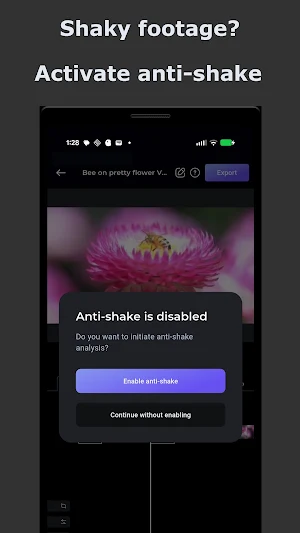
• Integrated anti-shake and deshake controls automatically activated for all users.
• Automated aspect ratio optimization.
• Minimal learning curve with professional-grade results.
Find the Perfect Plan for Your Workflow:
Starter Tier (100% Free)
Get full access to Pxlit’s core power without a paywall! Perfect for casual creators who don’t mind a small Pxlit watermark on their final exports.
• Automatic Anti-Shake: Pro-level video stabilization is fully active for free users.
• Core Tools: Dynamic framing, multi-aspect ratio exporting, and cloud import/export.
• Caps: Up to 1-minute story time limit and 1080p (FHD) max resolution.
Creator Tier (Premium Subscription)
Unlock the complete, unconstrained professional engine for heavy-duty editing.
• Watermark-Free: Clean, professional exports for your brand or clients.
• Expanded Limits: Up to 5-minute story time limits and gorgeous 4K (UHD) max resolution.
• Pro Workflow: Full multi-device editing capabilities and dedicated email support.
Download Pxlit today and stabilize your story.
Pxlit removes the complexity of social media distribution by combining video stabilization and intelligent composition into one seamless cloud-powered experience. With our patent-pending Composition technology, you can anchor the action and eliminate camera jitter without the need for a gimbal.
Why Pxlit is a game-changer for video editors:
• Compose-to-Stabilize Technology: Define and follow your composition. Keep your subject anchored and stable across every frame, turning shaky handheld footage into cinematic gold.
• "Compose Once, Share Everywhere": No more re-editing for different aspect ratios. Define your hero once, and Pxlit handles the stabilization and cropping for 9:16, 4:5, and 16:9 exports.
• Smooth AI Propagation: Our smart editor calculates transitions between your edits, ensuring that zooms and pans feel natural and fluid.
• Seamless Cloud Sync: Your video projects are stored in the Pxlit cloud. Start your edit on the go and switch to a larger device instantly without losing progress.
• Pro-Grade Multi-Device Support: Optimized for high-performance video processing across all your Android devices.
Master Your Social Media Distribution: Whether you are a wildlife filmmaker or a content creator, Pxlit acts as your video stabilizer and distribution engine in one. Stop wasting hours on manual keyframing and start using a workflow that works as hard as you do.
Main Features:
• Integrated anti-shake and deshake controls automatically activated for all users.
• Automated aspect ratio optimization.
• Minimal learning curve with professional-grade results.
Find the Perfect Plan for Your Workflow:
Starter Tier (100% Free)
Get full access to Pxlit’s core power without a paywall! Perfect for casual creators who don’t mind a small Pxlit watermark on their final exports.
• Automatic Anti-Shake: Pro-level video stabilization is fully active for free users.
• Core Tools: Dynamic framing, multi-aspect ratio exporting, and cloud import/export.
• Caps: Up to 1-minute story time limit and 1080p (FHD) max resolution.
Creator Tier (Premium Subscription)
Unlock the complete, unconstrained professional engine for heavy-duty editing.
• Watermark-Free: Clean, professional exports for your brand or clients.
• Expanded Limits: Up to 5-minute story time limits and gorgeous 4K (UHD) max resolution.
• Pro Workflow: Full multi-device editing capabilities and dedicated email support.
Download Pxlit today and stabilize your story.
What’s new
Version 1.4.0 · Updated September 16, 2026
- Support for 10-bit/hdr media. - User interface improvements.
Alternatives to Pxlit: Stabilized Video Editor
Looking for apps like Pxlit: Stabilized Video Editor? Here are 6 similar Android apps on Google Play. All of them are free to download.
-
All HD Video Downloader & Home
-
Gold Flix: Canais abertos
-
ClipScan
-
Edit By Words
-
Smart IPTV Player - Live TV
-
XV Video Player : HD Media
| App | Rating | Price | Installs | Last updated | Compare |
|---|---|---|---|---|---|
| Pxlit: Stabilized Video Editor | – | Free | 1,000+ | Sep 16, 2026 | |
| All HD Video Downloader & Home | – | Free | 50,000+ | – | Compare |
| Gold Flix: Canais abertos | – | Free | 100+ | Aug 7, 2026 | Compare |
| ClipScan | – | Free | 100+ | Sep 2, 2026 | Compare |
| Edit By Words | – | Free | 50+ | Sep 2, 2026 | Compare |
| Smart IPTV Player - Live TV | – | Free | 500+ | Sep 10, 2026 | Compare |
| XV Video Player : HD Media | – | Free | 10,000+ | Aug 25, 2026 | Compare |
Similar apps on Google Play
- Pxlit: Stabilized Video Editor
- All HD Video Downloader & Home
- Gold Flix: Canais abertos
- ClipScan
- Edit By Words
- Smart IPTV Player - Live TV
- XV Video Player : HD Media
- Yacine TV : IPTV Yacine
- LiteEdit
- Gt video player
- SyncBlast
- Text2Cast
- Kwai Video Downloader:For Kwai
- UXview
- M3Ultra TV: IPTV Player
- SplitClip: Status Maker
- BLOMBERG erleben
- BubbleUPnP - Smart Cast TV
- Video Editor Pro – Music Tools
- Hot Player IBO
- All Video Downloader
- DayFilm - Daily Vlog Maker
- Compy Split : Video Split
- Sub4Video AI
- AI Video Editor Tools, Upscale