
할 일(To Do List)
PIGSoft Lifestyle Contains ads
It is a simple planner app that records and manages to-dos.
- Downloads
- 41+
- on Google Play
- Price
- Free
- No in-app purchases
- Updated
- Nov 8
- 2024 · v1.0.1
Screenshots

About 할 일(To Do List)
The To Do List app is a simple planner app that allows anyone to easily and conveniently record and manage their to-dos with a simple and intuitive interface. Use this app to easily and simply check and manage your schedule to achieve your goals and improve productivity!
* This app requires an internet connection.
※ main function
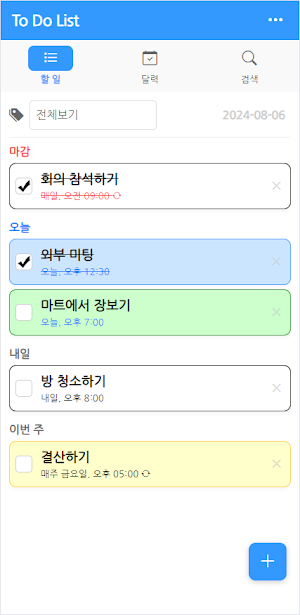
- You can sort your to-dos by category or color-code them.
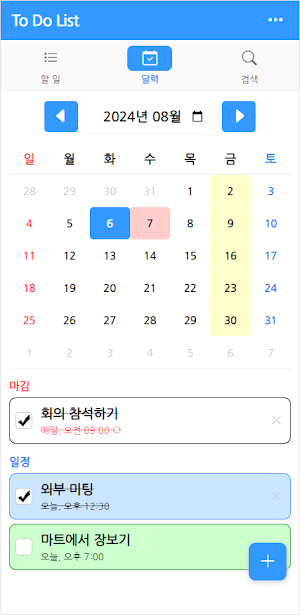
- You can check and manage your to-do list at once using the calendar.
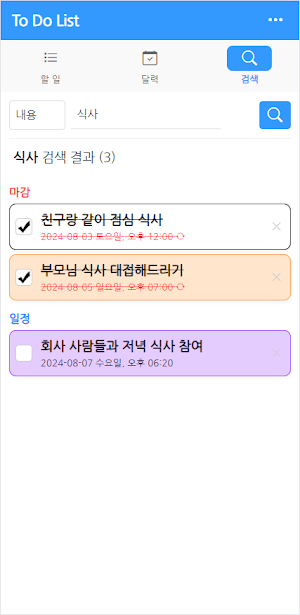
- Through search, you can find and check forgotten to-dos.
- You can check the achievement rate based on the tasks you have registered so far and the number of times you have completed them.
- Supports notifications. When you turn on notifications in the upper right menu, today's to-do list is displayed every day at 8 AM.
- Supports widgets. You can check today's tasks in the widget.
※ How to use
1. Add and manage tasks
- To add a task, select the [+] button at the bottom right of the [To Do] tab or the [Calendar] tab.
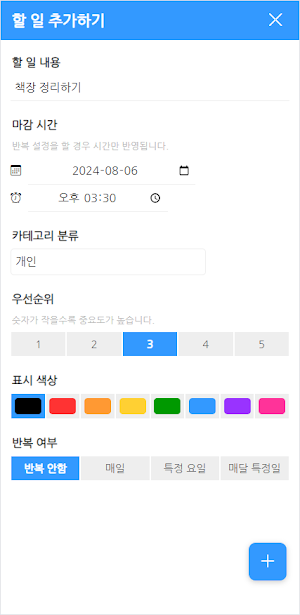
- Enter the content, deadline, other settings, etc. and select the [+] button at the bottom right again to complete registration.
- To complete a to-do, select the checkbox to the left of the to-do.
- To delete a to-do, click the [X] button to the right of the to-do.
2. Check the calendar
- Select the [Calendar] tab, set the year and month, and select the date you want to check. (By default, it is set to the current date.)
- If there is something to do on a specific day, it will be displayed in a specific color. (Basic - red / specific day of the week - yellow / specific day of each month - blue)
- After selecting a date, a to-do list for that day is displayed below the calendar.
3. Search
- Select the [Search] tab, enter content or date, and then select the search button.
- A to-do list that matches your search results will appear below.
4. Settings
- To go to the settings screen, select the [···] button at the top right of the app.
- Statistics: You can check the tasks you have written so far, the number of tasks you have completed, and the achievement rate.
- Category management: You can add or delete categories.
- Hide completed tasks: When hidden, completed tasks will not appear in the list.
- Display notifications: When set, today's to-do list is displayed as a push notification every day at 8 am.
- Theme color: You can set the app theme color.
- Delete all: Delete all saved tasks and categories. Your statistics will be retained and not deleted.
* This app requires an internet connection.
※ main function
- You can sort your to-dos by category or color-code them.
- You can check and manage your to-do list at once using the calendar.
- Through search, you can find and check forgotten to-dos.
- You can check the achievement rate based on the tasks you have registered so far and the number of times you have completed them.
- Supports notifications. When you turn on notifications in the upper right menu, today's to-do list is displayed every day at 8 AM.
- Supports widgets. You can check today's tasks in the widget.
※ How to use
1. Add and manage tasks
- To add a task, select the [+] button at the bottom right of the [To Do] tab or the [Calendar] tab.
- Enter the content, deadline, other settings, etc. and select the [+] button at the bottom right again to complete registration.
- To complete a to-do, select the checkbox to the left of the to-do.
- To delete a to-do, click the [X] button to the right of the to-do.
2. Check the calendar
- Select the [Calendar] tab, set the year and month, and select the date you want to check. (By default, it is set to the current date.)
- If there is something to do on a specific day, it will be displayed in a specific color. (Basic - red / specific day of the week - yellow / specific day of each month - blue)
- After selecting a date, a to-do list for that day is displayed below the calendar.
3. Search
- Select the [Search] tab, enter content or date, and then select the search button.
- A to-do list that matches your search results will appear below.
4. Settings
- To go to the settings screen, select the [···] button at the top right of the app.
- Statistics: You can check the tasks you have written so far, the number of tasks you have completed, and the achievement rate.
- Category management: You can add or delete categories.
- Hide completed tasks: When hidden, completed tasks will not appear in the list.
- Display notifications: When set, today's to-do list is displayed as a push notification every day at 8 am.
- Theme color: You can set the app theme color.
- Delete all: Delete all saved tasks and categories. Your statistics will be retained and not deleted.
What’s new
Version 1.0.1 · Updated November 8, 2024
[v1.0.1] - App stability is increased.
Alternatives to 할 일(To Do List)
Looking for apps like 할 일(To Do List)? Here are 6 similar Android apps on Google Play. The highest rated is Routine Planner, Habit Tracker (4.5/5), and all 6 are free to download.
-
To-Do Adventure: Task Tracker 3.3
-
Routine Planner, Habit Tracker 4.5
-
Habit Check Calendar 4.5
-
Listta: to-do list & planner 3.8
-
To-Do List & Planner: Taskito 4.2
-
MyRoutine: Routine Habit Goal 3.9
| App | Rating | Price | Installs | Last updated | Compare |
|---|---|---|---|---|---|
| 할 일(To Do List) | – | Free | 10+ | Nov 8, 2024 | |
| To-Do Adventure: Task Tracker | 3.3 / 5 | Free | 100,000+ | Oct 23, 2026 | Compare |
| Routine Planner, Habit Tracker | 4.5 / 5 | Free | 1,000,000+ | Oct 29, 2026 | Compare |
| Habit Check Calendar | 4.5 / 5 | Free | 100,000+ | Oct 13, 2026 | Compare |
| Listta: to-do list & planner | 3.8 / 5 | Free | 100,000+ | Aug 14, 2026 | Compare |
| To-Do List & Planner: Taskito | 4.2 / 5 | Free | 1,000,000+ | Oct 21, 2026 | Compare |
| MyRoutine: Routine Habit Goal | 3.9 / 5 | Free | 1,000,000+ | Nov 4, 2026 | Compare |
Compare 할 일(To Do List) with the top alternatives: ratings, updates, ASO score and keyword gaps →