

Think: Personal Diary, Journal
Winning Studio Apps Lifestyle In-app purchases
A unique personalized diary journal in which you can write moods and activities.
- Downloads
- 100+
- on Google Play
- Price
- Free
- In-app purchases
- Updated
- Dec 3
- 2022 · v1.0.0
Screenshots




About Think: Personal Diary, Journal
Write about your daily moods and journals and increase happiness in your life with images, you can add images related to your moods and activities.
Write your activities in three different phases 1. Start Day 2. Journal note 3. End Day.
Practicing meditation is a great way to help clean the mind, and body, strengthen your ability to breathe easily, and be happier throughout the rest of your day.
* Start of my day
- When your day started choose your mood, write anything about your goal, and select the best suitable affirmation. There are about 70+ affirmations are there.
* Journal Note
- Add your journal note with multiple activities like reading, listening to music, working, etc. You can create your custom activities as well.
- Add images related to your activities in your journal.
- For your journal post there are multiple templates available, you can use those templates as well.
* End of the day
- At- End of the day, you can think about meditation and get a completed tag on your end-day entries.
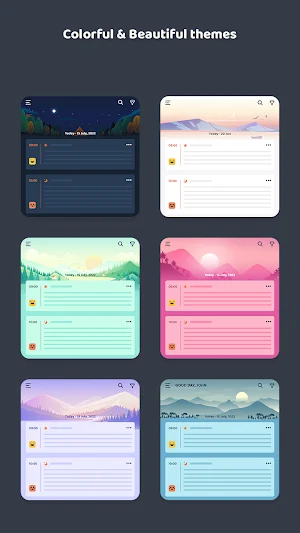
- Choose your multiple themes for a great user experience. There are 6 types of themes are there.
- You can create multiple activities. You can hide - unhide activities, unhide (active) activities will be seen on the entry page section.
- You will get reminded by the notification setting panel, which you can change later, three types of notification are there.
- For your security purpose there is an app lock that is using your device authentication.
- Backup & restore your data with Google drive backup facilities.
Calendar View :
- You can easily see your journal entries date-wise from the calendar view, you can edit or delete them.
- See all the images by media view, media appear according to your entries.
Write your activities in three different phases 1. Start Day 2. Journal note 3. End Day.
Practicing meditation is a great way to help clean the mind, and body, strengthen your ability to breathe easily, and be happier throughout the rest of your day.
* Start of my day
- When your day started choose your mood, write anything about your goal, and select the best suitable affirmation. There are about 70+ affirmations are there.
* Journal Note
- Add your journal note with multiple activities like reading, listening to music, working, etc. You can create your custom activities as well.
- Add images related to your activities in your journal.
- For your journal post there are multiple templates available, you can use those templates as well.
* End of the day
- At- End of the day, you can think about meditation and get a completed tag on your end-day entries.
- Choose your multiple themes for a great user experience. There are 6 types of themes are there.
- You can create multiple activities. You can hide - unhide activities, unhide (active) activities will be seen on the entry page section.
- You will get reminded by the notification setting panel, which you can change later, three types of notification are there.
- For your security purpose there is an app lock that is using your device authentication.
- Backup & restore your data with Google drive backup facilities.
Calendar View :
- You can easily see your journal entries date-wise from the calendar view, you can edit or delete them.
- See all the images by media view, media appear according to your entries.
What’s new
Version 1.0.0 · Updated December 3, 2022
- Colorful & Beautiful themes - Write your activities with different phases 1. Start Day 2. Journal note 3. End Day. - Calendar view and media view to find notes easily - With reminders never miss to enter daily journal notes - Listen handpicked relaxing meditation tracks - Diary templates for journal notes
User reviews

Very helpful in my everyday life
Alternatives to Think: Personal Diary, Journal
Looking for apps like Think: Personal Diary, Journal? Here are 6 similar Android apps on Google Play. The highest rated is Diary with Lock by Pointo (4.6/5), and all 6 are free to download.
-
Journal and Diary - Clearful 4.4
-
Journify - Audio Journal, Voic 3.2
-
Journaly
-
Diary with Lock by Pointo 4.6
-
Logg - Private Journal & Diary 3.5
-
Diary journal and mood tracker 4.3
| App | Rating | Price | Installs | Last updated | Compare |
|---|---|---|---|---|---|
| Think: Personal Diary, Journal | – | Free | 100+ | Dec 3, 2022 | |
| Journal and Diary - Clearful | 4.4 / 5 | Free | 10,000+ | Mar 17, 2026 | Compare |
| Journify - Audio Journal, Voic | 3.2 / 5 | Free | 1,000+ | Sep 10, 2020 | Compare |
| Journaly | – | Free | 1,000+ | Oct 9, 2022 | Compare |
| Diary with Lock by Pointo | 4.6 / 5 | Free | 10,000+ | Dec 15, 2020 | Compare |
| Logg - Private Journal & Diary | 3.5 / 5 | Free | 10,000+ | Jan 21, 2019 | Compare |
| Diary journal and mood tracker | 4.3 / 5 | Free | 50,000+ | Mar 30, 2020 | Compare |