

NeoMedia
Orange Lambda Tools
Easily hide private folders and media from your gallery with .nomedia files.
- Downloads
- 32+
- on Google Play
- Price
- Free
- No in-app purchases
- Updated
- Jun 23
- 2026 · v1.0
Screenshots
About NeoMedia
Take full control of your device's media privacy with Neomedia.
Neomedia is a lightweight, fast, and modern utility application designed to help you hide specific photos, videos, and audio files from
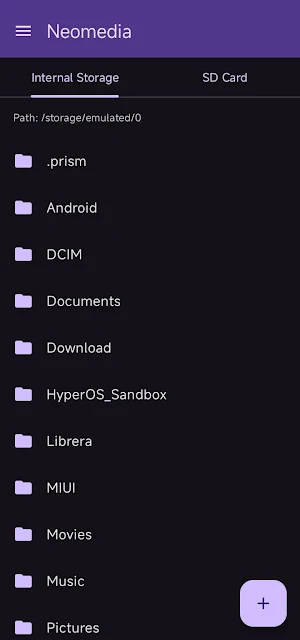
your phone's gallery apps. By simply browsing your folders and creating a standard ".nomedia" file with a single tap, you can instruct the
Android system to ignore and hide the media content inside those directories.
Whether it's private photos, downloaded memes, or WhatsApp voice notes cluttering your music player, Neomedia solves the problem instantly.
KEY FEATURES:
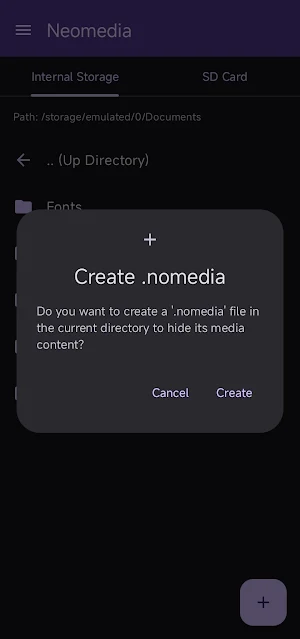
• One-Tap Media Hiding: Navigate to any folder and tap the "+" button to instantly create a ".nomedia" file. Your gallery apps will
immediately stop showing media from that folder.
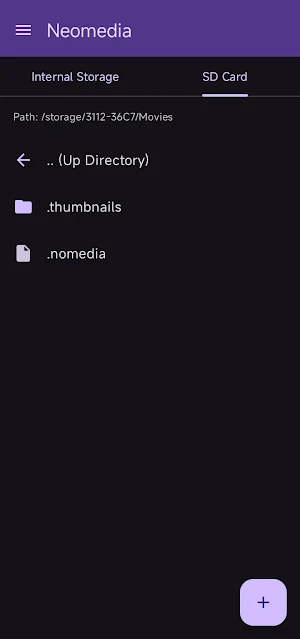
• Dynamic Storage Support: Seamlessly browse through your Internal Storage, SD Cards, and even connected USB OTG drives. All your storages
are automatically detected and neatly organized into swipeable tabs.
• Modern & Sleek Design: Built with the latest Material Design 3 guidelines, offering a smooth, intuitive, and visually pleasing user
interface with full dark mode support.
• Complete Privacy: Neomedia works 100% offline. We do not collect, store, or share any of your files or personal data. Everything happens
locally on your device.
• Lightweight & Fast: No bloatware, no heavy background processes. Just a simple, effective tool that does exactly what it promises.
HOW IT WORKS:
1. Open Neomedia and browse your device's storage.
2. Enter the folder containing the photos, videos, or audio you want to hide from your gallery.
3. Tap the "Add" button to create a .nomedia file.
4. That's it! The media inside that folder will no longer appear in your gallery or media player apps.
(Note: To unhide the media, you can simply delete the .nomedia file using a standard file manager, and your gallery will rescan the
folder.)
Download Neomedia today and keep your personal galleries clean, organized, and private!
Neomedia is a lightweight, fast, and modern utility application designed to help you hide specific photos, videos, and audio files from
your phone's gallery apps. By simply browsing your folders and creating a standard ".nomedia" file with a single tap, you can instruct the
Android system to ignore and hide the media content inside those directories.
Whether it's private photos, downloaded memes, or WhatsApp voice notes cluttering your music player, Neomedia solves the problem instantly.
KEY FEATURES:
• One-Tap Media Hiding: Navigate to any folder and tap the "+" button to instantly create a ".nomedia" file. Your gallery apps will
immediately stop showing media from that folder.
• Dynamic Storage Support: Seamlessly browse through your Internal Storage, SD Cards, and even connected USB OTG drives. All your storages
are automatically detected and neatly organized into swipeable tabs.
• Modern & Sleek Design: Built with the latest Material Design 3 guidelines, offering a smooth, intuitive, and visually pleasing user
interface with full dark mode support.
• Complete Privacy: Neomedia works 100% offline. We do not collect, store, or share any of your files or personal data. Everything happens
locally on your device.
• Lightweight & Fast: No bloatware, no heavy background processes. Just a simple, effective tool that does exactly what it promises.
HOW IT WORKS:
1. Open Neomedia and browse your device's storage.
2. Enter the folder containing the photos, videos, or audio you want to hide from your gallery.
3. Tap the "Add" button to create a .nomedia file.
4. That's it! The media inside that folder will no longer appear in your gallery or media player apps.
(Note: To unhide the media, you can simply delete the .nomedia file using a standard file manager, and your gallery will rescan the
folder.)
Download Neomedia today and keep your personal galleries clean, organized, and private!
What’s new
Version 1.0 · Updated June 23, 2026
Welcome to the initial release of Neomedia Easily hide your private folders and media from gallery apps with a single tap.
Alternatives to NeoMedia
Looking for apps like NeoMedia? Here are 6 similar Android apps on Google Play. The highest rated is Fortect Mobile Security (4.1/5), and all 6 are free to download.
-
KiWi Vault: Hide Photos, Video
-
MobiSaver: Data&Photo Recovery 2.1
-
Fortect Mobile Security 4.1
-
WhatisRemoved+ 3.9
-
Total Drive - Cloud Storage 3.6
-
Deleted Photo & Video Recovery 3.8
| App | Rating | Price | Installs | Last updated | Compare |
|---|---|---|---|---|---|
| NeoMedia | – | Free | 10+ | Jun 23, 2026 | |
| KiWi Vault: Hide Photos, Video | – | Free | 10,000+ | Sep 28, 2026 | Compare |
| MobiSaver: Data&Photo Recovery | 2.1 / 5 | Free | 10,000,000+ | Sep 1, 2026 | Compare |
| Fortect Mobile Security | 4.1 / 5 | Free | 10,000+ | Aug 17, 2026 | Compare |
| WhatisRemoved+ | 3.9 / 5 | Free | 10,000,000+ | Aug 26, 2026 | Compare |
| Total Drive - Cloud Storage | 3.6 / 5 | Free | 500,000+ | Jul 27, 2026 | Compare |
| Deleted Photo & Video Recovery | 3.8 / 5 | Free | 1,000,000+ | Sep 5, 2026 | Compare |
Compare NeoMedia with the top alternatives: ratings, updates, ASO score and keyword gaps →
Similar apps on Google Play
- KiWi Vault: Hide Photos, Video
- MobiSaver: Data&Photo Recovery
- Fortect Mobile Security
- WhatisRemoved+
- Total Drive - Cloud Storage
- Deleted Photo & Video Recovery
- Skit Premium - apps manager
- TAP Kiln Control Mobile
- ASTRO File Manager & Cleaner
- UltData: Photo & Data Recovery
- Super File Manager Explorer
- Total Commander - file manager
- Sensi
- Simple Gallery Pro
- RealVNC Viewer: Remote Desktop
- Nested Folder Notes - Folino
- UpNote - notes, diary, journal
- 1Tap Cleaner (clear cache)
- Solid Explorer File Manager
- Nextcloud
- Storage Analyzer & Disk Usage
- pCloud: Cloud Storage
- PRIVARY Secure Photo Vault
- USB Audio Player PRO
- LockMyPix Photo Vault PREMIUM
- Sportvibez
- Autosync - File Sync & Backup
- QuickEdit Text Editor Pro