

App to make flashcards
OneLightApplication Education Contains ads
Flashcards making app that makes it easy to make your own original flashcards!
- Downloads
- 5+
- on Google Play
- Price
- Free
- No in-app purchases
- Updated
- Jul 3
- 2025 · v2.0
Screenshots


About App to make flashcards
Flashcards making app that makes it easy to make your own original flashcards!
[How to make flashcards]
1. Tap the "MAKE FLASHCARDS" button on the top screen
2. Go to "Title list" screen
3. Tap the floating button (cross mark) at the bottom of the "Title list screen
4. Go to the "Make new flashcards" screen
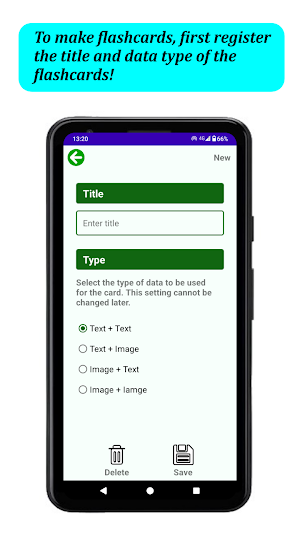
5. Enter the title and the type of data to be used for the card
*The data type cannot be changed later
6. Tap the "Save" button to register the data
7. Tap the left button (card image) of the two buttons to the right of the flashcards name in the "Title list" screen
8. Go to the "Card list" screen
9. Tap the floating button (cross mark) at the bottom of the "Card list" screen
10. Go to "Make new card" screen
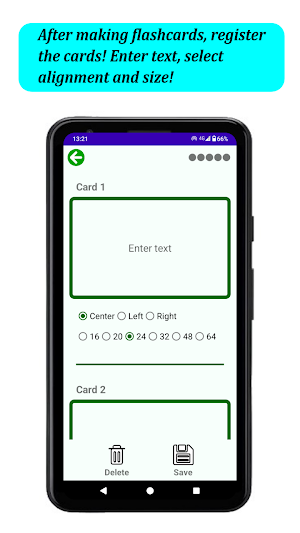
11. Enter text and images
12. Enter text alignment and size
13.Tap the "Save" button to register the card
[How to Edit]
*Tap the "Edit" button (pencil image) on the "Title List" and "Card List" screens to go to the respective editing screens
[Sorting]
*Check the checkbox at the bottom left of the "Title list" and "Card list" screens to change the order of the flashcards and cards (Drag and drop the knob on the left side of the list)
[How to use the flashcards]
1. Tap the "USE FLASHCARDS" button on the top screen
2. Go to "Title list" screen
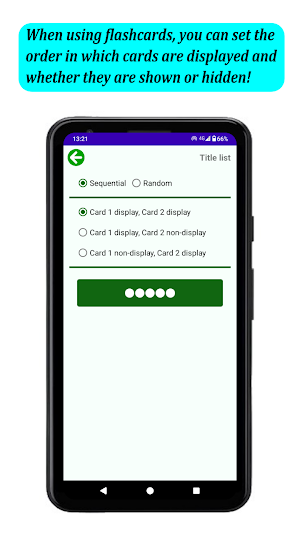
3. Tap the button of the flashcards you want to use after setting the order of cards and whether to show or hide them
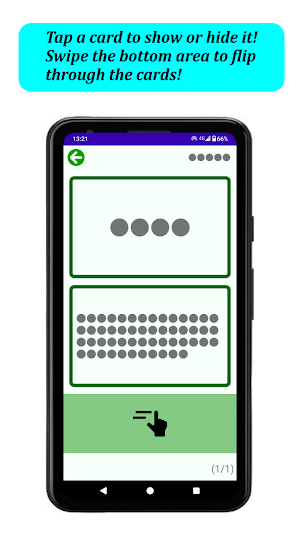
4. The cards will be displayed
5. Tap a card to show or hide it
6. Swipe the area at the bottom of the screen to flip cards
[Theme color setting]
*The theme color can be selected from the following 9 colors : GREEN, PINK, BLUE, RED, PURPLE, YELLOW, BROWN, ORANGE, and MONOTONE.
[Password setting]
*You can set a password to lock the app for security.
[Backup]
*You can back up your data to SD card. You can continue to use the app for a long time even if you change the device.
[Language]
*Language support is available in English and Japanese. Language switching within the app is not supported. The language is switched according to the language setting of the device.
[How to make flashcards]
1. Tap the "MAKE FLASHCARDS" button on the top screen
2. Go to "Title list" screen
3. Tap the floating button (cross mark) at the bottom of the "Title list screen
4. Go to the "Make new flashcards" screen
5. Enter the title and the type of data to be used for the card
*The data type cannot be changed later
6. Tap the "Save" button to register the data
7. Tap the left button (card image) of the two buttons to the right of the flashcards name in the "Title list" screen
8. Go to the "Card list" screen
9. Tap the floating button (cross mark) at the bottom of the "Card list" screen
10. Go to "Make new card" screen
11. Enter text and images
12. Enter text alignment and size
13.Tap the "Save" button to register the card
[How to Edit]
*Tap the "Edit" button (pencil image) on the "Title List" and "Card List" screens to go to the respective editing screens
[Sorting]
*Check the checkbox at the bottom left of the "Title list" and "Card list" screens to change the order of the flashcards and cards (Drag and drop the knob on the left side of the list)
[How to use the flashcards]
1. Tap the "USE FLASHCARDS" button on the top screen
2. Go to "Title list" screen
3. Tap the button of the flashcards you want to use after setting the order of cards and whether to show or hide them
4. The cards will be displayed
5. Tap a card to show or hide it
6. Swipe the area at the bottom of the screen to flip cards
[Theme color setting]
*The theme color can be selected from the following 9 colors : GREEN, PINK, BLUE, RED, PURPLE, YELLOW, BROWN, ORANGE, and MONOTONE.
[Password setting]
*You can set a password to lock the app for security.
[Backup]
*You can back up your data to SD card. You can continue to use the app for a long time even if you change the device.
[Language]
*Language support is available in English and Japanese. Language switching within the app is not supported. The language is switched according to the language setting of the device.
What’s new
Version 2.0 · Updated July 3, 2025
Now supports Android 15 (API level 35).
Alternatives to App to make flashcards
Looking for apps like App to make flashcards? Here are 6 similar Android apps on Google Play. All of them are free to download.
-
Escape Game - From Hotel
-
Simple To Do List
-
Escape Game - Witch's House
-
Escape Game ~Haunted House
-
Escape Game - University Bldg.
-
Riddle Escape Game - Office
| App | Rating | Price | Installs | Last updated | Compare |
|---|---|---|---|---|---|
| App to make flashcards | – | Free | 5+ | Jul 3, 2025 | |
| Escape Game - From Hotel | – | Free | 100+ | Aug 29, 2026 | Compare |
| Simple To Do List | – | Free | 1+ | Jul 29, 2025 | Compare |
| Escape Game - Witch's House | – | Free | 500+ | Aug 25, 2026 | Compare |
| Escape Game ~Haunted House | – | Free | 500+ | Aug 25, 2026 | Compare |
| Escape Game - University Bldg. | – | Free | 500+ | Aug 25, 2026 | Compare |
| Riddle Escape Game - Office | – | Free | 500+ | Aug 18, 2026 | Compare |
Similar apps on Google Play
- Escape Game - From Hotel
- Simple To Do List
- Escape Game - Witch's House
- Escape Game ~Haunted House
- Escape Game - University Bldg.
- Riddle Escape Game - Office
- Riddle Escape Game - Store
- Riddle Escape Game - Apartment
- House of Calculation
- Meal Diary
- Drawing App
- A day to remember
- Health Notebook
- Allowance Book
- Shopping List
- ハッピー クロスワード
- Lovely Piano
- Album Creator
- Saito-kun's part-time job
- If it's a pair, leave it to me
- Flags of World
- Brain training puzzle
- House of Brain Training
- Let's split the bill!
- House of Cards
- OL Kazumi's Doki-Doki Sugoroku
- 百人一首 簡単学習
- Kazumi's big rescue mission
- Kazumi's attendance book
- Historical Chronology
- We Love TRAIN
- Happy Recipe
- Happy Ending Note
- My Chronology
- Diary