

Happy Ending Note
OneLightApplication Lifestyle Contains ads
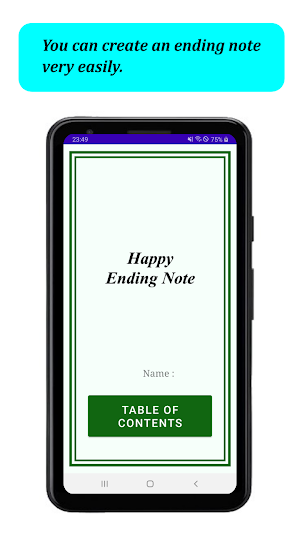
This is an application that allows you to easily create an ending note.
- Downloads
- 1.8K+
- on Google Play
- Price
- Free
- No in-app purchases
- Updated
- Feb 13
- 2026 · v3.0.0
Screenshots

About Happy Ending Note
"Happy Ending Note" This is an application that allows you to easily create an ending note.
An ending note is a notebook that you create to look back on your life, reflect on yourself, and make the most of your life in the future.
In case of emergency, you can write down what you want to tell your family and friends and what you want to do.
Please note that unlike a will, an ending note has no legal effect.
#Functions
*14 categories
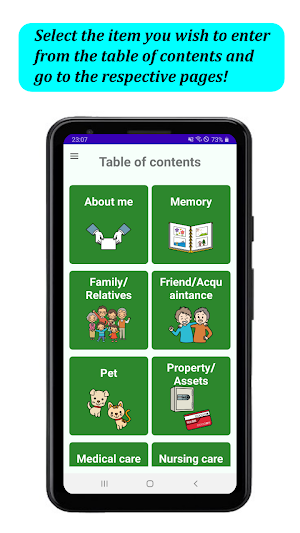
There are 14 categories : About me, Memory, Family/Relatives, Friend/Acquaintance, Pet, Property/Assets (deposits and savings, real estate, securities, precious metal, loan receivable, loan payable, others), Medical care (current illness, pre-existing conditions, allergy, notification), Nursing care, Funeral, Grave, Will, Message, What I want to do from now on, Graph of life.
Image/Video Registration
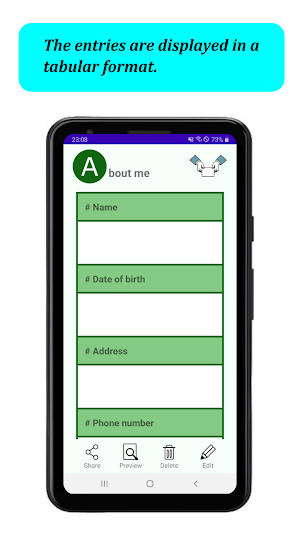
You can register image in "About me", "Family/Relatives", "Friend/Acquaintance", "Pet", "Property and Assets", and "Medical (current illness)" sections.
You can crop image in "About me", "Family/Relatives", "Friend/ Acquaintance", and "Pet".
You can register image and video in "Memory", "Message", and "What I want to do from now on".
Data sorting
You can rearrange the data by dragging the knob on the left side of the list in "Memory", "Family/Relatives", "Friend/Acquaintance", "Pet", "Property and Assets", "Medical (current illness, pre-existing conditions, allergies)," "Message", and "What I want to do from now on".
Funeral contact list
Funeral contact list is located on "Funeral" page and displays a list of people who have checked "Please contact." checkbox under "■Funeral Contacts" on "Family/Relatives" and "Friend/ Acquaintance" pages.
Theme Color
You can choose from 9 theme colors: GREEN, PINK, BLUE, RED, PURPLE, YELLOW, BROWN, ORANGE, and MONOTONE.
You can choose your favorite color.
Lock function
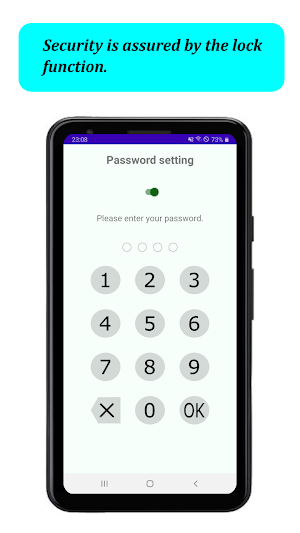
You can set a password to lock this appfor security.
Backup
You can back up your data to SD card. You can continue to use the app for a long time even if you change the device.
Data Deletion
On data deletion page, you can delete data by checking the checkboxes of the data you want to delete.
You can also delete all data at once.
Of course, you can also delete data one by one from each page.
An ending note is a notebook that you create to look back on your life, reflect on yourself, and make the most of your life in the future.
In case of emergency, you can write down what you want to tell your family and friends and what you want to do.
Please note that unlike a will, an ending note has no legal effect.
#Functions
*14 categories
There are 14 categories : About me, Memory, Family/Relatives, Friend/Acquaintance, Pet, Property/Assets (deposits and savings, real estate, securities, precious metal, loan receivable, loan payable, others), Medical care (current illness, pre-existing conditions, allergy, notification), Nursing care, Funeral, Grave, Will, Message, What I want to do from now on, Graph of life.
Image/Video Registration
You can register image in "About me", "Family/Relatives", "Friend/Acquaintance", "Pet", "Property and Assets", and "Medical (current illness)" sections.
You can crop image in "About me", "Family/Relatives", "Friend/ Acquaintance", and "Pet".
You can register image and video in "Memory", "Message", and "What I want to do from now on".
Data sorting
You can rearrange the data by dragging the knob on the left side of the list in "Memory", "Family/Relatives", "Friend/Acquaintance", "Pet", "Property and Assets", "Medical (current illness, pre-existing conditions, allergies)," "Message", and "What I want to do from now on".
Funeral contact list
Funeral contact list is located on "Funeral" page and displays a list of people who have checked "Please contact." checkbox under "■Funeral Contacts" on "Family/Relatives" and "Friend/ Acquaintance" pages.
Theme Color
You can choose from 9 theme colors: GREEN, PINK, BLUE, RED, PURPLE, YELLOW, BROWN, ORANGE, and MONOTONE.
You can choose your favorite color.
Lock function
You can set a password to lock this appfor security.
Backup
You can back up your data to SD card. You can continue to use the app for a long time even if you change the device.
Data Deletion
On data deletion page, you can delete data by checking the checkboxes of the data you want to delete.
You can also delete all data at once.
Of course, you can also delete data one by one from each page.
What’s new
Version 3.0.0 · Updated February 13, 2026
*Now supports Android 16 (API level 36). *Changes to Trimming Screen Operations - The Save button has been removed. When you perform a back operation, a save confirmation dialog will appear.
Alternatives to Happy Ending Note
Looking for apps like Happy Ending Note? Here are 6 similar Android apps on Google Play. All of them are free to download.
-
Escape Game - From Hotel
-
Simple To Do List
-
Escape Game - Witch's House
-
Escape Game ~Haunted House
-
Escape Game - University Bldg.
-
Riddle Escape Game - Office
| App | Rating | Price | Installs | Last updated | Compare |
|---|---|---|---|---|---|
| Happy Ending Note | – | Free | 1,000+ | Feb 13, 2026 | |
| Escape Game - From Hotel | – | Free | 100+ | Aug 29, 2026 | Compare |
| Simple To Do List | – | Free | 1+ | Jul 29, 2025 | Compare |
| Escape Game - Witch's House | – | Free | 500+ | Aug 25, 2026 | Compare |
| Escape Game ~Haunted House | – | Free | 500+ | Aug 25, 2026 | Compare |
| Escape Game - University Bldg. | – | Free | 500+ | Aug 25, 2026 | Compare |
| Riddle Escape Game - Office | – | Free | 500+ | Aug 18, 2026 | Compare |
Compare Happy Ending Note with the top alternatives: ratings, updates, ASO score and keyword gaps →
Similar apps on Google Play
- Escape Game - From Hotel
- Simple To Do List
- Escape Game - Witch's House
- Escape Game ~Haunted House
- Escape Game - University Bldg.
- Riddle Escape Game - Office
- Riddle Escape Game - Store
- Riddle Escape Game - Apartment
- House of Calculation
- App to make flashcards
- Meal Diary
- Drawing App
- A day to remember
- Health Notebook
- Allowance Book
- Shopping List
- ハッピー クロスワード
- Lovely Piano
- Album Creator
- Saito-kun's part-time job
- If it's a pair, leave it to me
- Flags of World
- Brain training puzzle
- House of Brain Training
- Let's split the bill!
- House of Cards
- OL Kazumi's Doki-Doki Sugoroku
- 百人一首 簡単学習
- Kazumi's big rescue mission
- Kazumi's attendance book
- Historical Chronology
- We Love TRAIN
- Happy Recipe
- My Chronology
- Diary