

Ogesture - Navigation Gestures
Tools
Add navigation gestures to third party launchers on any phone.
- Downloads
- 740+
- on Google Play
- Price
- Free
- No in-app purchases
- Updated
- Sep 18
- 2026
Screenshots
About Ogesture - Navigation Gestures
Some phones won't let you use gesture navigation once you install a third-party launcher. Ogesture gives the gestures back.
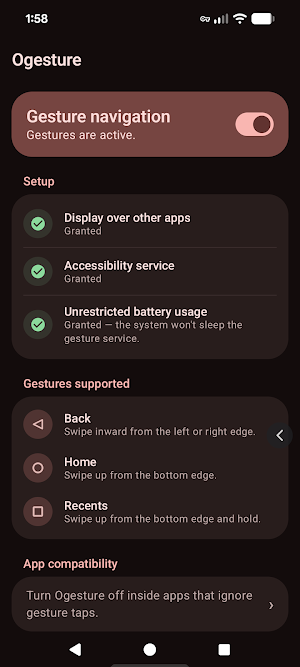
It draws thin, invisible strips along the edges of your screen and turns swipes on them into Back, Home and Recents. No root, no ADB, no custom ROM, no computer needed. It also runs alongside 3-button navigation, so you can keep the buttons and swipe anyway.
GESTURES SUPPORTED
• Swipe inward from the left or right edge — Back
• Swipe up from the bottom edge — Home
• Swipe up from the bottom edge and hold — Recents
ACCESSIBILITY SERVICE DISCLOSURE
Ogesture uses the Android AccessibilityService API, and this is the only reason it requests it: Android reserves the Back, Home and Recents actions for accessibility services, so no app can perform them any other way.
What the service does:
• Performs Back, Home or Recents when you swipe in from a screen edge.
• Reads the package name of the app currently in the foreground, purely so gestures can switch themselves off inside apps you add to your compatibility list.
What the service does not do:
• It cannot read your screen content, your messages, your passwords, or anything you type.
• It collects nothing, stores nothing off your phone, and shares nothing with anyone.
Ogesture does not request the INTERNET permission, so it has no technical ability to send data anywhere. You can turn the service off at any time in Settings › Accessibility › Ogesture.
OTHER PERMISSIONS
• Display over other apps — draws the invisible edge strips that detect your swipes.
• Unrestricted battery usage — stops Android and your phone's battery manager from killing the gesture service in the background.
The app walks you through granting each one on first launch, and explains what it needs and why before sending you anywhere.
APP COMPATIBILITY
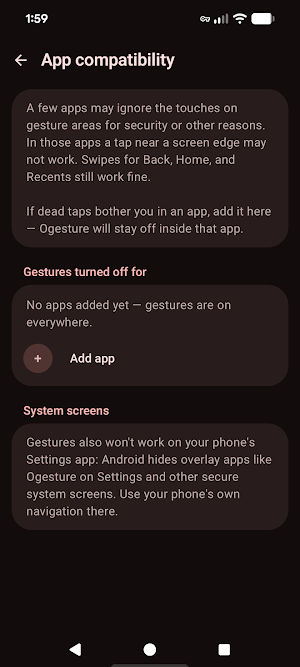
A few apps ignore touches on gesture areas for security reasons, so a tap right at the screen edge may not register inside them. Swipes for Back, Home and Recents still work. If those dead taps bother you in a particular app, add it to the compatibility list and Ogesture will stay off inside it.
WORTH KNOWING BEFORE YOU INSTALL
• Android hides overlay apps like Ogesture on the Settings app and other secure system screens, so gestures won't work there. Use your phone's own navigation on those screens.
• On Xiaomi, also enable Autostart for Ogesture (Security app › Permissions › Autostart). Without this, the system can kill the gesture service.
PRIVACY
Ogesture is free, open source under the AGPL-3.0, and collects no data at all. No accounts, no analytics, no crash reporting, no ads, no third-party SDKs. Your settings — whether gestures are on, and which apps you excluded — stay in the app's private storage and are deleted when you uninstall. The app is also excluded from Android's backup system, so nothing is copied to the cloud.
Source code and privacy policy: https://github.com/tanujnotes/Ogesture
Requires Android 10 or newer.
Built with ❤️ by team Olauncher.
It draws thin, invisible strips along the edges of your screen and turns swipes on them into Back, Home and Recents. No root, no ADB, no custom ROM, no computer needed. It also runs alongside 3-button navigation, so you can keep the buttons and swipe anyway.
GESTURES SUPPORTED
• Swipe inward from the left or right edge — Back
• Swipe up from the bottom edge — Home
• Swipe up from the bottom edge and hold — Recents
ACCESSIBILITY SERVICE DISCLOSURE
Ogesture uses the Android AccessibilityService API, and this is the only reason it requests it: Android reserves the Back, Home and Recents actions for accessibility services, so no app can perform them any other way.
What the service does:
• Performs Back, Home or Recents when you swipe in from a screen edge.
• Reads the package name of the app currently in the foreground, purely so gestures can switch themselves off inside apps you add to your compatibility list.
What the service does not do:
• It cannot read your screen content, your messages, your passwords, or anything you type.
• It collects nothing, stores nothing off your phone, and shares nothing with anyone.
Ogesture does not request the INTERNET permission, so it has no technical ability to send data anywhere. You can turn the service off at any time in Settings › Accessibility › Ogesture.
OTHER PERMISSIONS
• Display over other apps — draws the invisible edge strips that detect your swipes.
• Unrestricted battery usage — stops Android and your phone's battery manager from killing the gesture service in the background.
The app walks you through granting each one on first launch, and explains what it needs and why before sending you anywhere.
APP COMPATIBILITY
A few apps ignore touches on gesture areas for security reasons, so a tap right at the screen edge may not register inside them. Swipes for Back, Home and Recents still work. If those dead taps bother you in a particular app, add it to the compatibility list and Ogesture will stay off inside it.
WORTH KNOWING BEFORE YOU INSTALL
• Android hides overlay apps like Ogesture on the Settings app and other secure system screens, so gestures won't work there. Use your phone's own navigation on those screens.
• On Xiaomi, also enable Autostart for Ogesture (Security app › Permissions › Autostart). Without this, the system can kill the gesture service.
PRIVACY
Ogesture is free, open source under the AGPL-3.0, and collects no data at all. No accounts, no analytics, no crash reporting, no ads, no third-party SDKs. Your settings — whether gestures are on, and which apps you excluded — stay in the app's private storage and are deleted when you uninstall. The app is also excluded from Android's backup system, so nothing is copied to the cloud.
Source code and privacy policy: https://github.com/tanujnotes/Ogesture
Requires Android 10 or newer.
Built with ❤️ by team Olauncher.
What’s new
Updated September 18, 2026
• Cancel a Back swipe by dragging your finger back to the edge • Gestures now work on system screens like Settings • Removed 'Display over other apps' permission * Removed persistent notification • Zones adjust when the screen rotates and no longer cover the navigation buttons • Gesture navigation turns itself back on when a lost permission returns
Alternatives to Ogesture - Navigation Gestures
Looking for apps like Ogesture - Navigation Gestures? Here are 6 similar Android apps on Google Play. The highest rated is Macrorify - Image Auto Clicker (4.5/5), and all 6 are free to download.
-
Quikshort: Shortcut Creator 4.1
-
Macrorify - Image Auto Clicker 4.5
-
Battery Transfer / Receiver 3.7
-
Remote Mouse 4.2
-
MacroDroid - Device Automation 4.4
-
Touch Screen Test 4.4
| App | Rating | Price | Installs | Last updated | Compare |
|---|---|---|---|---|---|
| Ogesture - Navigation Gestures | – | Free | 500+ | Sep 18, 2026 | |
| Quikshort: Shortcut Creator | 4.1 / 5 | Free | 100,000+ | Sep 5, 2026 | Compare |
| Macrorify - Image Auto Clicker | 4.5 / 5 | Free | 1,000,000+ | Jan 7, 2025 | Compare |
| Battery Transfer / Receiver | 3.7 / 5 | Free | 1,000,000+ | Dec 31, 2021 | Compare |
| Remote Mouse | 4.2 / 5 | Free | 10,000,000+ | Oct 31, 2026 | Compare |
| MacroDroid - Device Automation | 4.4 / 5 | Free | 10,000,000+ | Oct 28, 2026 | Compare |
| Touch Screen Test | 4.4 / 5 | Free | 1,000,000+ | Jun 26, 2026 | Compare |
Similar apps on Google Play
- Quikshort: Shortcut Creator
- Macrorify - Image Auto Clicker
- Battery Transfer / Receiver
- Remote Mouse
- MacroDroid - Device Automation
- Touch Screen Test
- TAP Kiln Control Mobile
- Automate
- ISO Today
- Parental Control - Kroha
- Building Tools
- Tooly Toolbox All Tools In One
- Spatial Touch™ - Air Gestures
- App Lock: Fingerprint, Pattern
- Action Launcher: Pixel Edition
- AutoZen-Car Dashboard&Launcher
- Should I Answer?
- Orion Intelligence
- AppDash: App Manager & Backup
- One Key: password manager
- Control+
- DNA Launcher ‧ Home Screen
- Lenovo
- AirDroid: File & Remote Access
- Castro Premium - system info
- Stylework: Explore Workspaces
- GSMArena
- Quick Settings app
- WiFi Mouse Pro
- Automatic Scroll
- fooView - FV Float Viewer
- Screen Recorder Unlimited
- IronVest - Security & Privacy
- Taskbar
- OBDeleven – OBD2 car scanner
- IFTTT - Automate work and home
- Pushbullet: SMS on PC and more
- Ajax PRO: Tool For Engineers
- Simpro Mobile
- StarLine 2
- AIO Launcher
- Airthings
- eloomi
- Auto Agent
- Reveri: Relief in Minutes
- Chipolo
- Nuki Smart Lock
- DeskIn Remote Desktop
- Route: Package Tracker
- IFSTA HazMat First Responder 6
- F-Secure Mobile Security
- Contours: Ski Snowboard Tour
- Dashpivot
- dynamicSpot - Dynamic Island
- ScreenStream
- Elgato Stream Deck Mobile
- Parental Control App- FamiSafe
- Cool Mi Launcher - CC Launcher
- Autosync - File Sync & Backup
- AfterShip Package Tracker
- Computer Launcher Pro
- RealVNC Viewer: Remote Desktop
- Ikon Pass
- Google Automotive Keyboard
- Typewise Offline Keyboard
- Loom – Screen and Cam Recorder
- CPU Monitor - temperature