
SovaSpace: Encrypted Workspace
Nursova LLC Productivity In-app purchases
Encrypted writing and files — opens 70+ formats, stored in your Drive.
- Downloads
- 1+
- on Google Play
- Price
- Free
- In-app purchases
- Updated
- Aug 30
- 2026 · v1.0.7
Screenshots


About SovaSpace: Encrypted Workspace
START WITHOUT COMMITTING ANYTHING
• Sign in with Google. No second password, no registration form.
• A 7-day evaluation starts with your first Entry, covering up to 14 active Entries.
• No payment card is requested.
• It does not become a paid subscription by itself. Nothing is charged unless you choose.
• If you later stop paying, viewing, export and sync stay open — only creating and expanding are gated.
YOUR DATA IS ACTUALLY YOURS
• End-to-end encrypted by default: titles, text, tags, attachments, subtitles, annotations and the local database.
• Stored in your own Google Drive. Our service sees account and sync metadata — never Entry contents or attachment bytes.
• No ads, no trackers. Your content is not sold and does not train a generative model.
• Export to Markdown or PDF, and take plaintext attachments, any time.
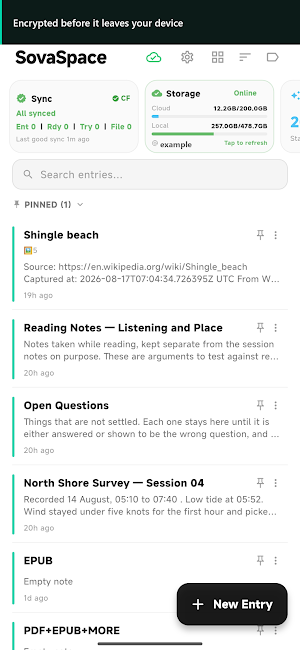
• Local-first: Entries open and edit without waiting for Drive; offline edits sync later.
WHAT OPENS INSIDE IT
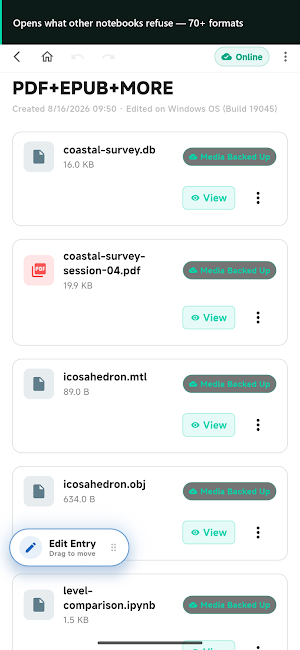
• 70+ file extensions: PDF, EPUB, DOCX, XLSX, PPTX, DICOM, DXF, PSD, SQLite, Jupyter, Anki, XMind, 3D models, fonts, archives, source code.
• Search inside an open file — documents, spreadsheets, code, data — reports when a result is incomplete instead of returning zero.
• Closed proprietary formats are declined with a reason and a suggested export format.
ANNOTATE WITHOUT DAMAGING THE ORIGINAL
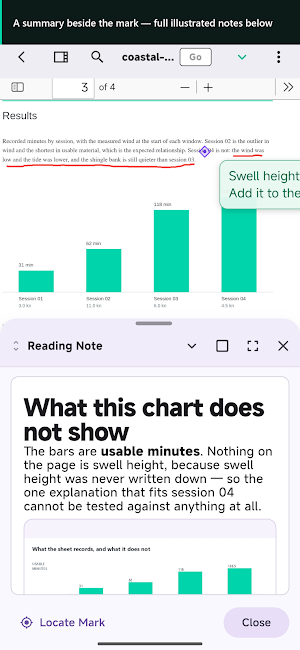
• Highlights, pen strokes, shapes and bookmarks — each carries a short summary and a full illustrated note.
• Marks work on scanned pages, no OCR.
• Annotations live in a separate encrypted sidecar; the source file is never rewritten.
• EPUB uses a fixed layout, so pages and annotations land identically on every device.
BUILT FOR REAL FILES AND REAL NETWORKS
• Large uploads resume from the byte they stopped at. Close the app, lose the network, reboot — nothing starts over.
• Encrypted cloud video seeks in ranges without downloading the whole file.
• No plan-based attachment size limit — Drive quota and device storage are the limits.
MEDIA YOU CAN WORK WITH
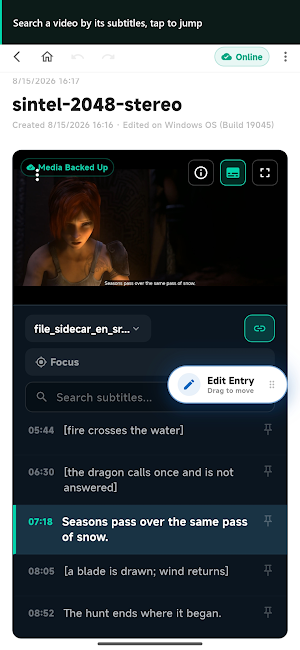
• Subtitles in seven formats (SRT, VTT, ASS, SSA, LRC, SUB, SMI) with search, click-to-seek, language tracks, and a Focus Mode that repeats a pinned line.
• Audio recording and playback.
• Web capture downloads a page's images and encrypts them as your own copies, so an old clipping still shows them.
ONE OR TWO PRIVATE SPACES
• Each Secret Space has its own password, keys and Recovery Key. Tactical Mode configures two; the shared reminder never says which exists.
• Switch away from the app and the Secret Space closes itself.
• Forgot one? Use your Recovery Key, or a protected reset after a waiting period you choose. Support cannot read your content.
THINK IN LINKS
Rich text, tables, tags with global rename and merge, wiki links, backlinks and a knowledge graph. (Standard Space only.)
WHEN SOMETHING GOES WRONG
• Trash keeps Entries for 30 days.
• Windows Cold Backup opens read-only and offline, independent of any Drive copy.
• Device history, trusted-device control, sign-in review; one session at a time.
• A failed task stays visible and retryable, never shown as done.
HONEST ABOUT WHAT IT DOES NOT DO
• Some formats are view-only; results depend on a file's version and complexity.
• Secret Spaces do not defeat screenshots, keyloggers, or an already-unlocked device.
REQUIREMENTS
A Google account is used for sign-in, trusted-device setup and Drive access. Encrypted objects use your Drive quota; local copies use device storage. Camera, photos, microphone and notifications are requested only when used.
Windows and Android are available today. Apple platforms are planned, not available.
nursova.com/app/privacy
nursova.com/app/terms
nursova.com/app/help
What’s new
Version 1.0.7 · Updated August 30, 2026
Documents that arrive as a set now work. • Attach a folder as one file — a Markdown note finds its .assets, a saved page its _files, a model its textures — and it opens on every signed-in device, not only the one it came from. • New: LaTeX, saved MHTML pages, compressed and animated 3D models, image-page EPUBs. • An EPUB mark stays on the paragraph it was drawn on. • Pictures no longer reload when you switch modes. • Paste a table as a table, and search inside it. • Lyrics follow their audio.
Alternatives to SovaSpace: Encrypted Workspace
Looking for apps like SovaSpace: Encrypted Workspace? Here are 6 similar Android apps on Google Play. The highest rated is Proton Pass: Password Manager (4.8/5), and all 6 are free to download.
-
Quitch
-
Notesnook Secure Private Notes 4.5
-
TicNote: AI Recorder & Agent 3.2
-
Total Drive - Cloud Storage 3.6
-
Thunderbird Beta for Testers 4.2
-
Proton Pass: Password Manager 4.8
| App | Rating | Price | Installs | Last updated | Compare |
|---|---|---|---|---|---|
| SovaSpace: Encrypted Workspace | – | Free | 1+ | Aug 30, 2026 | |
| Quitch | – | Free | 10,000+ | – | Compare |
| Notesnook Secure Private Notes | 4.5 / 5 | Free | 100,000+ | – | Compare |
| TicNote: AI Recorder & Agent | 3.2 / 5 | Free | 10,000+ | Aug 14, 2026 | Compare |
| Total Drive - Cloud Storage | 3.6 / 5 | Free | 500,000+ | Jul 27, 2026 | Compare |
| Thunderbird Beta for Testers | 4.2 / 5 | Free | 100,000+ | Sep 14, 2026 | Compare |
| Proton Pass: Password Manager | 4.8 / 5 | Free | 1,000,000+ | Sep 28, 2026 | Compare |
Similar apps on Google Play
- Quitch
- Notesnook Secure Private Notes
- TicNote: AI Recorder & Agent
- Total Drive - Cloud Storage
- Thunderbird Beta for Testers
- Proton Pass: Password Manager
- Hookle: Social Media Manager
- IFTTT - Automate work and home
- Autosync - File Sync & Backup
- Aegis Authenticator - 2FA App
- OPERI
- Zoho Solo - To do, CRM, bills
- Inoreader: News & RSS reader
- Nextcloud
- Lumo by Proton
- Mailchimp Email Marketing
- Gallup Access
- Regula Document Reader
- Mindbook Pro: Markdown Notes
- Friday: AI E-mail Assistant
- WaiverForever - Online Waiver
- Email Blue Mail - Calendar
- Memento Database
- Mixin - Private Crypto Wallet
- Proton Mail: Encrypted Email
- Proton Calendar: Secure Events
- Google Automotive Keyboard
- AI Email, Reply Writer: Xemail
- Email Aqua Mail - Fast, Secure
- Rocketbook