
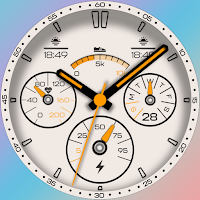
Super Verge Watch Face
Personalization
Analog & digital time in a stunning design. Elevate your style!
- Downloads
- 176+
- on Google Play
- Price
- $0.99
- No in-app purchases
- Updated
- Aug 28
- 2025
Screenshots


About Super Verge Watch Face
Discover the exquisite Hybrid Watch Face, seamlessly blending analog and digital time. Enjoy a stunning design!
Newer Super Verge Watch Face offers the perfect fusion of analog and digital time for your WearOS device. Note that certain features may vary across devices.
Features include synchronized analog and digital time, day of the week, day of the month, heart rate, battery level, steps count, 13 captivating color combinations, and an always-on display.
WATCH FACE INSTALLATION TROUBLESHOOTING:
Q1. Purchased watch face not visible on my device.
After purchase, watch faces require manual selection. Choose from two methods:
On your smartwatch: Press and hold the home screen for 2-3 seconds, swipe left to find the downloaded watch face, then press the home button.
In your watch app on your smartphone: Open the watch app (e.g., Galaxy Wear or WearOS by Google Smartwatch), navigate to the watchfaces section, and select the new watch face you purchased.
Q2. Watch face not listed after following Q1 steps.
Your watch may not have downloaded the new watch face yet. Allow 5 minutes for Google to synchronize your purchase across devices. If the download doesn't initiate:
Ensure your watch is connected to Wi-Fi.
Temporarily disable Bluetooth and connect to Wi-Fi for faster synchronization. Wait for 10 minutes.
If the watch face still doesn't appear, manually initiate the download by opening this webpage on your computer: https://play.google.com/store/apps/details?id=com.newer.super.verge.watchface. Ensure you're logged in with the purchasing account. Select the purchased watch face and click "Install on more devices" above the featured images section. Choose your watch and select "Install on this device." Your watch should start downloading shortly if you completed step Q2-1.
Q3. Found a bug or have a suggestion?
Email us at [email protected] with a detailed description and, if possible, a screenshot.
Q4. Want to share your own design?
Email us at [email protected] to showcase your creativity. If we love your design, we'll provide a promotion code for any of our watch faces of your choice.
Q5. Requesting a refund?
Find the watch face on Google Play, navigate to its main page, and click "refund." We'll process your refund promptly.
Q6. Have another problem?
Email us at [email protected] with a comprehensive description and, if possible, a screenshot. We're here to assist you!
For installation troubleshooting, visit: https://sites.google.com/view/newerdesignwatchfaces/help
This watch face requires Wear OS API 33+ and is compatible with Galaxy Watch 4/5 Series, Tic Watch, latest Fossil, and more.
Watch face highlights:
Analog and digital time
Full day of the week
Day of the month (numerical)
Heart rate indicator (BPM)
Steps count
Battery level
Always-on display with analog and digital time
13 unique color options
Explore our portfolio on Google Play: https://play.google.com/store/apps/dev?id=5120821883619916792. We're dedicated to crafting exceptional watch faces for your WearOS smartwatches.
Newer Super Verge Watch Face offers the perfect fusion of analog and digital time for your WearOS device. Note that certain features may vary across devices.
Features include synchronized analog and digital time, day of the week, day of the month, heart rate, battery level, steps count, 13 captivating color combinations, and an always-on display.
WATCH FACE INSTALLATION TROUBLESHOOTING:
Q1. Purchased watch face not visible on my device.
After purchase, watch faces require manual selection. Choose from two methods:
On your smartwatch: Press and hold the home screen for 2-3 seconds, swipe left to find the downloaded watch face, then press the home button.
In your watch app on your smartphone: Open the watch app (e.g., Galaxy Wear or WearOS by Google Smartwatch), navigate to the watchfaces section, and select the new watch face you purchased.
Q2. Watch face not listed after following Q1 steps.
Your watch may not have downloaded the new watch face yet. Allow 5 minutes for Google to synchronize your purchase across devices. If the download doesn't initiate:
Ensure your watch is connected to Wi-Fi.
Temporarily disable Bluetooth and connect to Wi-Fi for faster synchronization. Wait for 10 minutes.
If the watch face still doesn't appear, manually initiate the download by opening this webpage on your computer: https://play.google.com/store/apps/details?id=com.newer.super.verge.watchface. Ensure you're logged in with the purchasing account. Select the purchased watch face and click "Install on more devices" above the featured images section. Choose your watch and select "Install on this device." Your watch should start downloading shortly if you completed step Q2-1.
Q3. Found a bug or have a suggestion?
Email us at [email protected] with a detailed description and, if possible, a screenshot.
Q4. Want to share your own design?
Email us at [email protected] to showcase your creativity. If we love your design, we'll provide a promotion code for any of our watch faces of your choice.
Q5. Requesting a refund?
Find the watch face on Google Play, navigate to its main page, and click "refund." We'll process your refund promptly.
Q6. Have another problem?
Email us at [email protected] with a comprehensive description and, if possible, a screenshot. We're here to assist you!
For installation troubleshooting, visit: https://sites.google.com/view/newerdesignwatchfaces/help
This watch face requires Wear OS API 33+ and is compatible with Galaxy Watch 4/5 Series, Tic Watch, latest Fossil, and more.
Watch face highlights:
Analog and digital time
Full day of the week
Day of the month (numerical)
Heart rate indicator (BPM)
Steps count
Battery level
Always-on display with analog and digital time
13 unique color options
Explore our portfolio on Google Play: https://play.google.com/store/apps/dev?id=5120821883619916792. We're dedicated to crafting exceptional watch faces for your WearOS smartwatches.
What’s new
Updated August 28, 2025
Target SDK Update.
Alternatives to Super Verge Watch Face
Looking for apps like Super Verge Watch Face? Here are 6 similar Android apps on Google Play.
-
Another Pip-Boy Watchface
-
Pip-Boy Watchface
-
Tag Heuer Formula 1 - 10 in 1
-
T-Rex Ultra Cool Watch Face
-
Rolex Tribute 04 Watch Face
-
Rolex Tribute 03 Watch Face
| App | Rating | Price | Installs | Last updated | Compare |
|---|---|---|---|---|---|
| Super Verge Watch Face | – | $0.99 | 100+ | Aug 28, 2025 | |
| Another Pip-Boy Watchface | – | 0.49 USD | 5+ | Aug 19, 2023 | Compare |
| Pip-Boy Watchface | – | 0.49 USD | 10+ | Aug 21, 2023 | Compare |
| Tag Heuer Formula 1 - 10 in 1 | – | 0.49 USD | 10+ | Aug 18, 2023 | Compare |
| T-Rex Ultra Cool Watch Face | – | 0.49 USD | 0+ | Jul 24, 2023 | Compare |
| Rolex Tribute 04 Watch Face | – | 0.49 USD | 1+ | Jul 23, 2023 | Compare |
| Rolex Tribute 03 Watch Face | – | 0.49 USD | 50+ | Aug 26, 2025 | Compare |
Similar apps on Google Play
- Another Pip-Boy Watchface
- Pip-Boy Watchface
- Tag Heuer Formula 1 - 10 in 1
- T-Rex Ultra Cool Watch Face
- Rolex Tribute 04 Watch Face
- Rolex Tribute 03 Watch Face
- Rolex Tribute 02 Watch Face
- Neon Lovers Watch Face
- G-Shock Squad Watch Face
- T-Rex 2 Watch Face
- Future Radar Watch Face
- Super Verge Watch Face
- Pixel Hybrid Watch Face
- Big Numbers Watch Face