
Spaced Lite
Education
Automatically schedule your study sessions
- Downloads
- 72+
- on Google Play
- Price
- Free
- No in-app purchases
- Updated
- Aug 2
- 2026 · v0.3.0
Screenshots

About Spaced Lite
Spaced Lite is an intelligent study planner based on the spaced repetition technique. This app automatically schedules your next study session on academic or any other topics based on your recalling performance. It uses a token system to prevent wasting time on the app itself rather than studying for the exams.
How does it work?
1. Add one or multiple tasks
2. Learn it
3. Recall
4. Based on how well you have recalled, give a review (long press a task)
The task will be scheduled for revision automatically and will arrive in the Today section.
5. On the scheduled day, recall it without help, rate it based on your performance, and correct your mistakes.
6. Wait for the next date, while you learn new topics during that time!
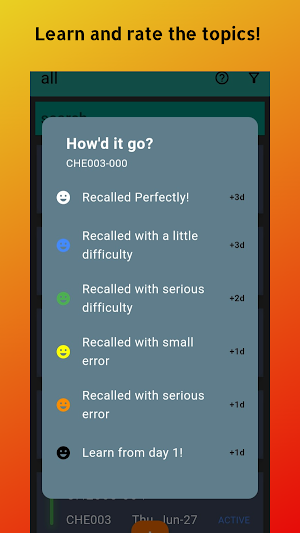
The Review System:
1. Recalled Perfectly
2. Recalled with a little difficulty
3. Recalled with serious difficulty
4. Recalled with small error
5. Recalled with serious error
6. Learn from day 1.
An Example Set of Tasks:
Imagine you have a list of topics you want to learn from the physics course in your third semester. Let's name the workspace SEM3 (for the third semester). Since you are studying physics, let the first three characters of the project code be PHY. Suppose you are studying from chapter 3. So, let the project code be PHY003.
Now, let's say there are 10 topics in that chapter. Here are the steps to add these topics to the app:
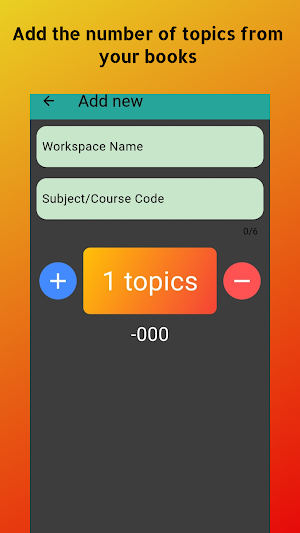
Press the add new button (the "+" button)
Workspace: SEM3
Project code: PHY003
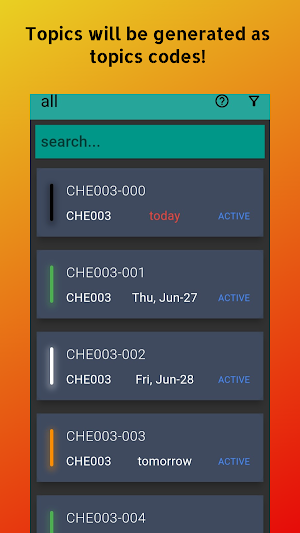
Now, we need to increase the number of tokens to 10. So press the "+" button until you see 10 topics (-000 to -009)
Press the tick mark and the 10 tasks will be added. Associate the token numbers with the 10 topics of your book.
You are all set! Please write down the token numbers in your texts or keep track of which token belongs to which topic.
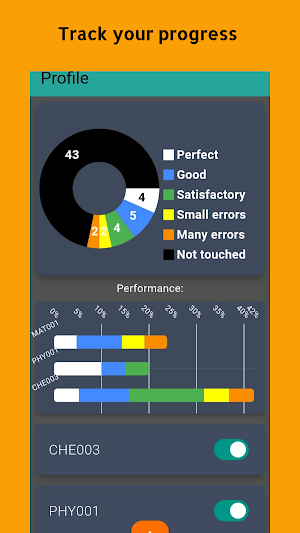
In the profile section, you can track your progress and identify the weak spots.
How does it work?
1. Add one or multiple tasks
2. Learn it
3. Recall
4. Based on how well you have recalled, give a review (long press a task)
The task will be scheduled for revision automatically and will arrive in the Today section.
5. On the scheduled day, recall it without help, rate it based on your performance, and correct your mistakes.
6. Wait for the next date, while you learn new topics during that time!
The Review System:
1. Recalled Perfectly
2. Recalled with a little difficulty
3. Recalled with serious difficulty
4. Recalled with small error
5. Recalled with serious error
6. Learn from day 1.
An Example Set of Tasks:
Imagine you have a list of topics you want to learn from the physics course in your third semester. Let's name the workspace SEM3 (for the third semester). Since you are studying physics, let the first three characters of the project code be PHY. Suppose you are studying from chapter 3. So, let the project code be PHY003.
Now, let's say there are 10 topics in that chapter. Here are the steps to add these topics to the app:
Press the add new button (the "+" button)
Workspace: SEM3
Project code: PHY003
Now, we need to increase the number of tokens to 10. So press the "+" button until you see 10 topics (-000 to -009)
Press the tick mark and the 10 tasks will be added. Associate the token numbers with the 10 topics of your book.
You are all set! Please write down the token numbers in your texts or keep track of which token belongs to which topic.
In the profile section, you can track your progress and identify the weak spots.
What’s new
Version 0.3.0 · Updated August 2, 2026
What's new in version 0.3.0 • Updated app compatibility for the latest Android versions
User reviews

nice app. usefull.
Alternatives to Spaced Lite
Looking for apps like Spaced Lite? Here are 6 similar Android apps on Google Play. The highest rated is IELTS Exam Prep App By EduRev (4.8/5), and all 6 are free to download.
-
Flashcard Maker Vocab Notebook 4.3
-
NBSTSA CST Exam Prep Mastery 4.8
-
Focusmeter: Pomodoro Timer 4.6
-
Knowt: AI Flashcards & Notes 4.5
-
IELTS Exam Prep App By EduRev 4.8
-
Course Hero: AI Homework Help 4.1
| App | Rating | Price | Installs | Last updated | Compare |
|---|---|---|---|---|---|
| Spaced Lite | – | Free | 50+ | Aug 2, 2026 | |
| Flashcard Maker Vocab Notebook | 4.3 / 5 | Free | 100,000+ | Oct 22, 2026 | Compare |
| NBSTSA CST Exam Prep Mastery | 4.8 / 5 | Free | 10,000+ | Sep 30, 2026 | Compare |
| Focusmeter: Pomodoro Timer | 4.6 / 5 | Free | 100,000+ | Oct 17, 2026 | Compare |
| Knowt: AI Flashcards & Notes | 4.5 / 5 | Free | 500,000+ | – | Compare |
| IELTS Exam Prep App By EduRev | 4.8 / 5 | Free | 100,000+ | Sep 18, 2026 | Compare |
| Course Hero: AI Homework Help | 4.1 / 5 | Free | 1,000,000+ | Oct 21, 2026 | Compare |
Compare Spaced Lite with the top alternatives: ratings, updates, ASO score and keyword gaps →
Similar apps on Google Play
- Flashcard Maker Vocab Notebook
- NBSTSA CST Exam Prep Mastery
- Focusmeter: Pomodoro Timer
- Knowt: AI Flashcards & Notes
- IELTS Exam Prep App By EduRev
- Course Hero: AI Homework Help
- CampusLearn - AI Companion
- Focus Dog: Pet Pomodoro Timer
- Numerade - Homework Help
- Pelago
- Kurio - Learn Math with AI
- Use of English PRO
- Motivated: Habit Tracker
- Pomodoro Focus Timer: Balance
- Seesaw
- Kharty - Educational Quiz Game
- AlgoApp - Flashcards
- Student Calendar - Timetable
- Skillsoft Percipio
- Accuplacer Practice Exam 2026
- Quizlet: More than Flashcards
- Pass CNOR Exam 2026
- Brainscape: Study Flashcards
- Mathos AI: Math Helper & Tutor
- Noji – Flashcards study app