
AeVault: Password Manager
MavDock Productivity In-app purchases
Private password and document vault stored on your phone.
- Downloads
- 14+
- on Google Play
- Price
- Free
- In-app purchases
- Updated
- Oct 3
- 2026 · v1.1.0
Screenshots

About AeVault: Password Manager
AeVault is a simple, local-first vault for storing your passwords and private documents securely on your phone.
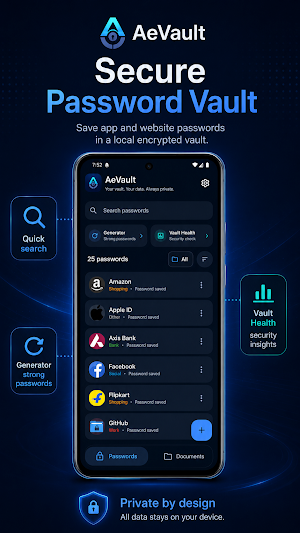
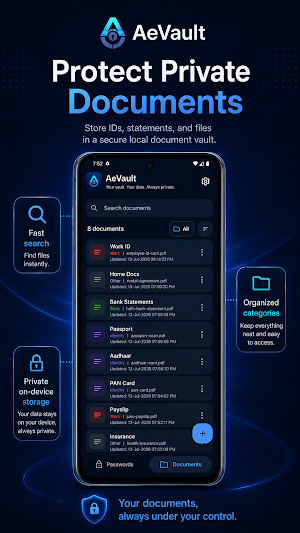
Save app and website passwords, usernames, notes, and categories in one organized vault. You can also keep important PDFs and images in a separate private document vault, making it easier to protect and find your sensitive information when you need it.
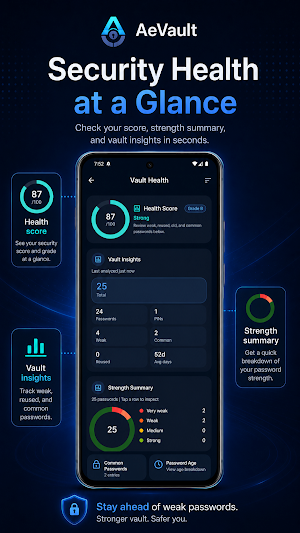
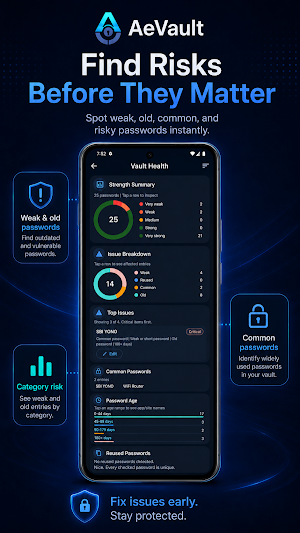
AeVault also includes a strong password generator and a vault health dashboard. The health dashboard helps you review weak, reused, old, or common passwords, so you can improve your password safety over time.
Your vault stays on your device. AeVault does not require an account, does not sync your data to the cloud, and does not send your passwords or documents to a server.
Key features:
• Store passwords, usernames, and notes
• Save private PDFs and images
• Organize passwords and documents with categories
• Search and access saved items quickly
• Generate strong passwords and passphrases
• Review password strength with Vault Health
• Find weak, reused, old, or common passwords
• Export encrypted password backups
• Unlock the app with your phone lock when enabled
Privacy-first by design:
AeVault is built for users who want a simple offline vault without accounts, cloud sync, or server storage. Your passwords and documents remain on your phone unless you choose to export an encrypted backup.
Important:
AeVault does not store your master secret. If you forget your secret, your encrypted vault data cannot be recovered. Please keep your secret safe.
Save app and website passwords, usernames, notes, and categories in one organized vault. You can also keep important PDFs and images in a separate private document vault, making it easier to protect and find your sensitive information when you need it.
AeVault also includes a strong password generator and a vault health dashboard. The health dashboard helps you review weak, reused, old, or common passwords, so you can improve your password safety over time.
Your vault stays on your device. AeVault does not require an account, does not sync your data to the cloud, and does not send your passwords or documents to a server.
Key features:
• Store passwords, usernames, and notes
• Save private PDFs and images
• Organize passwords and documents with categories
• Search and access saved items quickly
• Generate strong passwords and passphrases
• Review password strength with Vault Health
• Find weak, reused, old, or common passwords
• Export encrypted password backups
• Unlock the app with your phone lock when enabled
Privacy-first by design:
AeVault is built for users who want a simple offline vault without accounts, cloud sync, or server storage. Your passwords and documents remain on your phone unless you choose to export an encrypted backup.
Important:
AeVault does not store your master secret. If you forget your secret, your encrypted vault data cannot be recovered. Please keep your secret safe.
What’s new
Version 1.1.0 · Updated October 3, 2026
Optimization and minor fix
Alternatives to AeVault: Password Manager
Looking for apps like AeVault: Password Manager? Here are 6 similar Android apps on Google Play. The highest rated is mSecure - Password Manager (4.6/5), and all 6 are free to download.
-
Fortect Mobile Security 4.2
-
Trend Micro ID Protection 4.3
-
KiWi Vault: Hide Photos, Video
-
Enpass Password Manager 3.9
-
mSecure - Password Manager 4.6
-
One Key: password manager 4.4
| App | Rating | Price | Installs | Last updated | Compare |
|---|---|---|---|---|---|
| AeVault: Password Manager | – | Free | 10+ | Oct 3, 2026 | |
| Fortect Mobile Security | 4.2 / 5 | Free | 10,000+ | Aug 17, 2026 | Compare |
| Trend Micro ID Protection | 4.3 / 5 | Free | 50,000+ | Oct 22, 2026 | Compare |
| KiWi Vault: Hide Photos, Video | – | Free | 10,000+ | Sep 28, 2026 | Compare |
| Enpass Password Manager | 3.9 / 5 | Free | 1,000,000+ | Oct 15, 2026 | Compare |
| mSecure - Password Manager | 4.6 / 5 | Free | 500,000+ | Sep 29, 2026 | Compare |
| One Key: password manager | 4.4 / 5 | Free | 100,000+ | May 22, 2026 | Compare |
Similar apps on Google Play
- Fortect Mobile Security
- Trend Micro ID Protection
- KiWi Vault: Hide Photos, Video
- Enpass Password Manager
- mSecure - Password Manager
- One Key: password manager
- AOL: Email News Weather
- Total Drive - Cloud Storage
- Autosync - File Sync & Backup
- 1Password: Password Manager
- Aegis Authenticator - 2FA App
- ISO Today
- EcoNet
- Coast: Native Work Order CMMS
- 2FA Authenticator (2FAS)
- LastPass Password Manager
- RoboForm Password Manager
- VIP Notes
- TAP Kiln Control Mobile
- AppDash: App Manager & Backup
- Payhawk
- Chipolo
- IronVest - Security & Privacy
- Sesame Search & Shortcuts
- Keeper Password Manager
- Bitwarden Password Manager
- Password Manager: Safe
- PDK Access by ProdataKey
- Mastered.It
- Proton Pass: Password Manager
- LockTrip
- FITRIBE