

Maritime Optima
Maritime Optima AS Productivity In-app purchases
A FREE collaboration platform that enables your team to work from anywhere
- Rating
- 4.1
- 3K ratings
- Downloads
- 805K+
- on Google Play
- Price
- Free
- In-app purchases
- Updated
- Aug 17
- 2026 · v10.0.0
Screenshots


About Maritime Optima
Maritime Optima is free to use for private users and for teams.
Maritime Optima is available on the web, in Google Play Store and App Store and your data and work are always in sync on all your devices.
Log in to Maritime Optima from any of your devices to get:
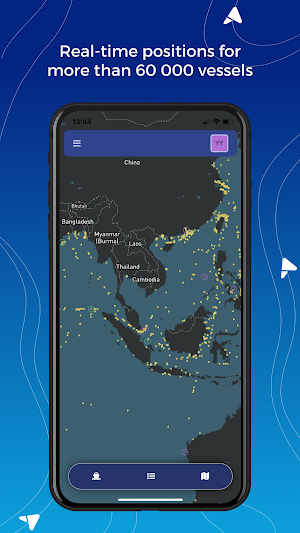
A vessel center with AIS position of more than 60 000 vessels:
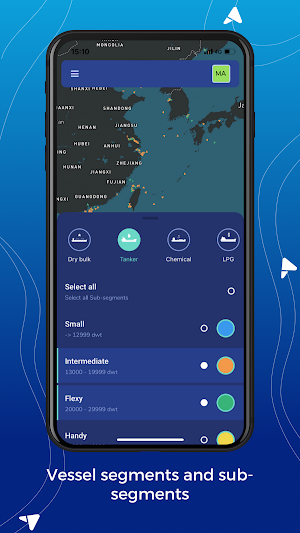
• The vessels are divided into segments and sub-segments to help you focus on the segments you are interested in.
Maritime Optima quickly gives you an overview of the supply side within a segment. Are you interested in tankers and only in suezmax and aframax? Then add those two layers on your map, and chose different colors for each of them so easy spot the vessels in your map.
• Each vessel has a technical template attached based on the most commonly used questionnaires; Q88, Baltic, C-Form and B-Form. On each vessel you will access some technical data and we have made it quick and easy to edit and add technical info to any of the vessels.
• You decide whether you want to keep the added or edited data private, share in a team or publish to everyone.
• In the vessel center you can search for any vessel by combining different search criteria; segment, sub-segment, yard built, year built, owned by etc.
• A port center with information on more than 5 200 ports where you will find information about the tide, weather, bunker prices and bunker availability and the activity in the ports.
• Take a photo, add documents, drawings etc. to any of the vessels or ports.
Build your customized map with layers of information:
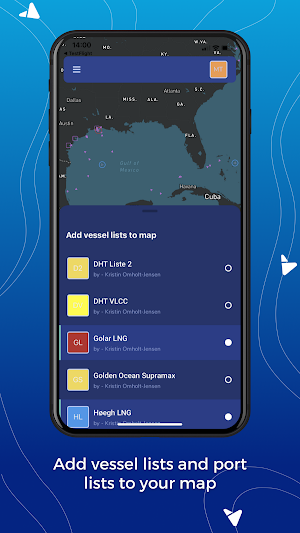
• You can create as many lists of vessels and list of ports you want and add the lists as layers to your customized map
List of ports might be "List of bunker ports in Med" or "List of dry cargo ports in Europe" or a "List of the ports your vessels most frequently visits".
If you want to follow your competitor's vessels; create one list with the vessels from each competitor and add the lists as layers in your map. If you are a trader and want to know where the vessels you fix most are trading, create lists of vessels for each partner.
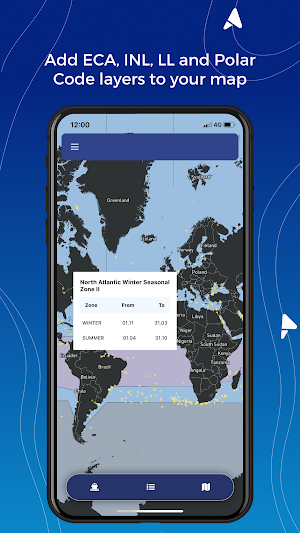
Add Maritime weather, INL, Polar codes, Loadline, Seca zones or satellite view.
Maritime Collaboration
• We have made it super easy to collaborate. Add notes and start building a digital notebook. Discuss with your team, and later you can access your comments on the ports, vessels, list of vessels or ports, documents, and photos, etc.
• You can also add photos, drawings, documents to any vessel or port.
• If you are a chartering manager, you can invite the technical manager and a jr charterers into your team; he/she can create lists of vessels operated or owned by your competitors so the team members can add the layers to their maps.
• The technical manager can add technical info to the vessels you own (technical description, drawings, and photos and the jr charterer can collect information of the vessels operated by your competitors). Everything can be shared within your team.
• When working a cargo or a vessel in the market, you can add the info you receive from the brokers about a vessel in a note attached to the vessel.
Our main market segments focus will be; dry cargo, tankers, and gas carriers, but we assume those interested in other vessel segments also will find Maritime Optima useful.
You can always reach out to us by using the in-app chat.
Maritime Optima is available on the web, in Google Play Store and App Store and your data and work are always in sync on all your devices.
Log in to Maritime Optima from any of your devices to get:
A vessel center with AIS position of more than 60 000 vessels:
• The vessels are divided into segments and sub-segments to help you focus on the segments you are interested in.
Maritime Optima quickly gives you an overview of the supply side within a segment. Are you interested in tankers and only in suezmax and aframax? Then add those two layers on your map, and chose different colors for each of them so easy spot the vessels in your map.
• Each vessel has a technical template attached based on the most commonly used questionnaires; Q88, Baltic, C-Form and B-Form. On each vessel you will access some technical data and we have made it quick and easy to edit and add technical info to any of the vessels.
• You decide whether you want to keep the added or edited data private, share in a team or publish to everyone.
• In the vessel center you can search for any vessel by combining different search criteria; segment, sub-segment, yard built, year built, owned by etc.
• A port center with information on more than 5 200 ports where you will find information about the tide, weather, bunker prices and bunker availability and the activity in the ports.
• Take a photo, add documents, drawings etc. to any of the vessels or ports.
Build your customized map with layers of information:
• You can create as many lists of vessels and list of ports you want and add the lists as layers to your customized map
List of ports might be "List of bunker ports in Med" or "List of dry cargo ports in Europe" or a "List of the ports your vessels most frequently visits".
If you want to follow your competitor's vessels; create one list with the vessels from each competitor and add the lists as layers in your map. If you are a trader and want to know where the vessels you fix most are trading, create lists of vessels for each partner.
Add Maritime weather, INL, Polar codes, Loadline, Seca zones or satellite view.
Maritime Collaboration
• We have made it super easy to collaborate. Add notes and start building a digital notebook. Discuss with your team, and later you can access your comments on the ports, vessels, list of vessels or ports, documents, and photos, etc.
• You can also add photos, drawings, documents to any vessel or port.
• If you are a chartering manager, you can invite the technical manager and a jr charterers into your team; he/she can create lists of vessels operated or owned by your competitors so the team members can add the layers to their maps.
• The technical manager can add technical info to the vessels you own (technical description, drawings, and photos and the jr charterer can collect information of the vessels operated by your competitors). Everything can be shared within your team.
• When working a cargo or a vessel in the market, you can add the info you receive from the brokers about a vessel in a note attached to the vessel.
Our main market segments focus will be; dry cargo, tankers, and gas carriers, but we assume those interested in other vessel segments also will find Maritime Optima useful.
You can always reach out to us by using the in-app chat.
What’s new
Version 10.0.0 · Updated August 17, 2026
Improved features and bug fixes.
Frequently asked questions
Is Maritime Optima free to use?
Yes, Maritime Optima is free to use for private users and for teams.
Where can I access Maritime Optima?
Maritime Optima is available on the web, in Google Play Store, and App Store. Your data and work are always synced on all your devices.
What information can I find in the vessel center of Maritime Optima?
The vessel center provides AIS position of more than 60,000 vessels. The vessels are divided into segments and sub-segments to help you focus on the segments you are interested in.
Can I customize the map in Maritime Optima?
Yes, you can build your customized map with layers of information. You can create lists of vessels and ports and add them as layers to your map.
Can I search for specific vessels in Maritime Optima?
Yes, in the vessel center, you can search for any vessel by combining different search criteria such as segment, sub-segment, yard built, year built, owned by, etc.
What information can I find in the port center of Maritime Optima?
The port center provides information on more than 5,200 ports, including tide, weather, bunker prices, bunker availability, and activity in the ports.
How can I collaborate with my team in Maritime Optima?
You can collaborate by adding notes, starting a digital notebook, and discussing with your team. You can also add photos, drawings, and documents to any vessel or port.
Can I share data within my team in Maritime Optima?
Yes, you can share added or edited data privately, share in a team, or publish it to everyone within your team.
What market segments does Maritime Optima focus on?
Maritime Optima focuses on dry cargo, tankers, and gas carriers, but it can also be useful for other vessel segments.
How can I contact Maritime Optima for support?
You can reach out to us by using the in-app chat feature.
Alternatives to Maritime Optima
Looking for apps like Maritime Optima? Here are 6 similar Android apps on Google Play. The highest rated is WindHub - marine weather (4.4/5), and all 6 are free to download.
-
Navily - Your Cruising Guide 3.5
-
Nautical map (The Netherlands) 3.4
-
KnowWake 3.6
-
NV Charts GPS Navigation AIS 3.3
-
WindHub - marine weather 4.4
-
C-MAP - Marine Charts 4.2
| App | Rating | Price | Installs | Last updated | Compare |
|---|---|---|---|---|---|
| Maritime Optima | 4.1 / 5 | Free | 500,000+ | Aug 17, 2026 | |
| Navily - Your Cruising Guide | 3.5 / 5 | Free | 500,000+ | – | Compare |
| Nautical map (The Netherlands) | 3.4 / 5 | Free | 100,000+ | Jul 3, 2026 | Compare |
| KnowWake | 3.6 / 5 | Free | 10,000+ | Sep 22, 2023 | Compare |
| NV Charts GPS Navigation AIS | 3.3 / 5 | Free | 100,000+ | Nov 18, 2025 | Compare |
| WindHub - marine weather | 4.4 / 5 | Free | 100,000+ | Sep 16, 2026 | Compare |
| C-MAP - Marine Charts | 4.2 / 5 | Free | 1,000,000+ | Jun 15, 2026 | Compare |
Compare Maritime Optima with the top alternatives: ratings, updates, ASO score and keyword gaps →