

Miharu – Website Monitor
M%26W SOFT Productivity In-app purchases
Track web page changes — prices, restocks, IR pages, jobs, and ticket releases.
- Downloads
- 1K+
- on Google Play
- Price
- Free
- In-app purchases
- Updated
- Jul 24
- 2026 · v1.5.1
Screenshots

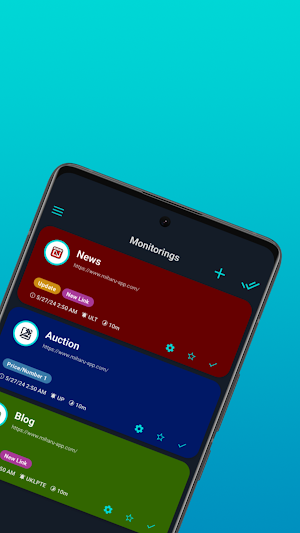
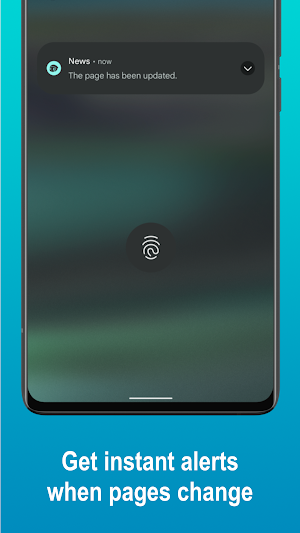
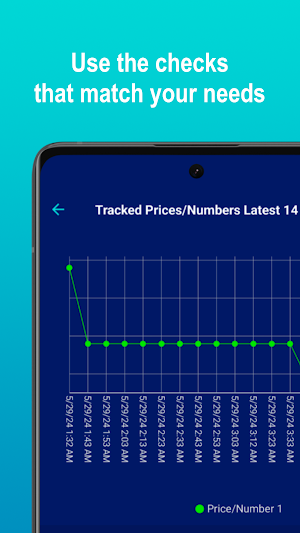

About Miharu – Website Monitor
Stay on top of changes to the web pages that matter to you. Miharu monitors competitor pricing, IR pages, new job postings, restocks, and ticket releases in the cloud, even when the app is closed.
ABOUT THE APP
Add a page to your Watchlist and Miharu monitors it in the cloud, even while the app is closed. When the conditions you set are met, you receive push notifications — or other channels on higher plans — to help you stay on top of important updates.
USE CASES
• Analysts & researchers — IR pages, earnings filings, industry news
• Competitive intelligence — competitor pricing, product launches
• DevOps & engineers — API status, SaaS docs, breaking changes
• Procurement & sales — supplier prices, government bid pages
• Recruiters & job seekers — new postings, hiring page updates
• Shoppers & event fans — restocks, ticket releases, price drops
WHAT MIHARU CAN DETECT
• Text changes on a page
• Your chosen keywords appearing on the page
• Newly added links (e.g., articles, listings, postings)
• Price or numeric value changes
• Changes to a specific text snippet you mark
MAIN FEATURES
• Select a Monitoring Area to focus on what matters
• Advanced Mode supports JavaScript-driven pages
• Home screen widget shows the latest status at a glance
• Add a page from Chrome or any browser via the Share menu
• Email and Slack notifications are available with the Business plan
PAID PLANS
• Business (for teams and pro users): 40 pages, all monitored every 10 minutes. Email & Slack notifications included.
• Plus (for power users): 15 pages — 3 monitored every 10 minutes, the remaining 12 every 3 hours.
• Standard (for regular use): 9 pages — 3 monitored every 20 minutes, the remaining 6 every 3 hours.
• Basic (to try out): 3 pages, every 3 hours.
All paid plans support continuous cloud monitoring — even when you don't open Miharu for a long time.
USAGE NOTES
• Use responsibly and follow each site's terms of use.
• Without a paid plan, monitoring pauses if Miharu is not opened for an extended time.
• Data such as your watchlist is removed after 12 months of inactivity.
• Try the free plan first; upgrade only when you need higher monitoring capacity.
SUBSCRIPTIONS & CANCELLATION
• A paid plan is an auto-renewing subscription. Payment is charged to your Google account at confirmation of purchase.
• The subscription renews automatically unless you cancel it before the next renewal date.
• Manage or cancel your subscription from the Google Play app or at play.google.com under "Subscriptions." Cancellations must be made there, not inside the app.
• To restore a subscription after reinstalling or switching devices, sign in with the same Google account, then open Settings & Usage > Paid Plan in the app and tap "Restore."
• Moving to a new device? Log in with your Miharu account to sync your watchlist.
• Refunds follow Google Play's refund policy.
TERMS OF USE & PRIVACY POLICY
https://www.mandwsoft.com/w-en-privacy-policy-and-term-of-use
ABOUT THE APP
Add a page to your Watchlist and Miharu monitors it in the cloud, even while the app is closed. When the conditions you set are met, you receive push notifications — or other channels on higher plans — to help you stay on top of important updates.
USE CASES
• Analysts & researchers — IR pages, earnings filings, industry news
• Competitive intelligence — competitor pricing, product launches
• DevOps & engineers — API status, SaaS docs, breaking changes
• Procurement & sales — supplier prices, government bid pages
• Recruiters & job seekers — new postings, hiring page updates
• Shoppers & event fans — restocks, ticket releases, price drops
WHAT MIHARU CAN DETECT
• Text changes on a page
• Your chosen keywords appearing on the page
• Newly added links (e.g., articles, listings, postings)
• Price or numeric value changes
• Changes to a specific text snippet you mark
MAIN FEATURES
• Select a Monitoring Area to focus on what matters
• Advanced Mode supports JavaScript-driven pages
• Home screen widget shows the latest status at a glance
• Add a page from Chrome or any browser via the Share menu
• Email and Slack notifications are available with the Business plan
PAID PLANS
• Business (for teams and pro users): 40 pages, all monitored every 10 minutes. Email & Slack notifications included.
• Plus (for power users): 15 pages — 3 monitored every 10 minutes, the remaining 12 every 3 hours.
• Standard (for regular use): 9 pages — 3 monitored every 20 minutes, the remaining 6 every 3 hours.
• Basic (to try out): 3 pages, every 3 hours.
All paid plans support continuous cloud monitoring — even when you don't open Miharu for a long time.
USAGE NOTES
• Use responsibly and follow each site's terms of use.
• Without a paid plan, monitoring pauses if Miharu is not opened for an extended time.
• Data such as your watchlist is removed after 12 months of inactivity.
• Try the free plan first; upgrade only when you need higher monitoring capacity.
SUBSCRIPTIONS & CANCELLATION
• A paid plan is an auto-renewing subscription. Payment is charged to your Google account at confirmation of purchase.
• The subscription renews automatically unless you cancel it before the next renewal date.
• Manage or cancel your subscription from the Google Play app or at play.google.com under "Subscriptions." Cancellations must be made there, not inside the app.
• To restore a subscription after reinstalling or switching devices, sign in with the same Google account, then open Settings & Usage > Paid Plan in the app and tap "Restore."
• Moving to a new device? Log in with your Miharu account to sync your watchlist.
• Refunds follow Google Play's refund policy.
TERMS OF USE & PRIVACY POLICY
https://www.mandwsoft.com/w-en-privacy-policy-and-term-of-use
What’s new
Version 1.5.1 · Updated July 24, 2026
- Minor performance improvements and bug fixes
Alternatives to Miharu – Website Monitor
Looking for apps like Miharu – Website Monitor? Here are 6 similar Android apps on Google Play. 5 of the 6 are free to download.





| App | Rating | Price | Installs | Last updated | Compare |
|---|---|---|---|---|---|
| Miharu – Website Monitor | – | Free | 1,000+ | Jul 24, 2026 | |
| IMPULSAR.APP | – | Free | 5+ | Oct 19, 2026 | Compare |
| Prompt Tile - Quick AI Vault | – | Free | 100+ | – | Compare |
| MyAssets | – | 0.49 USD | 10+ | – | Compare |
| iDyikan | – | Free | 100+ | Sep 28, 2026 | Compare |
| EFG Kempten | – | Free | 0+ | – | Compare |
| Gujrat 7/12, 8A ઉતારો- A RoR | – | Free | 1,000+ | Sep 16, 2026 | Compare |
Similar apps on Google Play
- IMPULSAR.APP
- Prompt Tile - Quick AI Vault
- MyAssets
- iDyikan
- EFG Kempten
- Gujrat 7/12, 8A ઉતારો- A RoR
- Miharu – Website Monitor
- WISE
- IDLC Ignite
- روح الالوان
- Fission: Offline AI Notes
- TXToCHART – Text to Charts
- SuryaPDF Reader & Editor
- Movie Blast
- Sesi Yazıya Çevirme: Deşifre
- TSMH Feedback App
- Miali - Beauty Pro Scheduling
- Super Lif
- All Languages Translate App
- Voce în Text: Transcriere AI
- Birdseye - Field Documentation
- CalcPop
- Control Stack: ISO 27001 & E8
- Sorady
- Capso: Nail Tech Booking App