

Prompt Tile - Quick AI Vault
Productivity Contains ads
1-tap Quick Settings tile & offline AI prompt vault with smart variable fill.
- Downloads
- 213+
- on Google Play
- Price
- Free
- No in-app purchases
- Updated
- Jul 28
- 2026 · v1.1
Screenshots


About Prompt Tile - Quick AI Vault
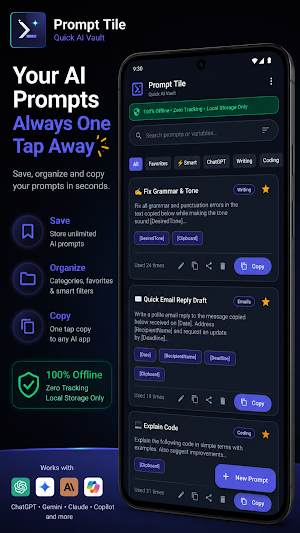
Access your custom AI prompt vault from ANY app in just 1 tap with Prompt Tile! ⚡
Whether you use ChatGPT, Claude, Gemini, DeepSeek, or custom LLM tools, typing the same AI prompt templates over and over wastes time. Prompt Tile puts your personal prompt library directly into your Android Quick Settings panel (notification shade) for instant, 1-tap copy & paste.
🔒 100% PRIVATE & OFFLINE AI PROMPT VAULT
Prompt Tile keeps your AI prompt library 100% private. All your custom templates, variables, and prompt snippets are stored locally on your device in a secure SQLite database. Zero cloud syncing, zero account registration, zero data collection.
⚡ 1-TAP QUICK SETTINGS TILE ACCESS
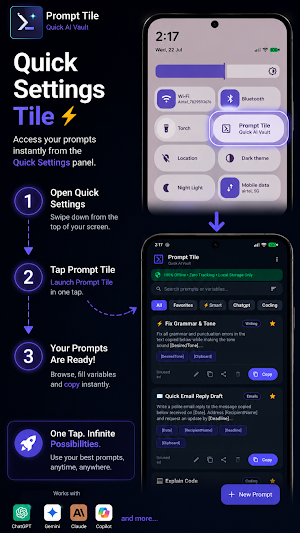
Swipe down from the top of your screen inside any app, tap the Prompt Tile icon, select your AI prompt template, and instantly paste or share into your favorite AI chatbot without leaving your active screen.
🎯 SMART VARIABLE & PARAMETER AUTO-FILL
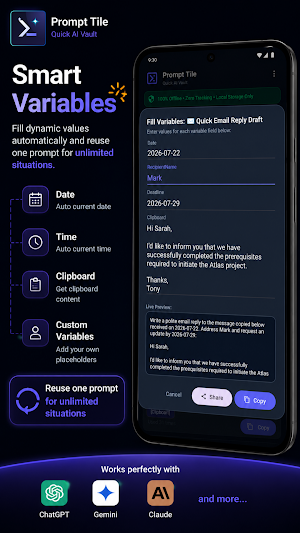
Create dynamic AI prompt templates with bracketed variables like [Language], [Tone], or [Topic]. Prompt Tile automatically detects variable placeholders and displays a quick fill-in menu before copying:
• ⚡ [Clipboard] / [Clip]: Automatically inserts your last copied text snippet into the prompt.
• 📅 [Date] / [Today]: Automatically inserts today's date.
• 🕒 [Time] / [Now]: Automatically inserts the current timestamp.
✨ KEY FEATURES:
• Quick Settings Tile Integration: Launch your prompt vault instantly over any app.
• Dynamic Variables: Universal bracket syntax `[Variable]` for structured prompt engineering.
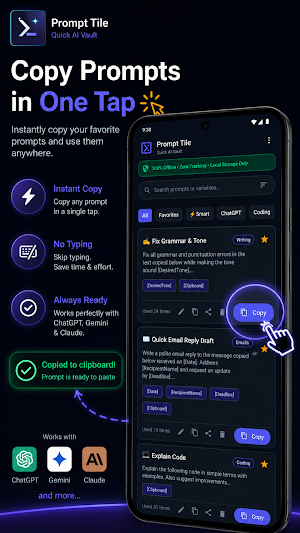
• Instant Copy & Direct Share: 1-tap copy formatted prompts to clipboard or share directly into ChatGPT, Claude, or Gemini.
• Category & Favorite Organizer: Group prompts by Coding, Writing, Marketing, Emails, or custom categories.
• Fast Search & Debounced Filter: Instant search by keyword, category, or most-used sorting.
• JSON Backup & Restore: Easily export and import your prompt library across devices.
• Sleek Material 3 Dark Theme: Battery-friendly, high-contrast UI optimized for quick workflow snippet management.
💡 POPULAR PROMPT USE CASES:
• 🐛 Software Development: "Act as a Senior [Language] Developer. Refactor and debug this code: [Clipboard]"
• ✉️ Email Drafting: "Write a professional response to [SenderName] regarding [Topic] by [Deadline]"
• ✍️ Content & Copywriting: "Fix grammar and tone in this draft to sound [DesiredTone]: [Clipboard]"
• ⚡ Summarization & Research: "Summarize this article copied at [Time] into [Number] key takeaways: [Clipboard]"
Stop re-typing your favorite AI prompts. Download Prompt Tile: Quick AI Vault today and supercharge your AI workflow! 🚀
Whether you use ChatGPT, Claude, Gemini, DeepSeek, or custom LLM tools, typing the same AI prompt templates over and over wastes time. Prompt Tile puts your personal prompt library directly into your Android Quick Settings panel (notification shade) for instant, 1-tap copy & paste.
🔒 100% PRIVATE & OFFLINE AI PROMPT VAULT
Prompt Tile keeps your AI prompt library 100% private. All your custom templates, variables, and prompt snippets are stored locally on your device in a secure SQLite database. Zero cloud syncing, zero account registration, zero data collection.
⚡ 1-TAP QUICK SETTINGS TILE ACCESS
Swipe down from the top of your screen inside any app, tap the Prompt Tile icon, select your AI prompt template, and instantly paste or share into your favorite AI chatbot without leaving your active screen.
🎯 SMART VARIABLE & PARAMETER AUTO-FILL
Create dynamic AI prompt templates with bracketed variables like [Language], [Tone], or [Topic]. Prompt Tile automatically detects variable placeholders and displays a quick fill-in menu before copying:
• ⚡ [Clipboard] / [Clip]: Automatically inserts your last copied text snippet into the prompt.
• 📅 [Date] / [Today]: Automatically inserts today's date.
• 🕒 [Time] / [Now]: Automatically inserts the current timestamp.
✨ KEY FEATURES:
• Quick Settings Tile Integration: Launch your prompt vault instantly over any app.
• Dynamic Variables: Universal bracket syntax `[Variable]` for structured prompt engineering.
• Instant Copy & Direct Share: 1-tap copy formatted prompts to clipboard or share directly into ChatGPT, Claude, or Gemini.
• Category & Favorite Organizer: Group prompts by Coding, Writing, Marketing, Emails, or custom categories.
• Fast Search & Debounced Filter: Instant search by keyword, category, or most-used sorting.
• JSON Backup & Restore: Easily export and import your prompt library across devices.
• Sleek Material 3 Dark Theme: Battery-friendly, high-contrast UI optimized for quick workflow snippet management.
💡 POPULAR PROMPT USE CASES:
• 🐛 Software Development: "Act as a Senior [Language] Developer. Refactor and debug this code: [Clipboard]"
• ✉️ Email Drafting: "Write a professional response to [SenderName] regarding [Topic] by [Deadline]"
• ✍️ Content & Copywriting: "Fix grammar and tone in this draft to sound [DesiredTone]: [Clipboard]"
• ⚡ Summarization & Research: "Summarize this article copied at [Time] into [Number] key takeaways: [Clipboard]"
Stop re-typing your favorite AI prompts. Download Prompt Tile: Quick AI Vault today and supercharge your AI workflow! 🚀
Alternatives to Prompt Tile - Quick AI Vault
Looking for apps like Prompt Tile - Quick AI Vault? Here are 6 similar Android apps on Google Play. All of them are free to download.
-
Daily Jokes: Stand-Up Comedy
-
DeepFlow: Pomodoro Focus Timer
-
Video Compress & Extract MP3
-
Morse & NATO Phonetic Trainer
-
Score Card: Board Game Tracker
-
PureDict - Offline Dictionary
| App | Rating | Price | Installs | Last updated | Compare |
|---|---|---|---|---|---|
| Prompt Tile - Quick AI Vault | – | Free | 100+ | Jul 28, 2026 | |
| Daily Jokes: Stand-Up Comedy | – | Free | 100+ | – | Compare |
| DeepFlow: Pomodoro Focus Timer | – | Free | 100+ | – | Compare |
| Video Compress & Extract MP3 | – | Free | 100+ | – | Compare |
| Morse & NATO Phonetic Trainer | – | Free | 10+ | – | Compare |
| Score Card: Board Game Tracker | – | Free | 500+ | Jul 6, 2026 | Compare |
| PureDict - Offline Dictionary | – | Free | 100+ | Sep 30, 2026 | Compare |