

Notepad: Notes & To-Do
Jia He Ju Tools Contains ads
Create notes, checklists, and back up your ideas with Google Drive.
- Downloads
- 5+
- on Google Play
- Price
- Free
- No in-app purchases
- Updated
- Jul 20
- 2026 · v1.0
Screenshots

About Notepad: Notes & To-Do
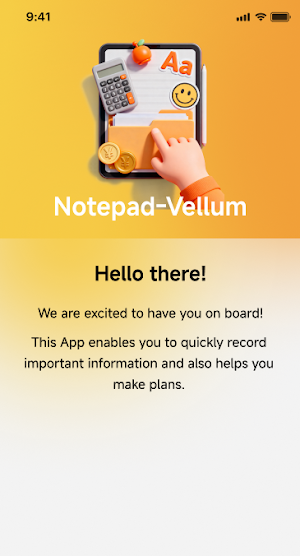
Notepad: Notes & To-Do is a simple and practical note-taking app for daily ideas, tasks, lists, and reminders. You can quickly create notes, organize checklists, search your content, and keep important information easy to find.
Whether you need to write down quick thoughts, manage a to-do list, save daily plans, or keep simple text records, this notepad app helps you stay organized with a clean and easy-to-use experience.
Key features:
Create notes
Write and save text notes for ideas, plans, study notes, work records, shopping lists, and daily information.
Create checklists
Make to-do lists and check off completed items. Finished tasks can stay in the list so you can review your progress.
Search notes and lists
Quickly find saved notes or checklist items by entering keywords.
Share notes
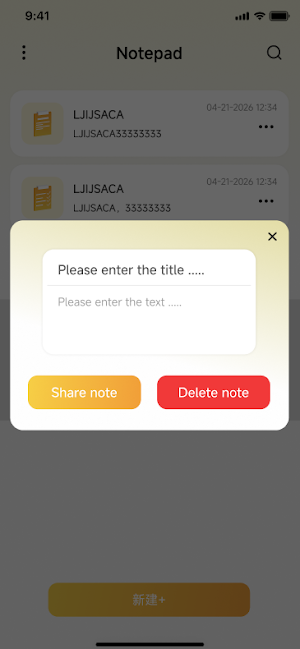
Use the system share panel to share note content with other apps when needed.
Delete notes safely
Delete notes or checklists with a confirmation step to help prevent accidental deletion.
Google Drive backup and restore
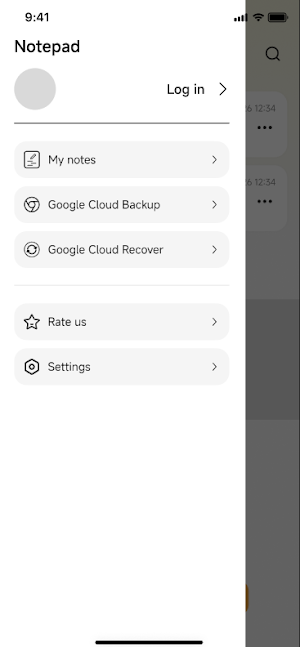
Sign in with your Google account to use optional Google Drive backup and restore features. You can back up your notes to your own Google Drive app data area and restore them when needed. The app only uses Google Drive access for note backup and restore and does not read or manage your other Google Drive files.
Dark mode
Switch to dark mode for a more comfortable writing experience in low-light environments.
Language settings
Choose your preferred app language and keep the setting for future use.
Local note storage
You can use the main note-taking features without signing in. Notes are saved locally on your device unless you choose to use Google Drive backup.
Notepad: Notes & To-Do is designed for simple daily note management. It is suitable for writing quick notes, tracking tasks, saving ideas, organizing checklists, and keeping personal text information easy to access.
Whether you need to write down quick thoughts, manage a to-do list, save daily plans, or keep simple text records, this notepad app helps you stay organized with a clean and easy-to-use experience.
Key features:
Create notes
Write and save text notes for ideas, plans, study notes, work records, shopping lists, and daily information.
Create checklists
Make to-do lists and check off completed items. Finished tasks can stay in the list so you can review your progress.
Search notes and lists
Quickly find saved notes or checklist items by entering keywords.
Share notes
Use the system share panel to share note content with other apps when needed.
Delete notes safely
Delete notes or checklists with a confirmation step to help prevent accidental deletion.
Google Drive backup and restore
Sign in with your Google account to use optional Google Drive backup and restore features. You can back up your notes to your own Google Drive app data area and restore them when needed. The app only uses Google Drive access for note backup and restore and does not read or manage your other Google Drive files.
Dark mode
Switch to dark mode for a more comfortable writing experience in low-light environments.
Language settings
Choose your preferred app language and keep the setting for future use.
Local note storage
You can use the main note-taking features without signing in. Notes are saved locally on your device unless you choose to use Google Drive backup.
Notepad: Notes & To-Do is designed for simple daily note management. It is suitable for writing quick notes, tracking tasks, saving ideas, organizing checklists, and keeping personal text information easy to access.
What’s new
Version 1.0 · Updated July 20, 2026
Initial release of Notepad: Notes & To-Do. Create notes and checklists for daily tasks and ideas. Search, share, and optionally back up notes with Google Drive.
Alternatives to Notepad: Notes & To-Do
Looking for apps like Notepad: Notes & To-Do? Here are 6 similar Android apps on Google Play. The highest rated is UpNote - notes, diary, journal (4.8/5), and all 6 are free to download.
-
To-Do List & Planner: Taskito 4.2
-
Color Notes, Notebook, Notepad 4.4
-
Grateful Diary: Daily Journal 4.7
-
UpNote - notes, diary, journal 4.8
-
Listok: To do list & Notes 4.1
-
LiveIt Journal, Planner, Notes 4.4
| App | Rating | Price | Installs | Last updated | Compare |
|---|---|---|---|---|---|
| Notepad: Notes & To-Do | – | Free | 5+ | Jul 20, 2026 | |
| To-Do List & Planner: Taskito | 4.2 / 5 | Free | 1,000,000+ | Oct 21, 2026 | Compare |
| Color Notes, Notebook, Notepad | 4.4 / 5 | Free | 1,000,000+ | Oct 23, 2025 | Compare |
| Grateful Diary: Daily Journal | 4.7 / 5 | Free | 1,000,000+ | – | Compare |
| UpNote - notes, diary, journal | 4.8 / 5 | Free | 500,000+ | Oct 23, 2026 | Compare |
| Listok: To do list & Notes | 4.1 / 5 | Free | 100,000+ | Aug 18, 2026 | Compare |
| LiveIt Journal, Planner, Notes | 4.4 / 5 | Free | 1,000,000+ | Aug 6, 2026 | Compare |
Similar apps on Google Play
- To-Do List & Planner: Taskito
- Color Notes, Notebook, Notepad
- Grateful Diary: Daily Journal
- UpNote - notes, diary, journal
- Listok: To do list & Notes
- LiveIt Journal, Planner, Notes
- Nested Folder Notes - Folino
- Daybook - Diary, Journal, Note
- Easy Diary
- Weekly Planner - Diary, Notes
- Inkpad Notepad & To do list
- Huion Note : Easy note-taking
- Notepad Notes
- Listta: to-do list & planner
- Notes : Color Folders & To-dos
- Notes
- ProBooks: Invoice Maker
- touchnotes
- DayDew - Daily Journal, Diary
- Wondr Note: Fun Notes & Tools
- Rocketbook
- Twos: Remember & Share Things