

App Manager
AndroidDeveloperLB Tools In-app purchases Contains ads
Easier, advanced alternative to the built-in app manager
- Rating
- 3.7
- 11.2K ratings
- Downloads
- 3.4M+
- on Google Play
- Price
- Free
- In-app purchases
- Updated
- Oct 1
- 2026 · v8.0
Screenshots


About App Manager
Do you hate the multiple steps it takes to just uninstall your apps ?
Do you sometimes install many apps in order to find one that suits your needs, but then you hate the time it takes to uninstall the rest?
Do you need to reset/uninstall apps frequently ?
Do you have a third party launcher and hate the fact that installing apps puts shortcuts on the old launchers?
Wanna try getting rid of some of the bloatware your device has (*) ?
If so, this is the app for you !
Features
This app has plenty of features, especially for rooted devices:
• Easiest uninstaller - single click on an app to uninstall it
• Install APK, APKS, APKM, XAPK files via other apps, directly
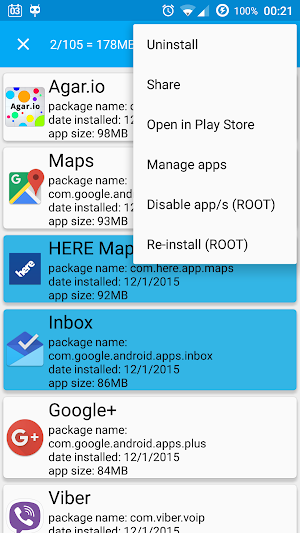
• Batch operations of apps : uninstallation, share, disable/enable, Re-install, manage, open in Play-Store or Amazon-AppStore
• APK files management
• Removed Apps history viewer
• Customizable Widgets, for uninstalling the recently installed app or clearing its internal/external data
• Normal/ROOT uninstallation of apps . Using ROOT, it's much easier and faster
• Shows all kinds of apps, and not just those that you can launch. For example: widgets, live wallpapers, keyboards, launchers, plugins,...
• Auto-handling of apps that have admin privileges, allowing you to revoke them and uninstall the apps
• Auto add shortcuts to newly installed apps, no matter how you've installed them. Also choose exactly which launcher will have the new shortcuts
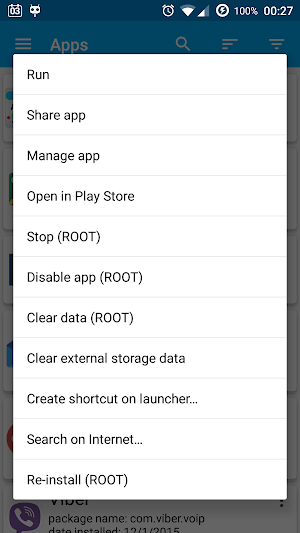
• Various operations on selected app:
• Run
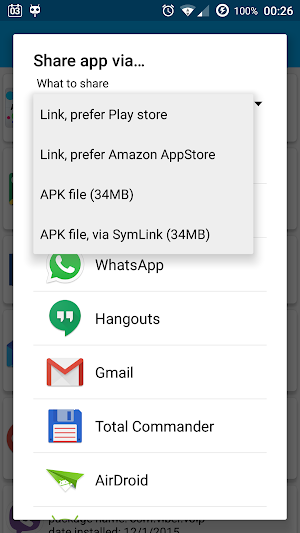
• Share app as link or APK file
• Manage
• Open link on play store.
• Stop app (ROOT)
• Clear internal storage (ROOT)
• Create shortcut, including hidden ones
• Search the Internet for app's name/package
• Disable/Enable app (ROOT)
• Re-install
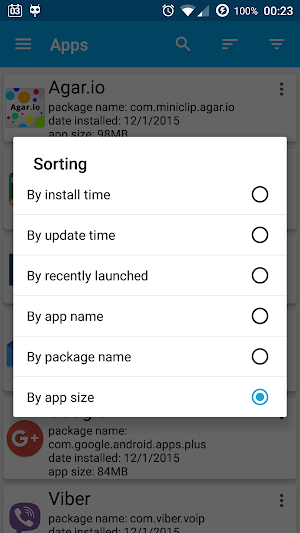
• Sort apps by size, name, package, date installed, date updated, launch time
• OS uninstallation integration
• Useful shortcuts to built in apps
• Filter apps by:
• System/user apps
• Enabled/disabled apps
• Installation path: SD card / internal storage
• Ability to uninstall system apps (Root , might not work on some cases)
• Shows app information: package name, date installed, build number, version name
• Auto-cleaning of external storage files of apps that the OS didn't remove them right for some reason
• Theme chooser, in case you don't like the cards UI
Best of all, it's free ! ! !
Permissions explanations
• INSTALL_SHORTCUT - allows the app to create apps shortcuts, either manually or automatically (upon installation)
• KILL_BACKGROUND_PROCESSES - allows the app to kill selected apps
• READ_EXTERNAL_STORAGE - allows the app to check if there is taken space on selected app, in order to allow to reclaim it
• WRITE_EXTERNAL_STORAGE - to clear the external storage of selected app
• ACCESS_SUPERUSER - for rooted devices only, allows many more cool features, for example background uninstallation
• ACCESS_NETWORK_STATE , INTERNET- for ads
• BILLING, GET_ACCOUNTS - for donations
• GET_PACKAGE_SIZE - for getting apps' sizes
• GET_TASKS , PACKAGE_USAGE_STATS - to get recently launched apps
Notes
• System apps removal is a risky operation. I do not hold any responsibility in case the functionality of your OS is damaged in any way when using this feature
•Some system apps cannot be removed due to restrictions enforced by the ROM itself, but the app will try handling it the best it can, and sometimes a restart is needed to see the result
• You can remove the ads by donating as much as you wish
• I've worked for a long time on this app, and I have plenty of features I have in mind to add to it
• Please feel free to rate the app and show your opinion (preferably via the forum) on which features you'd like to have for the next versions.
If you like this app, show you support by rating it, sharing it or donating.
Do you sometimes install many apps in order to find one that suits your needs, but then you hate the time it takes to uninstall the rest?
Do you need to reset/uninstall apps frequently ?
Do you have a third party launcher and hate the fact that installing apps puts shortcuts on the old launchers?
Wanna try getting rid of some of the bloatware your device has (*) ?
If so, this is the app for you !
Features
This app has plenty of features, especially for rooted devices:
• Easiest uninstaller - single click on an app to uninstall it
• Install APK, APKS, APKM, XAPK files via other apps, directly
• Batch operations of apps : uninstallation, share, disable/enable, Re-install, manage, open in Play-Store or Amazon-AppStore
• APK files management
• Removed Apps history viewer
• Customizable Widgets, for uninstalling the recently installed app or clearing its internal/external data
• Normal/ROOT uninstallation of apps . Using ROOT, it's much easier and faster
• Shows all kinds of apps, and not just those that you can launch. For example: widgets, live wallpapers, keyboards, launchers, plugins,...
• Auto-handling of apps that have admin privileges, allowing you to revoke them and uninstall the apps
• Auto add shortcuts to newly installed apps, no matter how you've installed them. Also choose exactly which launcher will have the new shortcuts
• Various operations on selected app:
• Run
• Share app as link or APK file
• Manage
• Open link on play store.
• Stop app (ROOT)
• Clear internal storage (ROOT)
• Create shortcut, including hidden ones
• Search the Internet for app's name/package
• Disable/Enable app (ROOT)
• Re-install
• Sort apps by size, name, package, date installed, date updated, launch time
• OS uninstallation integration
• Useful shortcuts to built in apps
• Filter apps by:
• System/user apps
• Enabled/disabled apps
• Installation path: SD card / internal storage
• Ability to uninstall system apps (Root , might not work on some cases)
• Shows app information: package name, date installed, build number, version name
• Auto-cleaning of external storage files of apps that the OS didn't remove them right for some reason
• Theme chooser, in case you don't like the cards UI
Best of all, it's free ! ! !
Permissions explanations
• INSTALL_SHORTCUT - allows the app to create apps shortcuts, either manually or automatically (upon installation)
• KILL_BACKGROUND_PROCESSES - allows the app to kill selected apps
• READ_EXTERNAL_STORAGE - allows the app to check if there is taken space on selected app, in order to allow to reclaim it
• WRITE_EXTERNAL_STORAGE - to clear the external storage of selected app
• ACCESS_SUPERUSER - for rooted devices only, allows many more cool features, for example background uninstallation
• ACCESS_NETWORK_STATE , INTERNET- for ads
• BILLING, GET_ACCOUNTS - for donations
• GET_PACKAGE_SIZE - for getting apps' sizes
• GET_TASKS , PACKAGE_USAGE_STATS - to get recently launched apps
Notes
• System apps removal is a risky operation. I do not hold any responsibility in case the functionality of your OS is damaged in any way when using this feature
•Some system apps cannot be removed due to restrictions enforced by the ROM itself, but the app will try handling it the best it can, and sometimes a restart is needed to see the result
• You can remove the ads by donating as much as you wish
• I've worked for a long time on this app, and I have plenty of features I have in mind to add to it
• Please feel free to rate the app and show your opinion (preferably via the forum) on which features you'd like to have for the next versions.
If you like this app, show you support by rating it, sharing it or donating.
What’s new
Version 8.0 · Updated October 1, 2026
Fixed a rare crash. Minor bug fixes
User reviews

Ads

Absolutely love this app! Been using it since its debut. I was looking for an app to track last used, last launched, last installed and remembered this app by its icon and name! Installed today! Is there an option to show the last-used-date? Thanks

Adarsh kujur

Nice

I think it's mite work

great and easy
Frequently asked questions
What can App Manager do?
App Manager can uninstall apps with a single click, install APK files, manage batch operations of apps, view removed apps history, provide customizable widgets, uninstall apps with or without root access, handle apps with admin privileges, add shortcuts to newly installed apps, perform various operations on selected apps, sort apps by different criteria, integrate with OS uninstallation, provide useful shortcuts, filter apps by different categories, uninstall system apps (root may be required), show app information, clean external storage files of apps, and allow users to choose a theme.
Is App Manager free?
Yes, App Manager is free to use.
Alternatives to App Manager
Looking for apps like App Manager? Here are 6 similar Android apps on Google Play. The highest rated is Apk Analyzer (4.5/5), and all 6 are free to download.
-
UnApp — Batch Uninstall Apps 4.2
-
Apk Analyzer 4.5
-
Installer - Install APK 3.8
-
My Drawer 4.3
-
AppMgr III (App 2 SD) 4.5
-
Greenify 4.2
| App | Rating | Price | Installs | Last updated | Compare |
|---|---|---|---|---|---|
| App Manager | 3.7 / 5 | Free | 1,000,000+ | Oct 1, 2026 | |
| UnApp — Batch Uninstall Apps | 4.2 / 5 | Free | 100,000+ | Mar 22, 2020 | Compare |
| Apk Analyzer | 4.5 / 5 | Free | 1,000,000+ | Sep 25, 2026 | Compare |
| Installer - Install APK | 3.8 / 5 | Free | 5,000,000+ | – | Compare |
| My Drawer | 4.3 / 5 | Free | 1,000,000+ | Oct 20, 2026 | Compare |
| AppMgr III (App 2 SD) | 4.5 / 5 | Free | 50,000,000+ | Oct 22, 2026 | Compare |
| Greenify | 4.2 / 5 | Free | 10,000,000+ | Aug 31, 2024 | Compare |
Compare App Manager with the top alternatives: ratings, updates, ASO score and keyword gaps →
Similar apps on Google Play
- UnApp — Batch Uninstall Apps
- Apk Analyzer
- Installer - Install APK
- My Drawer
- AppMgr III (App 2 SD)
- Greenify
- Samsung My Files
- SD Maid - System Cleaning Tool
- Droid Insight 360: Files, Apps
- Split APKs Installer (SAI)
- App Usage - Manage/Track Usage
- App Swap Drawer - T9 Search
- Files by Google
- Digital Wellbeing
- Android System WebView Dev
- Android Accessibility Suite
- Action Blocks
- Google Fi