
AutoProX Assistant
MAYTON Tools
This is an app that helps with AutoProX and connecting external displays.
- Downloads
- 1.6K+
- on Google Play
- Price
- Free
- No in-app purchases
- Updated
- Sep 16
- 2026 · v1.6.0
Screenshots
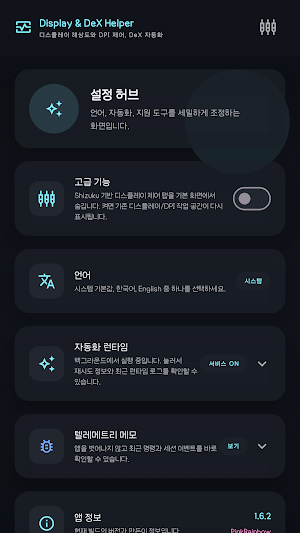


About AutoProX Assistant
[Supported Features]
1. Changing resolution and DPI of smartphone display mirroring screen
* Wireless debugging using Shizuku is required
* Connection status can be checked
2. Checking connected internal/external display information
3. Automation features using connected external display ID
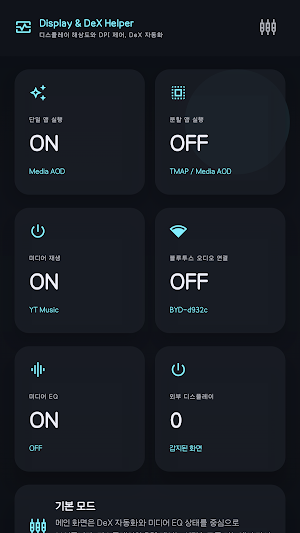
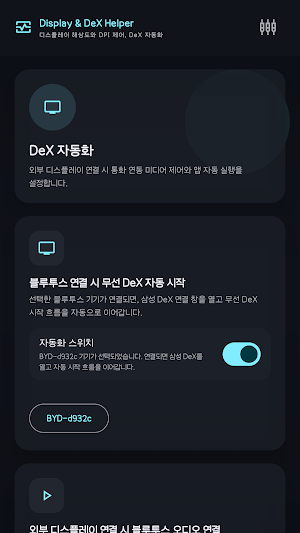
4. DeX Automation
* Automatically start wireless DeX when a selected Bluetooth device is connected - Latency can be applied
* Automatically pause media during a call
* Automatically play media when a call ends
* Pause media when external display is disconnected
* Automatically play media when external display is connected
* Automatically launch single app in full screen when external display is connected
* Automatically launch split-screen apps when external display is connected (supports 3:7, 5:5, 7:3 ratios) - Latency can be applied
* Automatically connect Bluetooth audio when external display is connected
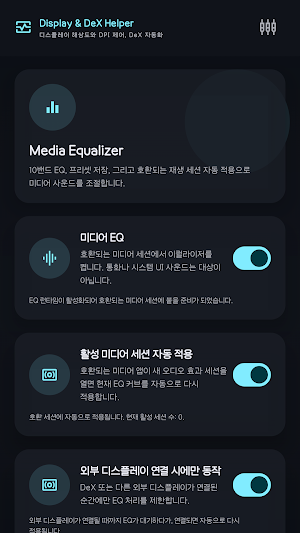
5. 10-Band Equalizer
* Supports default presets and 3 user presets (addition and reset)
* Supports operation only when external display is connected
* Automatically sets desired preset when connected to external display
* Supports volume amplification
5. 10-Band Equalizer
* Default Supports Presets and 3 User Presets (Add and reset)
* Supports operation only when an external display is connected
* Automatically sets the desired preset when connected to an external display
* App-specific presets can be applied separately
* Supports Virtualizer, Bass Booster, and Loudness Enhancer
6. Added OneUI 9 Mode
* Disabling recommended for OneUI versions 8.5 and below
7. Separation of Basic and Advanced Modes
[AccessibilityService API Usage Guide]
AutoProX Assistant uses the Android AccessibilityService API to provide user-configured Samsung DeX auto-launch features.
Accessibility services are used only for the following functions:
- Performing user-configured auto-launch button actions on the Samsung DeX start screen
- Launching user-selected apps when an external display is connected
- Assisting in launching user-configured single or split-screen apps
AutoProX Assistant does not collect, store, transmit, or share screen content, input text, personal information, financial information, messages, or contacts through accessibility services. Accessibility services operate only when the user enables the feature in the app and allows it directly in Android Settings, and can be turned off at any time in Android Accessibility Settings.
1. Changing resolution and DPI of smartphone display mirroring screen
* Wireless debugging using Shizuku is required
* Connection status can be checked
2. Checking connected internal/external display information
3. Automation features using connected external display ID
4. DeX Automation
* Automatically start wireless DeX when a selected Bluetooth device is connected - Latency can be applied
* Automatically pause media during a call
* Automatically play media when a call ends
* Pause media when external display is disconnected
* Automatically play media when external display is connected
* Automatically launch single app in full screen when external display is connected
* Automatically launch split-screen apps when external display is connected (supports 3:7, 5:5, 7:3 ratios) - Latency can be applied
* Automatically connect Bluetooth audio when external display is connected
5. 10-Band Equalizer
* Supports default presets and 3 user presets (addition and reset)
* Supports operation only when external display is connected
* Automatically sets desired preset when connected to external display
* Supports volume amplification
5. 10-Band Equalizer
* Default Supports Presets and 3 User Presets (Add and reset)
* Supports operation only when an external display is connected
* Automatically sets the desired preset when connected to an external display
* App-specific presets can be applied separately
* Supports Virtualizer, Bass Booster, and Loudness Enhancer
6. Added OneUI 9 Mode
* Disabling recommended for OneUI versions 8.5 and below
7. Separation of Basic and Advanced Modes
[AccessibilityService API Usage Guide]
AutoProX Assistant uses the Android AccessibilityService API to provide user-configured Samsung DeX auto-launch features.
Accessibility services are used only for the following functions:
- Performing user-configured auto-launch button actions on the Samsung DeX start screen
- Launching user-selected apps when an external display is connected
- Assisting in launching user-configured single or split-screen apps
AutoProX Assistant does not collect, store, transmit, or share screen content, input text, personal information, financial information, messages, or contacts through accessibility services. Accessibility services operate only when the user enables the feature in the app and allows it directly in Android Settings, and can be turned off at any time in Android Accessibility Settings.
What’s new
Version 1.6.0 · Updated September 16, 2026
1. 커스텀 펌웨어 개선 업데이트 2. 앱 권한 허브 추가 3. DeX 모드 3분할 설정 추가
Alternatives to AutoProX Assistant
Looking for apps like AutoProX Assistant? Here are 6 similar Android apps on Google Play. All of them are free to download.






| App | Rating | Price | Installs | Last updated | Compare |
|---|---|---|---|---|---|
| AutoProX Assistant | – | Free | 1,000+ | Sep 16, 2026 | |
| CNC Engrave G-Code & Simulator | – | Free | 500+ | Sep 15, 2026 | Compare |
| VS Safety | – | Free | 100+ | – | Compare |
| Engelect - Solar Power Sizer | – | Free | 10+ | – | Compare |
| cyba | – | Free | 10+ | Jun 15, 2026 | Compare |
| IsnetCam | – | Free | 10+ | Jul 10, 2026 | Compare |
| GSO Assist | – | Free | 100+ | Jul 17, 2026 | Compare |
Compare AutoProX Assistant with the top alternatives: ratings, updates, ASO score and keyword gaps →
Similar apps on Google Play
- CNC Engrave G-Code & Simulator
- VS Safety
- Engelect - Solar Power Sizer
- cyba
- IsnetCam
- GSO Assist
- Cycle Speed: Bike Computer
- Bombeiros Paço de Arcos
- Smartconn
- Chem Calculator
- MKM: Minimal Kernel Manager
- CR15NM
- ElectroCot
- Solvix QR
- pve client
- Stromma
- Masaar Badr
- Beton App
- ZoomBoost: HD Zoom Camera
- Unit Converter: Convert Units
- electromaster
- My Kids Bank
- Canvas-Paint/Signature
- Fireplace App Control
- Printorive - Print better.