
Stromma
Craxiom Tools
Stream your phone's screen or camera live to an RTSP server you control
- Downloads
- 10+
- on Google Play
- Price
- Free
- No in-app purchases
- Updated
- Aug 27
- 2026 · v2.3.0
Screenshots
About Stromma
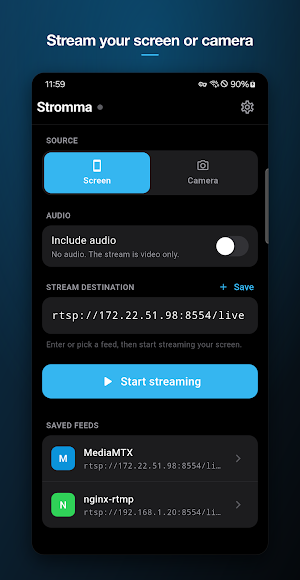
Stromma turns your phone into a live RTSP publisher. It streams the phone's screen or camera to an RTSP server that you control, and you watch the feed anywhere that plays RTSP, such as VLC, OBS, Home Assistant, or your NVR.
IMPORTANT: BRING YOUR OWN SERVER
Stromma does nothing by itself. It needs a server that accepts incoming RTSP streams, such as the free MediaMTX, running on your computer, home server, or NAS. Enter the server's rtsp:// address in Stromma and press Start streaming. If you do not run, or have access to, an RTSP server, this app will not be useful to you.
WHAT IT STREAMS
• Your screen: share anything on the phone. Android asks for consent before every capture session.
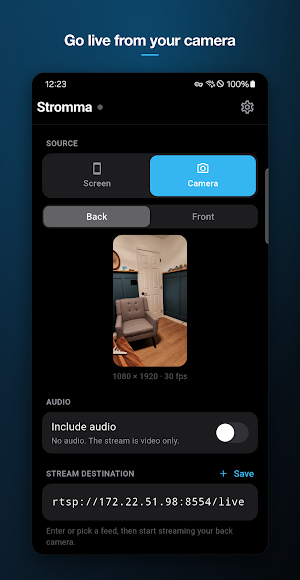
• Your camera: back or front, with a live preview before you go live.
• Audio is optional and off by default. When enabled, choose microphone, device audio, or both (device audio requires Android 10 or newer and a screen session).
BUILT FOR UNATTENDED STREAMING
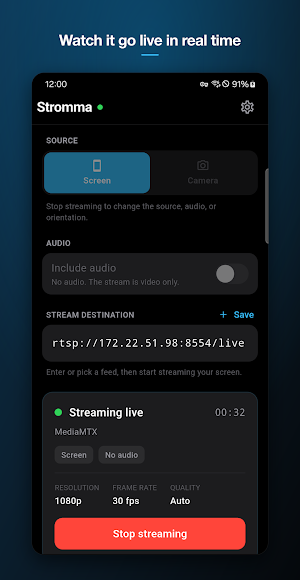
• Live status card with a timer and the current resolution, frame rate, and quality.
• Automatic reconnect when the connection drops.
• Streaming continues in the background as a foreground service, with a persistent notification while capture is running.
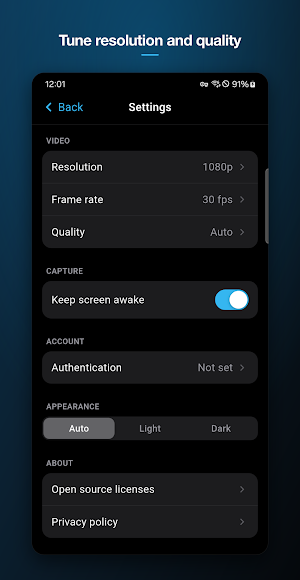
• Keep screen awake option for long sessions.
TUNE THE OUTPUT
• Resolution: 480p, 720p, 1080p, or 2K (1440p).
• Frame rate: 24, 30, or 60 fps.
• Quality: adaptive Auto mode, or fixed Low, Medium, and High presets.
YOUR SERVERS, SAVED
• Save feeds by name and switch servers in one tap.
• RTSP username and password support. Credentials are kept in your device's secure storage, never in plain text.
PRIVATE BY DESIGN
• Your video and audio go directly from your phone to your server. They are never sent to us.
• No account and no ads.
• The app collects anonymous crash reports and basic usage statistics to keep it working well. See the privacy policy for details.
GOOD TO KNOW
Stromma publishes a stream; it does not play streams. To view the feed, open it in VLC, OBS, Home Assistant, your NVR, or any other RTSP player.
IMPORTANT: BRING YOUR OWN SERVER
Stromma does nothing by itself. It needs a server that accepts incoming RTSP streams, such as the free MediaMTX, running on your computer, home server, or NAS. Enter the server's rtsp:// address in Stromma and press Start streaming. If you do not run, or have access to, an RTSP server, this app will not be useful to you.
WHAT IT STREAMS
• Your screen: share anything on the phone. Android asks for consent before every capture session.
• Your camera: back or front, with a live preview before you go live.
• Audio is optional and off by default. When enabled, choose microphone, device audio, or both (device audio requires Android 10 or newer and a screen session).
BUILT FOR UNATTENDED STREAMING
• Live status card with a timer and the current resolution, frame rate, and quality.
• Automatic reconnect when the connection drops.
• Streaming continues in the background as a foreground service, with a persistent notification while capture is running.
• Keep screen awake option for long sessions.
TUNE THE OUTPUT
• Resolution: 480p, 720p, 1080p, or 2K (1440p).
• Frame rate: 24, 30, or 60 fps.
• Quality: adaptive Auto mode, or fixed Low, Medium, and High presets.
YOUR SERVERS, SAVED
• Save feeds by name and switch servers in one tap.
• RTSP username and password support. Credentials are kept in your device's secure storage, never in plain text.
PRIVATE BY DESIGN
• Your video and audio go directly from your phone to your server. They are never sent to us.
• No account and no ads.
• The app collects anonymous crash reports and basic usage statistics to keep it working well. See the privacy policy for details.
GOOD TO KNOW
Stromma publishes a stream; it does not play streams. To view the feed, open it in VLC, OBS, Home Assistant, your NVR, or any other RTSP player.
What’s new
Version 2.3.0 · Updated August 27, 2026
Stromma now streams over RTMP and SRT as well as RTSP, so you can go live directly to YouTube, Twitch, and other RTMP or SRT destinations.
Alternatives to Stromma
Looking for apps like Stromma? Here are 6 similar Android apps on Google Play. The highest rated is Avigilon Unity Video (4.6/5), and all 6 are free to download.
-
Blink Home Monitor 4.5
-
Lorex Classic 3.3
-
GoPro Quik: Video Editor 4.5
-
Loom – Screen and Cam Recorder 3.2
-
Avigilon Unity Video 4.6
-
Home V 3.8
| App | Rating | Price | Installs | Last updated | Compare |
|---|---|---|---|---|---|
| Stromma | – | Free | 10+ | Aug 27, 2026 | |
| Blink Home Monitor | 4.5 / 5 | Free | 10,000,000+ | Oct 15, 2026 | Compare |
| Lorex Classic | 3.3 / 5 | Free | 1,000,000+ | Jun 16, 2026 | Compare |
| GoPro Quik: Video Editor | 4.5 / 5 | Free | 50,000,000+ | Oct 19, 2026 | Compare |
| Loom – Screen and Cam Recorder | 3.2 / 5 | Free | 1,000,000+ | Oct 13, 2026 | Compare |
| Avigilon Unity Video | 4.6 / 5 | Free | 10,000+ | Apr 28, 2026 | Compare |
| Home V | 3.8 / 5 | Free | 100,000+ | Jun 26, 2026 | Compare |
Compare Stromma with the top alternatives: ratings, updates, ASO score and keyword gaps →
Similar apps on Google Play
- Blink Home Monitor
- Lorex Classic
- GoPro Quik: Video Editor
- Loom – Screen and Cam Recorder
- Avigilon Unity Video
- Home V
- Cinmoore
- ieGeek Cam
- Intellifi by Adtran®
- OSAIO
- RealVNC Viewer: Remote Desktop
- AWS Console
- Froling Connect
- Schlage Home
- Elgato Stream Deck Mobile
- Arenti
- ZUMIMALL
- Home Assistant
- Viidure-Dashcam Viewer
- Dzees Home
- IPC360 Home
- Nest
- CloudEdge
- IP Camera Viewer
- Moultrie
- Sony | Creators' App
- VicoHome: Smart Home Camera
- CompanyCam