
Secure Notes Notepad - Notaker
Productivity
Private notes app with automatic AES-256 encryption and cloud backup
- Downloads
- 500+
- on Google Play
- Price
- Free
- No in-app purchases
- Updated
- Jun 29
- 2026 · v2.2.1
Screenshots


About Secure Notes Notepad - Notaker
Protect your ideas, passwords, and personal data with Notaker, a simple, fast, and easy-to-use notes app. Designed for those who value privacy without complexity, your notes are automatically encrypted, stored locally on your device, and remain fully under your control, even without an internet connection.
Changed your phone? No worries. You can create encrypted backups in Google Drive to keep your notes safe and restore them whenever you need.
🔒 Advanced privacy and security
- Three layers of protection: local note encryption, encrypted cloud backups, and biometric lock to prevent unauthorized access.
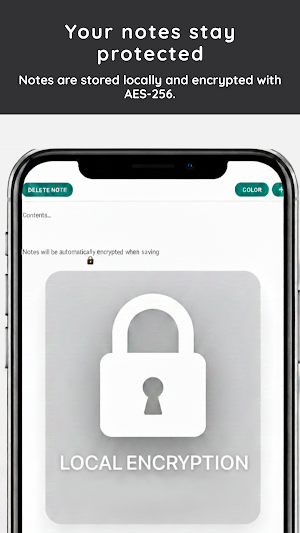
- Automatic encryption (AES-256): a widely used high-level encryption standard to protect sensitive information.
- Biometric lock: protect access to the app using fingerprint or other biometric authentication supported by your device.
- No accounts or sign-ups: start taking notes instantly without providing email or personal data.
- Local storage on your device: works offline with no external servers, with optional encrypted Google Drive backups.
- Google Drive backups: your backups are encrypted before upload using a password only you know.
- Works offline: access, create, and edit your notes anytime, anywhere.
- No ads: enjoy a clean, distraction-free experience.
📝 Easily organize your notes and tasks
- Quickly create, edit, and delete notes.
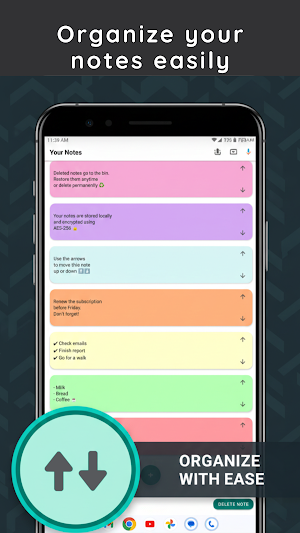
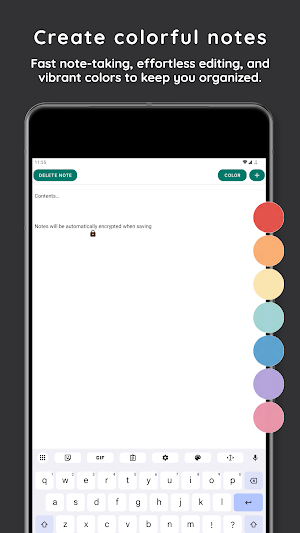
- Color-coded notes: visually organize ideas, projects, or reminders.
- Custom organization: sort your notes based on your priorities.
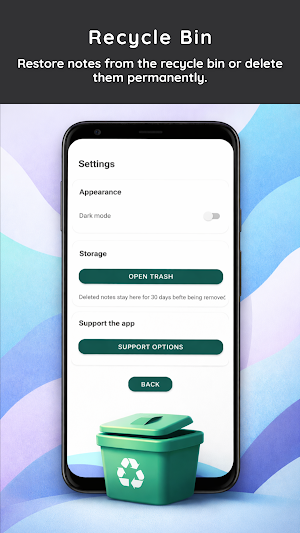
- Built-in trash: easily restore deleted notes.
📋 Your everyday notes companion
- Manage personal notes, to-do lists, and shopping lists.
- Securely store passwords, keys, and sensitive data.
- Write quick reminders, personal journals, or creative ideas.
🌙 Simple, clean, and comfortable design
- Minimal and smooth interface with no complicated settings.
- Built-in dark mode: ideal for night use and eye comfort.
- Fully compatible with Android phones and tablets.
⚠️ Important note:
Notaker does not use its own servers. Backups are encrypted on your device before being uploaded to Google Drive.
The encryption password is not stored on any server. If you lose it, it will not be possible to recover access to your backed-up data.
Changed your phone? No worries. You can create encrypted backups in Google Drive to keep your notes safe and restore them whenever you need.
🔒 Advanced privacy and security
- Three layers of protection: local note encryption, encrypted cloud backups, and biometric lock to prevent unauthorized access.
- Automatic encryption (AES-256): a widely used high-level encryption standard to protect sensitive information.
- Biometric lock: protect access to the app using fingerprint or other biometric authentication supported by your device.
- No accounts or sign-ups: start taking notes instantly without providing email or personal data.
- Local storage on your device: works offline with no external servers, with optional encrypted Google Drive backups.
- Google Drive backups: your backups are encrypted before upload using a password only you know.
- Works offline: access, create, and edit your notes anytime, anywhere.
- No ads: enjoy a clean, distraction-free experience.
📝 Easily organize your notes and tasks
- Quickly create, edit, and delete notes.
- Color-coded notes: visually organize ideas, projects, or reminders.
- Custom organization: sort your notes based on your priorities.
- Built-in trash: easily restore deleted notes.
📋 Your everyday notes companion
- Manage personal notes, to-do lists, and shopping lists.
- Securely store passwords, keys, and sensitive data.
- Write quick reminders, personal journals, or creative ideas.
🌙 Simple, clean, and comfortable design
- Minimal and smooth interface with no complicated settings.
- Built-in dark mode: ideal for night use and eye comfort.
- Fully compatible with Android phones and tablets.
⚠️ Important note:
Notaker does not use its own servers. Backups are encrypted on your device before being uploaded to Google Drive.
The encryption password is not stored on any server. If you lose it, it will not be possible to recover access to your backed-up data.
What’s new
Version 2.2.1 · Updated June 29, 2026
- Added biometric lock protection to help keep your notes more secure. - Improved the app design and overall user experience. - Fixed scrolling issues when creating new notes. - Performance improvements and bug fixes.
Alternatives to Secure Notes Notepad - Notaker
Looking for apps like Secure Notes Notepad - Notaker? Here are 6 similar Android apps on Google Play. All of them are free to download.
-
Weight & Calorie Log – BodyLog
-
MedVision: Emergency Alerts
-
Gym Workout Tracker: GymLoad
-
Timer Active Break
-
Toilet Timer: Healthy Tips
-
Dengue & Mosquitoes InfoDengue
| App | Rating | Price | Installs | Last updated | Compare |
|---|---|---|---|---|---|
| Secure Notes Notepad - Notaker | – | Free | 500+ | Jun 29, 2026 | |
| Weight & Calorie Log – BodyLog | – | Free | 10+ | Sep 5, 2026 | Compare |
| MedVision: Emergency Alerts | – | Free | 10+ | Sep 6, 2026 | Compare |
| Gym Workout Tracker: GymLoad | – | Free | 10+ | – | Compare |
| Timer Active Break | – | Free | 100+ | – | Compare |
| Toilet Timer: Healthy Tips | – | Free | 500+ | – | Compare |
| Dengue & Mosquitoes InfoDengue | – | Free | 100+ | – | Compare |