
ClipVault: Clipboard Notes
Dev Jang Tools Contains ads
Save text locally, then organize, search, lock, and export your snippets.
- Downloads
- 50+
- on Google Play
- Price
- Free
- No in-app purchases
- Updated
- Jul 28
- 2026 · v1.0.5
Screenshots
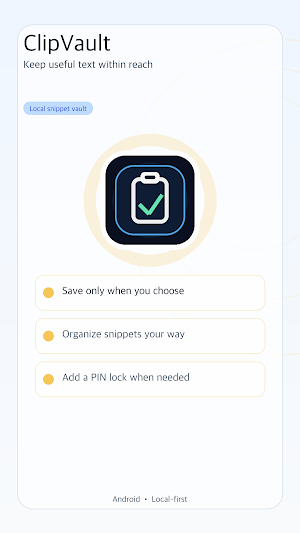
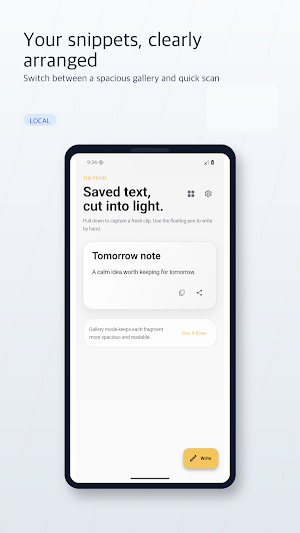
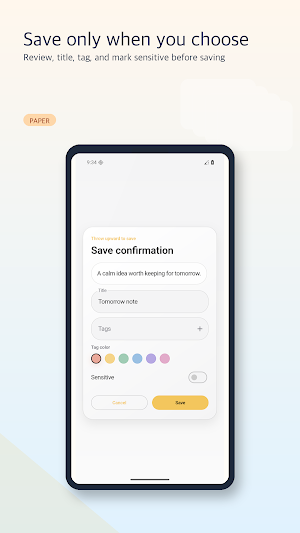
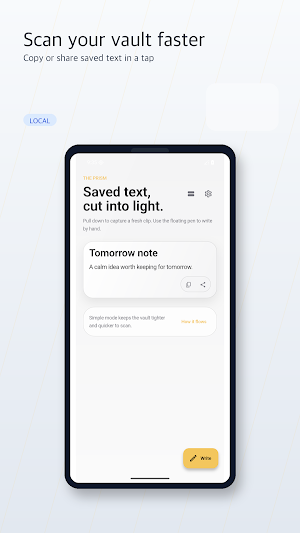


About ClipVault: Clipboard Notes
Keep useful text close without background clipboard monitoring.
ClipVault stores a snippet only when you choose to save it. Tap Save from Clipboard inside the app, or share text to ClipVault from the Android share menu. Review the text before it enters your vault.
ORGANIZE YOUR SNIPPETS
• Switch between a spacious gallery and a compact scan view
• Search titles and snippet text
• Add folders, tags, and favorites
• Copy or share saved text when you need it
EXTRA CONTROLS
• Mark an item as sensitive
• Add an optional per-item password
• Set sensitive-item expiration
• Lock app launch or sensitive items with a PIN
• Export your data as JSON or CSV
PRIVACY IN PLAIN LANGUAGE
• Snippets are stored locally on your device
• No account and no cloud sync
• No background clipboard monitoring
• Saved snippet content is not uploaded to the developer
• PINs and sensitive-item passwords are stored as one-way hashes
The in-app lock limits access inside ClipVault. It does not encrypt the snippet database or protect data on a compromised or rooted device.
ClipVault uses Google Mobile Ads. Depending on your region, consent, device, and settings, Google may process data such as IP address, app and ad interactions, diagnostics, and device or advertising identifiers for advertising, analytics, and fraud prevention.
Questions: [email protected]
ClipVault stores a snippet only when you choose to save it. Tap Save from Clipboard inside the app, or share text to ClipVault from the Android share menu. Review the text before it enters your vault.
ORGANIZE YOUR SNIPPETS
• Switch between a spacious gallery and a compact scan view
• Search titles and snippet text
• Add folders, tags, and favorites
• Copy or share saved text when you need it
EXTRA CONTROLS
• Mark an item as sensitive
• Add an optional per-item password
• Set sensitive-item expiration
• Lock app launch or sensitive items with a PIN
• Export your data as JSON or CSV
PRIVACY IN PLAIN LANGUAGE
• Snippets are stored locally on your device
• No account and no cloud sync
• No background clipboard monitoring
• Saved snippet content is not uploaded to the developer
• PINs and sensitive-item passwords are stored as one-way hashes
The in-app lock limits access inside ClipVault. It does not encrypt the snippet database or protect data on a compromised or rooted device.
ClipVault uses Google Mobile Ads. Depending on your region, consent, device, and settings, Google may process data such as IP address, app and ad interactions, diagnostics, and device or advertising identifiers for advertising, analytics, and fraud prevention.
Questions: [email protected]
What’s new
Version 1.0.5 · Updated July 28, 2026
• Faster startup while advertising consent is checked in the background • Clearer privacy and advertising information in Settings • PINs now use one-way hashes, with automatic migration from older versions • Improved native ad layout and large-text accessibility • Refined home-screen wording and privacy guidance
Alternatives to ClipVault: Clipboard Notes
Looking for apps like ClipVault: Clipboard Notes? Here are 6 similar Android apps on Google Play. All of them are free to download.
-
SubmitFit
-
TOEIC Recall Voca
-
TakeLedger: Shot List
-
Study Sprout: Homework
-
Letter Lantern: Word Search
-
Firefly Trail: Memory Game
| App | Rating | Price | Installs | Last updated | Compare |
|---|---|---|---|---|---|
| ClipVault: Clipboard Notes | – | Free | 50+ | Jul 28, 2026 | |
| SubmitFit | – | Free | 0+ | – | Compare |
| TOEIC Recall Voca | – | Free | 1+ | – | Compare |
| TakeLedger: Shot List | – | Free | 10+ | Aug 3, 2026 | Compare |
| Study Sprout: Homework | – | Free | 5+ | Aug 3, 2026 | Compare |
| Letter Lantern: Word Search | – | Free | 1+ | Jul 29, 2026 | Compare |
| Firefly Trail: Memory Game | – | Free | 1+ | Jul 29, 2026 | Compare |
Similar apps on Google Play
- SubmitFit
- TOEIC Recall Voca
- TakeLedger: Shot List
- Study Sprout: Homework
- Letter Lantern: Word Search
- Firefly Trail: Memory Game
- Interval Garden: Ear Training
- Math Mallow: Mental Math
- Study Nook: Focus Timer
- CodepointDeck: Text Inspector
- MarqueeDeck: LED Banner
- SeamStack: Screenshot Stitch
- PulseDry: Speaker Water Eject
- ScoreCove: Game Scoreboard
- ExifShield: Photo Privacy
- ScreenScope: Pixel & Touch
- TypeProof: Typing Speed Test
- RewindNote: Offline Notepad
- Recipe Scale Quick
- Lawn Seed Quick
- Laundry Care Quick
- Plant Spacing Quick
- Dim Weight Quick
- AC BTU Calculator
- Thread Pitch Quick
- Knitting Gauge Quick
- Fabric Yardage Quick
- Curtain Size Quick
- Belt Length Quick
- Ohm Law Quick
- Recipe Scale Quick
- Coffee Ratio Quick
- Tile Calculator Quick
- Picture Frame Calculator
- QR Poster Quick
- Grocery List Quick
- Pantry Stock Quick
- Discount Calculator Quick
- Work Hours Quick
- Age Date Quick
- Tally Counter Quick
- Stock Count Quick
- Warranty Date Quick
- Fraction Calculator Quick
- Random Number Quick
- Tip Split Quick
- Home Maintenance Quick
- Plant Watering Quick
- ClipShelf
- Home Upkeep Log
- Battery Charge Alarm
- Sutra Drop
- Clockwork Focus
- 유통기한 박스
- PDF Scanner - PaperLite
- App Blocker: Focus Timer
- Rainbow Spiral Toy
- Battery Saver & App Sleep
- DoseCare: Pill Reminder
- Permio: Permission Review
- Screen Rotation Control
- Double Tap Screen Lock
- Flash - Minimal Flashlight
- FolderPlay: Music by Folder
- WordK: Korean Vocab Coach
- Sleepy: White Noise & Sleep
- Reflex Rush: Reaction Speed
- Simple Watch Face 2
- Simple Watch Face
- StudyK: Learn Korean Daily