
CodepointDeck: Text Inspector
Dev Jang Tools Contains ads
Inspect graphemes, code points, bytes, hidden controls, and normalization.
- Downloads
- 5+
- on Google Play
- Price
- Free
- No in-app purchases
- Updated
- Jul 27
- 2026 · v1.0.1
Screenshots


About CodepointDeck: Text Inspector
See the structure inside text without sending it to a website.
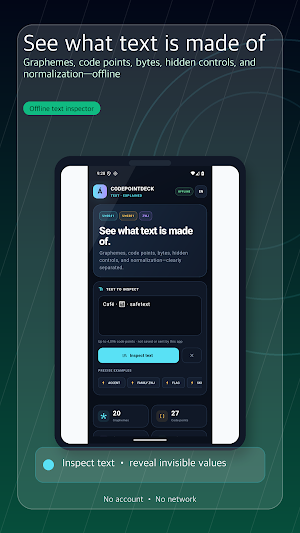
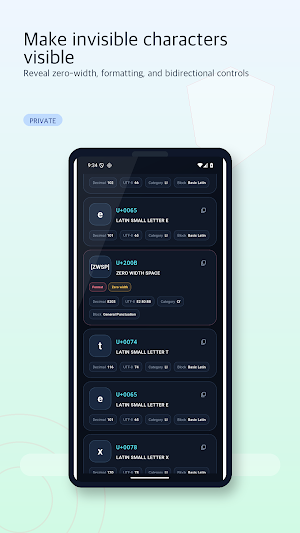
CodepointDeck is an offline text inspector for text you enter or paste yourself. It separates what looks like one character on screen from the code points, UTF-16 units, and UTF-8 bytes underneath it. Use it to understand emoji sequences, combining marks, formatting values, and normalization changes without an account or network connection.
Inspect text clearly:
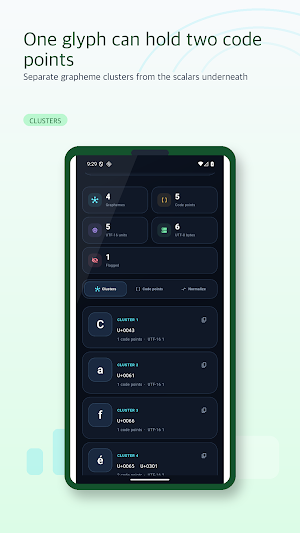
• Compare grapheme-cluster, code-point, UTF-16-unit, and UTF-8-byte counts.
• Browse grapheme clusters separately from their individual code points.
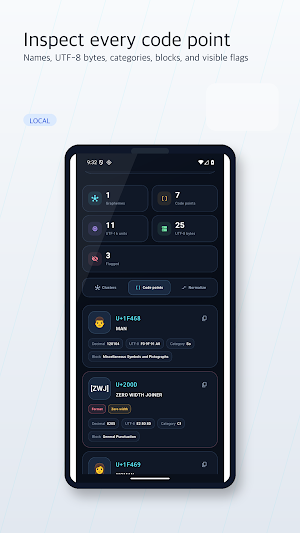
• See each value as U+ notation and decimal, with UTF-8 bytes, name, general category, and block.
• Reveal controls, format values, combining marks, zero-width values, byte-order marks, bidirectional controls, private-use values, and unassigned code points with visible flags.
• Start with precise examples for combining marks, ZWJ emoji, flags, skin-tone modifiers, zero-width space, and bidirectional controls.
Compare four normalization forms:
• Review NFC, NFD, NFKC, and NFKD side by side.
• See whether each result changed or stayed the same.
• Copy only the result you choose. Copied text is marked as sensitive through the Android clipboard API.
Clear boundaries:
CodepointDeck accepts up to 4,096 code points at a time. This app does not read the clipboard automatically, open files, keep inspection history, or provide security or threat verdicts. It has no account, network access, ads, analytics, or tracking. Text is processed in app memory and is not transmitted or retained by the app as history. Android, your active keyboard, and other software control their own input and clipboard handling outside CodepointDeck. The interface is available in English, Korean, and Spanish.
Engine disclosure:
Character properties use Unicode® Character Database 17.0 data. NFC, NFD, NFKC, and NFKD use version 17.0 normalization data through unorm_dart 0.3.2. Grapheme segmentation uses version 16.0 rules through characters 1.4.1. These components are versioned separately, and CodepointDeck does not claim full conformance to a single version of the Unicode Standard.
Trademark notice: Unicode and the Unicode Logo are registered trademarks of Unicode, Inc. in the United States and other countries. CodepointDeck is not associated with, endorsed by, or sponsored by Unicode, Inc. (aka The Unicode Consortium).
CodepointDeck is an offline text inspector for text you enter or paste yourself. It separates what looks like one character on screen from the code points, UTF-16 units, and UTF-8 bytes underneath it. Use it to understand emoji sequences, combining marks, formatting values, and normalization changes without an account or network connection.
Inspect text clearly:
• Compare grapheme-cluster, code-point, UTF-16-unit, and UTF-8-byte counts.
• Browse grapheme clusters separately from their individual code points.
• See each value as U+ notation and decimal, with UTF-8 bytes, name, general category, and block.
• Reveal controls, format values, combining marks, zero-width values, byte-order marks, bidirectional controls, private-use values, and unassigned code points with visible flags.
• Start with precise examples for combining marks, ZWJ emoji, flags, skin-tone modifiers, zero-width space, and bidirectional controls.
Compare four normalization forms:
• Review NFC, NFD, NFKC, and NFKD side by side.
• See whether each result changed or stayed the same.
• Copy only the result you choose. Copied text is marked as sensitive through the Android clipboard API.
Clear boundaries:
CodepointDeck accepts up to 4,096 code points at a time. This app does not read the clipboard automatically, open files, keep inspection history, or provide security or threat verdicts. It has no account, network access, ads, analytics, or tracking. Text is processed in app memory and is not transmitted or retained by the app as history. Android, your active keyboard, and other software control their own input and clipboard handling outside CodepointDeck. The interface is available in English, Korean, and Spanish.
Engine disclosure:
Character properties use Unicode® Character Database 17.0 data. NFC, NFD, NFKC, and NFKD use version 17.0 normalization data through unorm_dart 0.3.2. Grapheme segmentation uses version 16.0 rules through characters 1.4.1. These components are versioned separately, and CodepointDeck does not claim full conformance to a single version of the Unicode Standard.
Trademark notice: Unicode and the Unicode Logo are registered trademarks of Unicode, Inc. in the United States and other countries. CodepointDeck is not associated with, endorsed by, or sponsored by Unicode, Inc. (aka The Unicode Consortium).
What’s new
Version 1.0.1 · Updated July 27, 2026
Added privacy-aware ad support and improved app stability.
Alternatives to CodepointDeck: Text Inspector
Looking for apps like CodepointDeck: Text Inspector? Here are 5 similar Android apps on Google Play. The highest rated is Typhur (4.8/5), and all 5 are free to download.
-
FAX Desk: Send Fax from Phone 4.5
-
One Key: password manager 4.4
-
Typhur 4.8
-
Yomiwa - Japanese Dictionary 4.7
-
Cubii 4.1
| App | Rating | Price | Installs | Last updated | Compare |
|---|---|---|---|---|---|
| CodepointDeck: Text Inspector | – | Free | 5+ | Jul 27, 2026 | |
| FAX Desk: Send Fax from Phone | 4.5 / 5 | Free | 10,000+ | Dec 18, 2025 | Compare |
| One Key: password manager | 4.4 / 5 | Free | 100,000+ | May 21, 2026 | Compare |
| Typhur | 4.8 / 5 | Free | 50,000+ | Sep 23, 2026 | Compare |
| Yomiwa - Japanese Dictionary | 4.7 / 5 | Free | 500,000+ | – | Compare |
| Cubii | 4.1 / 5 | Free | 50,000+ | Sep 14, 2026 | Compare |