
iCallScreen - iOS Phone Dialer
Varsha dev. Personalization Contains ads
Icall screen and iPhone Dialer for look and fill like iPhone callers system
- Rating
- 4.0
- 7 ratings
- Downloads
- 5K+
- on Google Play
- Price
- Free
- No in-app purchases
- Updated
- Apr 9
- 2024 · v1.0.0
Screenshots
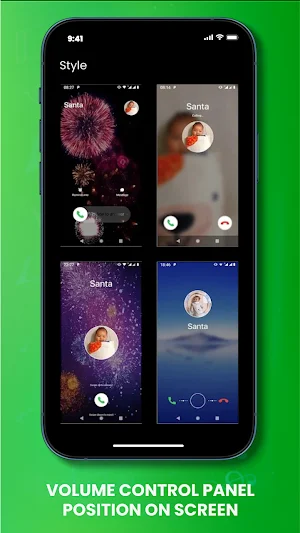


About iCallScreen - iOS Phone Dialer
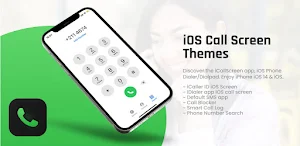
Check out the "iOS Phone Dialer/Dialpad" and the "iCallScreen app". Make use of the features that your Android device has to offer with "iOS 17 and iOS 15".
Are you tired of the outdated "caller screens"? We provide you with "iCallScreen - iCall Dialer" to make your Android caller screen resemble both iOS 16 and iOS 17. The full-screen caller ID that appears on "iPhone 15," "iPhone 16," "iOS 15," or "OS 16" smartphones is the identical one that you receive. The contact list, recent list, favorite list, and dialer T9 search keypad are all included in this caller screen software.
Features of iCallScreen :
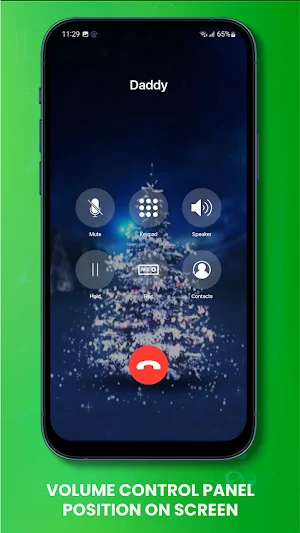
- Your phone dialer or dialpad is very easy to modify! You may swipe to answer calls, alter the call screen's background, select a different ringtone, ban or unlock people, and adjust SIM card options. Utilize your Android device's full-screen caller ID, dialer, and iPhone call pads.
- The "caller name announcer option" in the "iCallScreen app" lets you hear the caller's name or number. You therefore get the idea that you are using iOS 15 or iOS 17.
- iCallScreen - iOS Phone Dialler has great features for iOS 16 and iOS 17.
- Block unwanted calls : You can use it to stop unsolicited or spam calls.
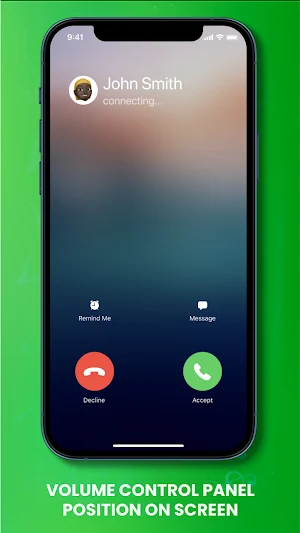
- Slide to answer button : What everyone wants is the "slide to answer button." With iOS 15, the iCallScreen app simulates a real iPhone slide-to-reply button.
-Dual SIM cards are supported by the app. Hence, a user can control SIM settings, select a SIM card ahead of time for a call, or set a default SIM.
- Fake Call: Plan a fictitious call with a personalized ringtone, mobile number, and contact name.
- Flash on Call : When the phone rings, blink a flashlight and change the flash setting to suit your needs.
- Call back screen : The call and call back screens appear after the call ends, allowing you to remember, message, block, or record calls.
Manage Conference : If necessary, you can split the calls, manage the conference, and combine two or more calls.
- Disclaimer
All trademarks, brands, product names, logos, and registered trademarks that are not our property belong to their respective owners.
The names of any companies, goods, or services mentioned in this app are solely for identification. Utilizing these names, Brands and trademarks do not indicate endorsement.
We are the owners of the "iCallScreen" - "iOS Phone Dialer" application; it is not an official iPhone app. We have no official affiliation with, authorization from, endorsement from, or association with iPhone.
Are you tired of the outdated "caller screens"? We provide you with "iCallScreen - iCall Dialer" to make your Android caller screen resemble both iOS 16 and iOS 17. The full-screen caller ID that appears on "iPhone 15," "iPhone 16," "iOS 15," or "OS 16" smartphones is the identical one that you receive. The contact list, recent list, favorite list, and dialer T9 search keypad are all included in this caller screen software.
Features of iCallScreen :
- Your phone dialer or dialpad is very easy to modify! You may swipe to answer calls, alter the call screen's background, select a different ringtone, ban or unlock people, and adjust SIM card options. Utilize your Android device's full-screen caller ID, dialer, and iPhone call pads.
- The "caller name announcer option" in the "iCallScreen app" lets you hear the caller's name or number. You therefore get the idea that you are using iOS 15 or iOS 17.
- iCallScreen - iOS Phone Dialler has great features for iOS 16 and iOS 17.
- Block unwanted calls : You can use it to stop unsolicited or spam calls.
- Slide to answer button : What everyone wants is the "slide to answer button." With iOS 15, the iCallScreen app simulates a real iPhone slide-to-reply button.
-Dual SIM cards are supported by the app. Hence, a user can control SIM settings, select a SIM card ahead of time for a call, or set a default SIM.
- Fake Call: Plan a fictitious call with a personalized ringtone, mobile number, and contact name.
- Flash on Call : When the phone rings, blink a flashlight and change the flash setting to suit your needs.
- Call back screen : The call and call back screens appear after the call ends, allowing you to remember, message, block, or record calls.
Manage Conference : If necessary, you can split the calls, manage the conference, and combine two or more calls.
- Disclaimer
All trademarks, brands, product names, logos, and registered trademarks that are not our property belong to their respective owners.
The names of any companies, goods, or services mentioned in this app are solely for identification. Utilizing these names, Brands and trademarks do not indicate endorsement.
We are the owners of the "iCallScreen" - "iOS Phone Dialer" application; it is not an official iPhone app. We have no official affiliation with, authorization from, endorsement from, or association with iPhone.
What’s new
Version 1.0.0 · Updated April 9, 2024
App for caller screen for your personal usage of call Dialer
Alternatives to iCallScreen - iOS Phone Dialer
Looking for apps like iCallScreen - iOS Phone Dialer? Here are 6 similar Android apps on Google Play. 3 of the 6 are free to download.
-
IP Checker
-
ISAAC WATCH HJ120
-
OneYou Three Accent Icons
-
Dynamic Wallpaper:Auto changer
-
ALX19 Analog Watch Face
-
W-Design WOS132 - Watch Face
| App | Rating | Price | Installs | Last updated | Compare |
|---|---|---|---|---|---|
| iCallScreen - iOS Phone Dialer | 4.0 / 5 | Free | 5,000+ | Apr 9, 2024 | |
| IP Checker | – | Free | 5+ | Nov 29, 2023 | Compare |
| ISAAC WATCH HJ120 | – | 1.7 USD | 100+ | Oct 29, 2025 | Compare |
| OneYou Three Accent Icons | – | 1.49 USD | 1,000+ | Aug 18, 2026 | Compare |
| Dynamic Wallpaper:Auto changer | – | Free | 1,000+ | Jun 13, 2023 | Compare |
| ALX19 Analog Watch Face | – | 0.99 USD | 100+ | Apr 16, 2024 | Compare |
| W-Design WOS132 - Watch Face | – | Free | 10,000+ | Aug 28, 2025 | Compare |
Similar apps on Google Play
- IP Checker
- ISAAC WATCH HJ120
- iCallScreen - iOS Phone Dialer
- OneYou Three Accent Icons
- Dynamic Wallpaper:Auto changer
- ALX19 Analog Watch Face
- W-Design WOS132 - Watch Face
- Krishna Wallpaper 2024
- Girly Glitter Wallpapers
- Tricolor crimson
- ALX10 Digital Watch Face
- huawei watch fit 3 user guide
- Dragon Wallpaper HD - Dragondi
- Huawei freebuds 3 app guide
- ISAAC WATCH David White
- Cat Wallpaper 2024
- Aespa Wallpaper HD 2K 4K
- SNSD Taeyeon Wallpaper HD 2K
- Jesus Wallpaper 2024
- Dark Glow Watch Face SAM-13
- القرآن كاملا عبدالرشيد صوفي
- Waifu Call Video: Anime Lover
- Flower Wallpaper 2024
- Wallpapers Ultra HD 4K
- Dynamic Gear