
Import Export Contact Master
Video.fun Tools Contains ads
Easily export contacts to excel file and import contacts from excel file now!!
- Rating
- 3.7
- 259 ratings
- Downloads
- 50K+
- on Google Play
- Price
- Free
- No in-app purchases
- Updated
- Apr 13
- 2021 · v10.0
Screenshots

About Import Export Contact Master
All queries like import sim contacts, copy contacts to sim, transfer my contacts, import contacts, import contacts meaning, transfer my contacts app, upload my contacts, load my contacts can be resolved by the Import Export Contact Master app.
Features of the Import Export Contact Master:
- Easy to install.
- Easy to operate.
- Completely free Android application.
- Professional design.
- User-friendly GUI.
- Readily available application.
- Quick click executions.
- Transformation takes place within seconds.
- Professional Converters used to export the contact list into an excel file and to import contacts from an excel file.
- Contact details are secure.
- Information may contain Name, Number, Email, Address, Work number, Home number, etc.
- Full version app.
- Easy export and creation of file formats.
- The app supports all screen resolutions of mobile and tablet devices.
- A lightweight application, will not drain the phone battery and other resources.
- Once installed, no further internet connection is required.
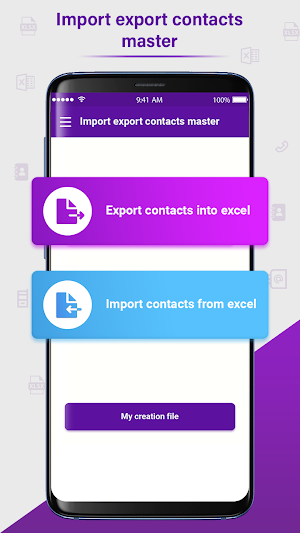
The Import Export Contact Master app has two main components:-
1! EXPORT CONTACTS INTO EXCEL
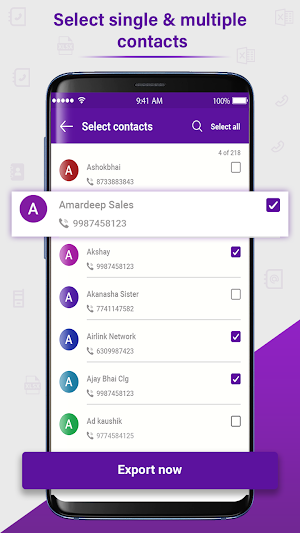
Selects the contacts to be exported into an excel file and click on the Done option and then select Export. A window with excel file name and .xls file extension will be displayed along with Open, Share, and Delete options.
2! IMPORT CONTACTS FROM EXCEL
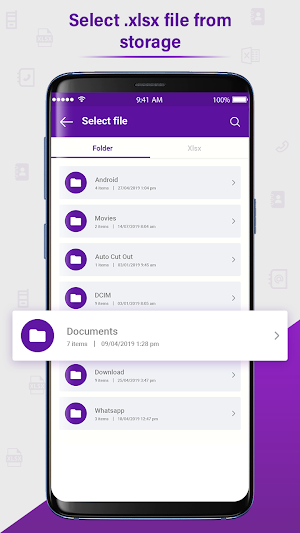
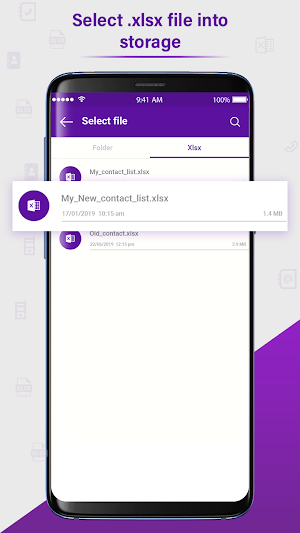
Select an excel file from the phone memory and select import. Contacts will be saved in the contact list automatically.
Import Export Contact Master is easy to operate Android app to facilitate the users with the best user experience while dealing with import export of contacts.
Install the all-new free Android Import Export Contact Master app to resolve your contact queries instantly!!!
Features of the Import Export Contact Master:
- Easy to install.
- Easy to operate.
- Completely free Android application.
- Professional design.
- User-friendly GUI.
- Readily available application.
- Quick click executions.
- Transformation takes place within seconds.
- Professional Converters used to export the contact list into an excel file and to import contacts from an excel file.
- Contact details are secure.
- Information may contain Name, Number, Email, Address, Work number, Home number, etc.
- Full version app.
- Easy export and creation of file formats.
- The app supports all screen resolutions of mobile and tablet devices.
- A lightweight application, will not drain the phone battery and other resources.
- Once installed, no further internet connection is required.
The Import Export Contact Master app has two main components:-
1! EXPORT CONTACTS INTO EXCEL
Selects the contacts to be exported into an excel file and click on the Done option and then select Export. A window with excel file name and .xls file extension will be displayed along with Open, Share, and Delete options.
2! IMPORT CONTACTS FROM EXCEL
Select an excel file from the phone memory and select import. Contacts will be saved in the contact list automatically.
Import Export Contact Master is easy to operate Android app to facilitate the users with the best user experience while dealing with import export of contacts.
Install the all-new free Android Import Export Contact Master app to resolve your contact queries instantly!!!
User reviews

Nice

Number 1 Application for Import and export Contact Number easliy in 10s..

Best app to share contact.. And easiest app to use...

Best for import and export contact

Make life-easy this app. Great help to create any format file of mobile contact numbers. Greate...Greate...Greate..👍

It's exceptional service. I like it very much.
Alternatives to Import Export Contact Master
Looking for apps like Import Export Contact Master? Here are 6 similar Android apps on Google Play. The highest rated is Sober Counter: Quit Addiction (4.8/5), and all 6 are free to download.
-
Bluetooth Equalizer & Sound Pr 4.3
-
Graffiti Name Logo Maker 3.6
-
Super Power Effects Photo FX 4.3
-
Fight Injury Face Photo Editor 3.9
-
Sober Counter: Quit Addiction 4.8
-
Video Subtitle Creator 2.9
| App | Rating | Price | Installs | Last updated | Compare |
|---|---|---|---|---|---|
| Import Export Contact Master | 3.7 / 5 | Free | 50,000+ | Apr 13, 2021 | |
| Bluetooth Equalizer & Sound Pr | 4.3 / 5 | Free | 5,000+ | Oct 8, 2021 | Compare |
| Graffiti Name Logo Maker | 3.6 / 5 | Free | 1,000,000+ | Sep 15, 2026 | Compare |
| Super Power Effects Photo FX | 4.3 / 5 | Free | 10,000+ | Mar 1, 2021 | Compare |
| Fight Injury Face Photo Editor | 3.9 / 5 | Free | 10,000+ | Oct 6, 2020 | Compare |
| Sober Counter: Quit Addiction | 4.8 / 5 | Free | 10+ | Aug 22, 2022 | Compare |
| Video Subtitle Creator | 2.9 / 5 | Free | 1,000+ | Jan 7, 2022 | Compare |
Similar apps on Google Play
- Bluetooth Equalizer & Sound Pr
- Graffiti Name Logo Maker
- Super Power Effects Photo FX
- Fight Injury Face Photo Editor
- Sober Counter: Quit Addiction
- Video Subtitle Creator
- My Photo Gangster Look Photo E
- Photo Combiner
- Stylish Jewellery Photo Editor
- Replace Video BG with Photo
- Make me Girl: Fun Photo Editor
- Draw & Make Font in your Style
- Fasting Record & Tracker
- Dreams Vision Board
- Audio Message to Text for WA
- Fancy Fonts, Text & Symbols fo
- Calculator Photo Hide
- Tattoo Booth: Name Tattoo Make
- Six Pack Abs Photo Maker
- My Photo Butterfly Background
- Animated Watermark on Videos