
Image to PDF
Lumbini mines Tools Contains ads
Convert your photos and images to secure PDF documents quickly and offline.
- Downloads
- 9+
- on Google Play
- Price
- Free
- No in-app purchases
- Updated
- Aug 25
- 2026 · v1.4
Screenshots

About Image to PDF
Transform your images into professional PDF documents instantly!
Whether you need to convert a single receipt, a set of lecture notes, or an entire gallery of photos into a single PDF, Image to PDF is the ultimate tool for the job. Designed with simplicity and privacy in mind, our app works entirely offline to ensure your data stays on your device.
Key Features:
•
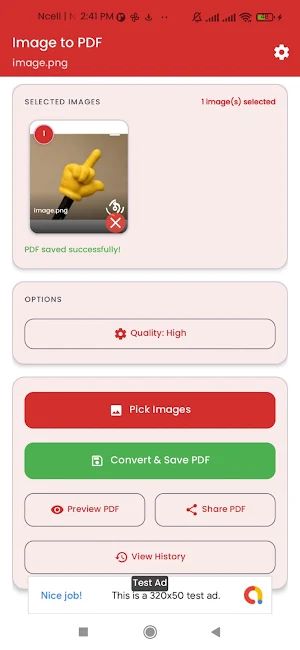
Easy Conversion: Select images from your gallery and convert them with one tap.
•
Multi-Image Support: Batch convert multiple images into a single, organized PDF.
•
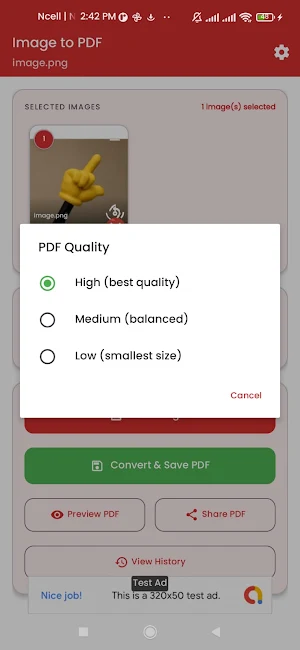
Quality Control: Choose between High, Medium, and Low quality settings to manage file size.
•
Organize with Ease: Use the drag-and-drop feature to reorder your images before conversion.
•
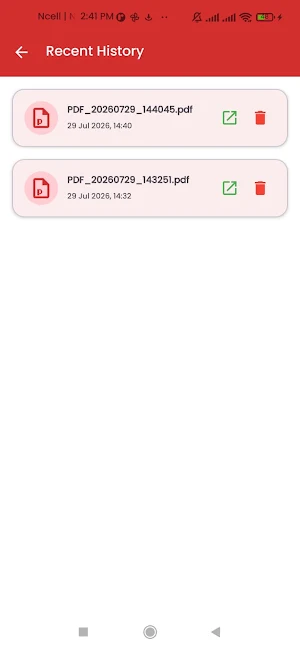
PDF History: Keep track of all your converted documents in a dedicated history tab.
•
Preview & Share: Preview your PDFs directly in the app and share them instantly via email, WhatsApp, or cloud storage.
•
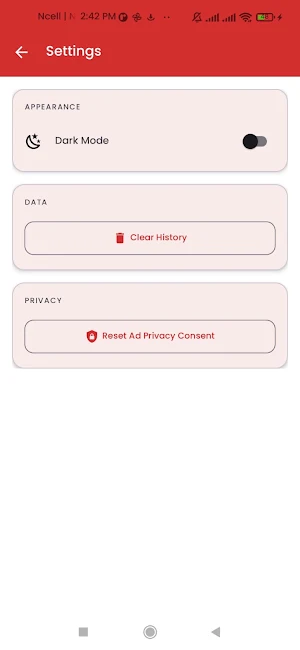
Dark Mode Support: A beautiful, easy-on-the-eyes interface for any time of day.
How to use:
1.
Tap 'Pick Images' and select one or more photos.
2.
Reorder or rotate images if needed.
3.
Choose your preferred quality.
4.
Tap 'Convert & Save' and give your PDF a name.
5.
You're done! View it in history or share it immediately.
Disclaimer: This app uses the device's local storage to process images. We do not upload your images or documents to any external servers. This app includes advertisements provided by Google AdMob. All PDF conversion functionality is provided "as is" without warranties of any kind.
Whether you need to convert a single receipt, a set of lecture notes, or an entire gallery of photos into a single PDF, Image to PDF is the ultimate tool for the job. Designed with simplicity and privacy in mind, our app works entirely offline to ensure your data stays on your device.
Key Features:
•
Easy Conversion: Select images from your gallery and convert them with one tap.
•
Multi-Image Support: Batch convert multiple images into a single, organized PDF.
•
Quality Control: Choose between High, Medium, and Low quality settings to manage file size.
•
Organize with Ease: Use the drag-and-drop feature to reorder your images before conversion.
•
PDF History: Keep track of all your converted documents in a dedicated history tab.
•
Preview & Share: Preview your PDFs directly in the app and share them instantly via email, WhatsApp, or cloud storage.
•
Dark Mode Support: A beautiful, easy-on-the-eyes interface for any time of day.
How to use:
1.
Tap 'Pick Images' and select one or more photos.
2.
Reorder or rotate images if needed.
3.
Choose your preferred quality.
4.
Tap 'Convert & Save' and give your PDF a name.
5.
You're done! View it in history or share it immediately.
Disclaimer: This app uses the device's local storage to process images. We do not upload your images or documents to any external servers. This app includes advertisements provided by Google AdMob. All PDF conversion functionality is provided "as is" without warranties of any kind.
Alternatives to Image to PDF
Looking for apps like Image to PDF? Here are 6 similar Android apps on Google Play. All of them are free to download.
-
Ged File Viewer
-
SQL DB Viewer : Editor
-
Recommendation Letter Maker
-
RTF to PDF Converter
-
Palette Generator - Color Pro
-
RTF Reader and Viewer
| App | Rating | Price | Installs | Last updated | Compare |
|---|---|---|---|---|---|
| Image to PDF | – | Free | 5+ | Aug 25, 2026 | |
| Ged File Viewer | – | Free | 50+ | – | Compare |
| SQL DB Viewer : Editor | – | Free | 100+ | Sep 30, 2026 | Compare |
| Recommendation Letter Maker | – | Free | 50+ | Aug 21, 2026 | Compare |
| RTF to PDF Converter | – | Free | 10+ | – | Compare |
| Palette Generator - Color Pro | – | Free | 0+ | – | Compare |
| RTF Reader and Viewer | – | Free | 10+ | – | Compare |
Compare Image to PDF with the top alternatives: ratings, updates, ASO score and keyword gaps →
Similar apps on Google Play
- Ged File Viewer
- SQL DB Viewer : Editor
- Recommendation Letter Maker
- RTF to PDF Converter
- Palette Generator - Color Pro
- RTF Reader and Viewer
- OCR Scanner: Text & Doc Scan
- Pro Aspect Ratio Calculator
- XML Viewer Pro
- Broken Display Prank
- Convert Tiff to Pdf
- LatTeX Editor
- Color Picker:Palette Tool
- Shake Screenshot
- Take Private Screenshots
- Gradient Maker: Design Tool
- CYMK Converter
- Screenshot Text Editor
- Bluetooth Speaker Mic
- Photo Translator: OCR & Text
- Bulk App Uninstaller
- Photo Dimension: Resizer
- Negative Film Scanner
- Bloatware Remover
- ODT to PDF
- MOBI to EPUB Converter
- JSON to CSV
- Image to ASCII
- Excel to PDF Converter
- EPUB to PDF Converter
- DOCX to TXT
- DOCX to ODT Converter
- DOC to DOCX Converter
- Bin File Viewer
- TeX Editor
- SheetFlow: Excel File Viewer
- Scan & PDF Converter
- MHT & MHTML Editor
- MD File Editor
- JSON Creator & Editor
- INDD Viewer
- DICOM File Viewer
- MsgReader:View unsent messages
- Phone Speaker Tester
- Phone Microphone Tester
- Display Touch Tester
- Flute Simulator
- Speaker Water Remover
- mht and mhtml editor/Viewer
- WPS to PDF Converter
- News Photo Editor
- Image AltGen
- Job Cover letter Maker
- EPS Viewer
- CBR to Pdf - Comic Reader
- SRT File Maker-Subtitle Editor
- OGG to MP3 Audio
- Europass CV Builder
- Fb2 to Pdf Converter
- Flowchart Maker
- Rain Sounds for Sleep
- BUSSID Skin Maker
- Lumbini mines