

JSON Creator & Editor
Lumbini mines Tools Contains ads
Create, edit, format, and validate JSON files with ease. Built-in search & undo
- Downloads
- 50+
- on Google Play
- Price
- Free
- No in-app purchases
- Updated
- Aug 5
- 2026 · v1.2
Screenshots
About JSON Creator & Editor
JSON Creator & Editor is a powerful, lightweight tool designed for developers, students, and data enthusiasts who need to handle JSON files on the go. Whether you are debugging an API response or creating complex data structures, this app provides everything you need in a sleek, Material 3 interface.
Core Features:
•
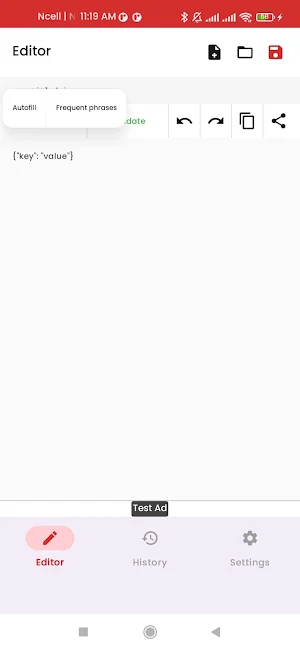
Advanced Editor: Write and edit JSON with a specialized code-focused interface.
•
Format & Minify: Instantly beautify messy JSON or minify it to save space.
•
Validation: Built-in syntax checking with clear error messages to help you find mistakes instantly.
•
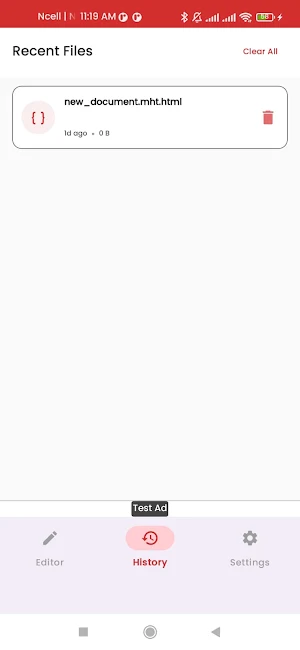
History & Recent Files: Never lose your work. Access previously edited files with one tap.
•
Search & Replace: Quickly find specific keys or values within large JSON documents.
•
Templates: Speed up your workflow with common JSON structure templates.
•
Safe Storage: Open and save files directly from your device using the Android Storage Access Framework.
•
Undo & Redo: Full history support so you can revert changes effortlessly.
•
Share & Copy: One-tap sharing to email, cloud storage, or copying to clipboard.
Perfect for:
•
Web and mobile developers testing APIs.
•
Data scientists managing configuration files.
•
Students learning JSON structure.
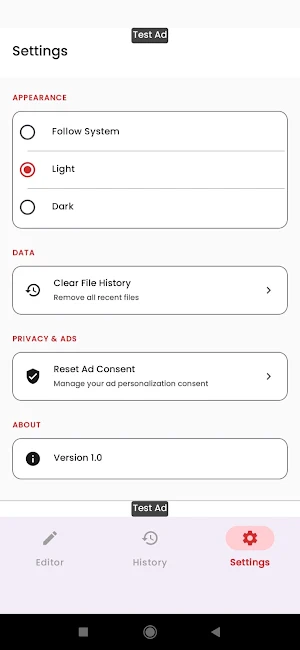
Disclaimer: This application is provided "as is" without warranty of any kind. While we strive to ensure data integrity, the developer is not responsible for any data loss or corruption resulting from the use of this tool. This app contains ads to support development; you can manage your ad personalization preferences within the settings.
Support: [email protected]
Core Features:
•
Advanced Editor: Write and edit JSON with a specialized code-focused interface.
•
Format & Minify: Instantly beautify messy JSON or minify it to save space.
•
Validation: Built-in syntax checking with clear error messages to help you find mistakes instantly.
•
History & Recent Files: Never lose your work. Access previously edited files with one tap.
•
Search & Replace: Quickly find specific keys or values within large JSON documents.
•
Templates: Speed up your workflow with common JSON structure templates.
•
Safe Storage: Open and save files directly from your device using the Android Storage Access Framework.
•
Undo & Redo: Full history support so you can revert changes effortlessly.
•
Share & Copy: One-tap sharing to email, cloud storage, or copying to clipboard.
Perfect for:
•
Web and mobile developers testing APIs.
•
Data scientists managing configuration files.
•
Students learning JSON structure.
Disclaimer: This application is provided "as is" without warranty of any kind. While we strive to ensure data integrity, the developer is not responsible for any data loss or corruption resulting from the use of this tool. This app contains ads to support development; you can manage your ad personalization preferences within the settings.
Support: [email protected]
Alternatives to JSON Creator & Editor
Looking for apps like JSON Creator & Editor? Here are 3 similar Android apps on Google Play. The highest rated is Choolaah Ordering (4.8/5), and all 3 are free to download.



| App | Rating | Price | Installs | Last updated | Compare |
|---|---|---|---|---|---|
| JSON Creator & Editor | – | Free | 50+ | Aug 5, 2026 | |
| Syd | – | Free | 1,000+ | Oct 2, 2026 | Compare |
| Vantix Law | 4.6 / 5 | Free | 5,000+ | Oct 1, 2026 | Compare |
| Choolaah Ordering | 4.8 / 5 | Free | 10,000+ | Oct 26, 2026 | Compare |