
BUSSID Skin Maker
Lumbini mines Tools
Create, edit, and export custom liveries for Bus Simulator Indonesia (BUSSID)
- Downloads
- 4.6K+
- on Google Play
- Price
- Free
- No in-app purchases
- Updated
- Sep 10
- 2026 · v1.0.3
Screenshots
About BUSSID Skin Maker
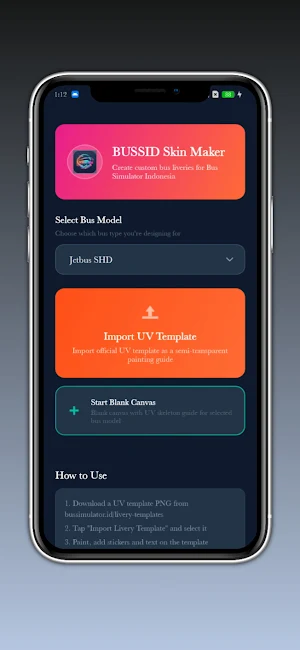
Unleash your creativity and design the ultimate custom skins for Bus Simulator Indonesia with BUSSID Skin Maker! Whether you want to build a livery from scratch or import a UV template, our powerful editing suite gives you all the tools you need to create professional-grade bus liveries on your mobile device.
BUSSID Skin Maker provides a comprehensive suite of drawing and graphic design features tailored specifically for bus simulator enthusiasts. From custom decals to complex gradient paints, designing your dream fleet has never been easier.
🔥 POWERFUL DESIGN FEATURES:
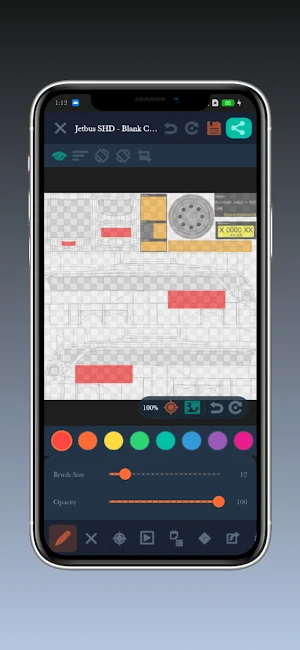
• Complete Drawing Tools: Choose from precision brushes, erasers, spray cans, shape tools (lines, rectangles, circles), and advanced smudge/stamp options.
• Smart Mirror Mode: Save time by enabling vertical or horizontal symmetry to paint both sides of the bus simultaneously.
• Layer Manager: Arrange, hide, duplicate, and merge design layers just like professional desktop editor software.
• Custom Stickers & Text: Add your own decals, images, or stylized text. Select custom colors, sizes, and fonts to personalize your bus.
• Precision Color Picker & Replacement: Extract colors directly from the canvas using the Eyedropper tool or swap matching colors instantly using the Color Replace filter.
• Multiple Template Support: Fully compatible with popular bus model UV templates, including:
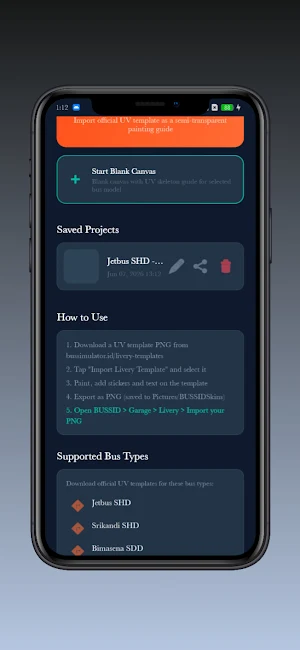
- Jetbus SHD
- Srikandi SHD
- Bimasena SDD (Double Decker)
- Arjuna XHD
- JB HD
📂 PROJECT MANAGEMENT & EXPORT:
• Save Projects Locally: Work at your own pace. Save your designs in the app's manager and duplicate or edit them anytime.
• High-Resolution Export: Export your final livery designs in high-quality PNG formats ready to be loaded directly into Bus Simulator Indonesia.
• Share with Friends: Export and package your project file (.bskin) to share with your friends and local simulator community.
How it works:
1. Select your bus model template.
2. Paint, add stickers, and customize your layout using our multi-layer canvas.
3. Export your high-resolution livery.
4. Open Bus Simulator Indonesia, load the livery, and hit the road!
---
Disclaimer:
BUSSID Skin Maker is an unofficial companion application. It is not developed by, associated with, or officially endorsed by Maleo (the developer of Bus Simulator Indonesia). All references to "BUSSID" and "Bus Simulator Indonesia" are solely for compatibility demonstration and user guidance
BUSSID Skin Maker provides a comprehensive suite of drawing and graphic design features tailored specifically for bus simulator enthusiasts. From custom decals to complex gradient paints, designing your dream fleet has never been easier.
🔥 POWERFUL DESIGN FEATURES:
• Complete Drawing Tools: Choose from precision brushes, erasers, spray cans, shape tools (lines, rectangles, circles), and advanced smudge/stamp options.
• Smart Mirror Mode: Save time by enabling vertical or horizontal symmetry to paint both sides of the bus simultaneously.
• Layer Manager: Arrange, hide, duplicate, and merge design layers just like professional desktop editor software.
• Custom Stickers & Text: Add your own decals, images, or stylized text. Select custom colors, sizes, and fonts to personalize your bus.
• Precision Color Picker & Replacement: Extract colors directly from the canvas using the Eyedropper tool or swap matching colors instantly using the Color Replace filter.
• Multiple Template Support: Fully compatible with popular bus model UV templates, including:
- Jetbus SHD
- Srikandi SHD
- Bimasena SDD (Double Decker)
- Arjuna XHD
- JB HD
📂 PROJECT MANAGEMENT & EXPORT:
• Save Projects Locally: Work at your own pace. Save your designs in the app's manager and duplicate or edit them anytime.
• High-Resolution Export: Export your final livery designs in high-quality PNG formats ready to be loaded directly into Bus Simulator Indonesia.
• Share with Friends: Export and package your project file (.bskin) to share with your friends and local simulator community.
How it works:
1. Select your bus model template.
2. Paint, add stickers, and customize your layout using our multi-layer canvas.
3. Export your high-resolution livery.
4. Open Bus Simulator Indonesia, load the livery, and hit the road!
---
Disclaimer:
BUSSID Skin Maker is an unofficial companion application. It is not developed by, associated with, or officially endorsed by Maleo (the developer of Bus Simulator Indonesia). All references to "BUSSID" and "Bus Simulator Indonesia" are solely for compatibility demonstration and user guidance
User reviews

nice game

good app
Alternatives to BUSSID Skin Maker
Looking for apps like BUSSID Skin Maker? Here are 6 similar Android apps on Google Play. All of them are free to download.
-
Ged File Viewer
-
SQL DB Viewer : Editor
-
Recommendation Letter Maker
-
RTF to PDF Converter
-
Palette Generator - Color Pro
-
RTF Reader and Viewer
| App | Rating | Price | Installs | Last updated | Compare |
|---|---|---|---|---|---|
| BUSSID Skin Maker | – | Free | 1,000+ | Sep 10, 2026 | |
| Ged File Viewer | – | Free | 50+ | Aug 5, 2026 | Compare |
| SQL DB Viewer : Editor | – | Free | 100+ | Sep 30, 2026 | Compare |
| Recommendation Letter Maker | – | Free | 50+ | Aug 21, 2026 | Compare |
| RTF to PDF Converter | – | Free | 100+ | Aug 21, 2026 | Compare |
| Palette Generator - Color Pro | – | Free | 0+ | – | Compare |
| RTF Reader and Viewer | – | Free | 50+ | Nov 2, 2026 | Compare |
Compare BUSSID Skin Maker with the top alternatives: ratings, updates, ASO score and keyword gaps →
Similar apps on Google Play
- Ged File Viewer
- SQL DB Viewer : Editor
- Recommendation Letter Maker
- RTF to PDF Converter
- Palette Generator - Color Pro
- RTF Reader and Viewer
- OCR Scanner: Text & Doc Scan
- Pro Aspect Ratio Calculator
- XML Viewer Pro
- Broken Display Prank
- Convert Tiff to Pdf
- LatTeX Editor
- Color Picker:Palette Tool
- Shake Screenshot
- Take Private Screenshots
- Gradient Maker: Design Tool
- CYMK Converter
- Screenshot Text Editor
- Bluetooth Speaker Mic
- Photo Translator: OCR & Text
- Bulk App Uninstaller
- Photo Dimension: Resizer
- Negative Film Scanner
- Bloatware Remover
- ODT to PDF
- MOBI to EPUB Converter
- JSON to CSV
- Image to PDF
- Image to ASCII
- Excel to PDF Converter
- EPUB to PDF Converter
- DOCX to TXT
- DOCX to ODT Converter
- DOC to DOCX Converter
- Bin File Viewer
- TeX Editor
- SheetFlow: Excel File Viewer
- Scan & PDF Converter
- MHT & MHTML Editor
- MD File Editor
- JSON Creator & Editor
- INDD Viewer
- DICOM File Viewer
- MsgReader:View unsent messages
- Phone Speaker Tester
- Phone Microphone Tester
- Display Touch Tester
- Flute Simulator
- Speaker Water Remover
- mht and mhtml editor/Viewer
- WPS to PDF Converter
- News Photo Editor
- Image AltGen
- Job Cover letter Maker
- EPS Viewer
- CBR to Pdf - Comic Reader
- SRT File Maker-Subtitle Editor
- OGG to MP3 Audio
- Europass CV Builder
- Fb2 to Pdf Converter
- Flowchart Maker
- Rain Sounds for Sleep
- Lumbini mines