
Icon changer: Custom app icons
Personalization Contains ads
Change your app icons with our custom icon changer and color widgets app
- Downloads
- 500+
- on Google Play
- Price
- Free
- No in-app purchases
- Updated
- Aug 27
- 2024
Screenshots


About Icon changer: Custom app icons
Unlock Your Phone's True Potential with Icon Changer.
Have you ever wondered how your phone could reflect your style and personality? The Icon Changer app has the answers to your customization questions.
Icon Changer is not just another app; it's your passport to a uniquely personalized mobile experience. Have you ever felt limited by the stock icons on your device? Do you crave the freedom to express yourself through vibrant themes and custom app icons? Icon Changer is your shortcut to a phone that truly reflects who you are.
How to Use:
1. Open Icon Changer.
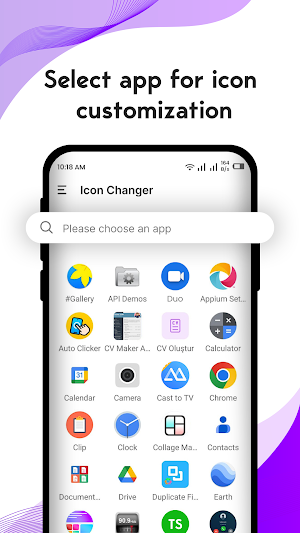
2. Select an app to change the icon.
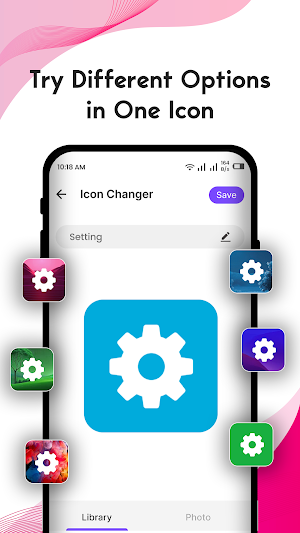
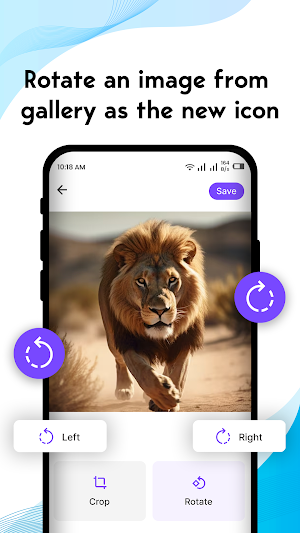
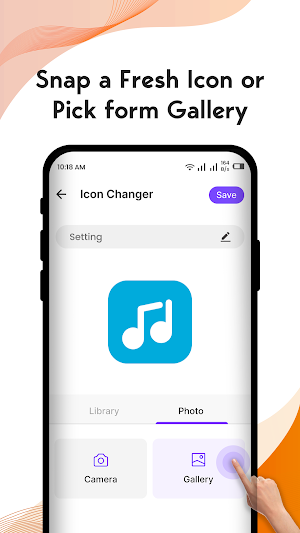
3. Choose a new image from the app's icon pack, gallery, other app icons, or third-party personalized icon packs.
4. Give it a name. (can be void)
5. Go to the home screen to view the new shortcut icons.
Key Features:
• Custom app Icons: Create a shortcut to your unique style with a wide range of custom app icons.
• Fancy Widgets Themes: Elevate your phone's aesthetic with a vibrant and dynamic widget theme.
• Icon Changer: Seamlessly switch between themes and transform your device's look with the app changer.
• App Icon Maker: Unleash your creativity and design your own app icons with our intuitive icon maker.
• Phone Customizer: Icon Changer is not just an app; it's your phone customizer for a truly tailored experience.
Icon Changer goes beyond being a simple icon app; it's a comprehensive phone designer. Say goodbye to the dull and hello to a phone that's as unique as you are.
Ready to transform your phone into a masterpiece? Install Icon Changer now and experience the freedom to change app icons and elevate your phone's aesthetic with ease.
Your opinion matters! If you enjoy using Icon Changer - Custom app icons app, please take a moment to leave us a review. Your feedback helps us enhance the app and ensures you get the best-personalized experience possible. Contact us at [email protected]. Thank you for choosing Icon Changer!
Have you ever wondered how your phone could reflect your style and personality? The Icon Changer app has the answers to your customization questions.
Icon Changer is not just another app; it's your passport to a uniquely personalized mobile experience. Have you ever felt limited by the stock icons on your device? Do you crave the freedom to express yourself through vibrant themes and custom app icons? Icon Changer is your shortcut to a phone that truly reflects who you are.
How to Use:
1. Open Icon Changer.
2. Select an app to change the icon.
3. Choose a new image from the app's icon pack, gallery, other app icons, or third-party personalized icon packs.
4. Give it a name. (can be void)
5. Go to the home screen to view the new shortcut icons.
Key Features:
• Custom app Icons: Create a shortcut to your unique style with a wide range of custom app icons.
• Fancy Widgets Themes: Elevate your phone's aesthetic with a vibrant and dynamic widget theme.
• Icon Changer: Seamlessly switch between themes and transform your device's look with the app changer.
• App Icon Maker: Unleash your creativity and design your own app icons with our intuitive icon maker.
• Phone Customizer: Icon Changer is not just an app; it's your phone customizer for a truly tailored experience.
Icon Changer goes beyond being a simple icon app; it's a comprehensive phone designer. Say goodbye to the dull and hello to a phone that's as unique as you are.
Ready to transform your phone into a masterpiece? Install Icon Changer now and experience the freedom to change app icons and elevate your phone's aesthetic with ease.
Your opinion matters! If you enjoy using Icon Changer - Custom app icons app, please take a moment to leave us a review. Your feedback helps us enhance the app and ensures you get the best-personalized experience possible. Contact us at [email protected]. Thank you for choosing Icon Changer!
Alternatives to Icon changer: Custom app icons
Looking for apps like Icon changer: Custom app icons? Here are 6 similar Android apps on Google Play. The highest rated is Resume Builder: CV maker PDF (4.0/5), and all 6 are free to download.
-
Screen Mirroring - Cast to TV 3.7
-
Resume Builder: CV maker PDF 4.0
-
Smart Transfer: Copy My Data
-
Magic fluid: live wallpaper
-
Emoji Maker: DIY Emoji Mix
-
Haircut Prank: Funny Sounds 3.6
| App | Rating | Price | Installs | Last updated | Compare |
|---|---|---|---|---|---|
| Icon changer: Custom app icons | – | Free | 500+ | Aug 27, 2024 | |
| Screen Mirroring - Cast to TV | 3.7 / 5 | Free | 5,000,000+ | – | Compare |
| Resume Builder: CV maker PDF | 4.0 / 5 | Free | 10,000,000+ | – | Compare |
| Smart Transfer: Copy My Data | – | Free | 1,000,000+ | Feb 23, 2026 | Compare |
| Magic fluid: live wallpaper | – | Free | 100,000+ | Sep 18, 2024 | Compare |
| Emoji Maker: DIY Emoji Mix | – | Free | 100+ | Oct 4, 2024 | Compare |
| Haircut Prank: Funny Sounds | 3.6 / 5 | Free | 1,000+ | May 26, 2021 | Compare |
Similar apps on Google Play
- Screen Mirroring - Cast to TV
- Resume Builder: CV maker PDF
- Smart Transfer: Copy My Data
- Magic fluid: live wallpaper
- Emoji Maker: DIY Emoji Mix
- Haircut Prank: Funny Sounds
- QR Code Reader & Generator
- Document Scanner - PDF Scanner
- Duplicate Files Remover App
- Screen Recorder: Record Video
- Color Phone: Call Screen Theme
- Icon changer: Custom app icons
- Invoice Maker: PDF Receipt App