
Resume Builder - CV Maker
Business In-app purchases Contains ads
Resume maker is a professional app that easily creates your CV in a few minutes.
- Rating
- 3.8
- 21.3K ratings
- Downloads
- 10M+
- on Google Play
- Price
- Free
- In-app purchases
- Updated
- Mar 27
- 2026 · v6.3.4
Screenshots



About Resume Builder - CV Maker
If you are worried about how to make a resume or professional CV. Don't need to worry just Install our resume builder app and create an intelligent cv within a few minutes and make your next career move with confidence.
Resume builder and CV maker is a very simple and useful tool to help you in creating a Curriculum Vitae of professional level in just a few steps. CV builder is a professional resume maker app that is simple for both freshers & experienced. Curriculum Vitae is the first impression while job hunting. Having a great resume will place you ahead of the competition in the job search. The resume builder app will assist you to generate, manage & share your CV resume quickly.
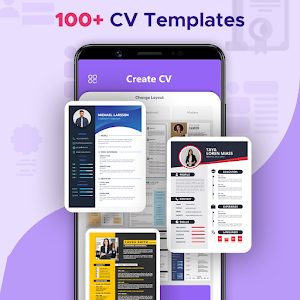
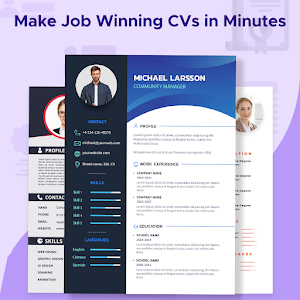
A perfect resume format for the job is compulsory when you apply for any job or go for an interview. The cv maker app has 30+ professional resume templates through which you can create multiple resumes as per your working experience. The resume maker app will be really beneficial in generating a perfect resume.
The following features are provided by resume builder to assist you in creating your Curriculum Vitae:
- Objective
- Education details
- Working experience
- Projects details
- Skills both Non-technical/Technical
- Known Languages
- Other activities, achievements & awards
- Hobbies/ Interests/ curricular activities
- Photograph & E-Signature
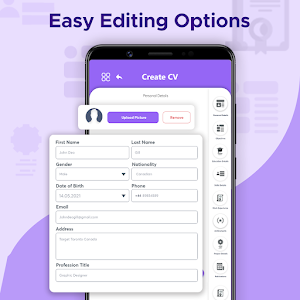
1. Fill out all the required fields in the personal information section. Also provide details regarding education, projects, work experience, other skills, etc.
2. Select any resume template you want.
3. Download resume CV in PDF/JPEG format.
4. You can also email or print the resume directly.
You may easily modify the design of your CV to whatever format you like, such as reverse chronological, functional, or combination CVs, etc. by using a resume builder application.
Hopefully, the CV maker app will be beneficial for you. Your feedback is welcoming for us. If you want to suggest more features or give any feedback, please feel free to contact us via email: [email protected]. Do not forget to rate this app 5★ for developer support. Thank you for using it!
Resume builder and CV maker is a very simple and useful tool to help you in creating a Curriculum Vitae of professional level in just a few steps. CV builder is a professional resume maker app that is simple for both freshers & experienced. Curriculum Vitae is the first impression while job hunting. Having a great resume will place you ahead of the competition in the job search. The resume builder app will assist you to generate, manage & share your CV resume quickly.
A perfect resume format for the job is compulsory when you apply for any job or go for an interview. The cv maker app has 30+ professional resume templates through which you can create multiple resumes as per your working experience. The resume maker app will be really beneficial in generating a perfect resume.
The following features are provided by resume builder to assist you in creating your Curriculum Vitae:
- Objective
- Education details
- Working experience
- Projects details
- Skills both Non-technical/Technical
- Known Languages
- Other activities, achievements & awards
- Hobbies/ Interests/ curricular activities
- Photograph & E-Signature
How to use CV maker app:
1. Fill out all the required fields in the personal information section. Also provide details regarding education, projects, work experience, other skills, etc.
2. Select any resume template you want.
3. Download resume CV in PDF/JPEG format.
4. You can also email or print the resume directly.
You may easily modify the design of your CV to whatever format you like, such as reverse chronological, functional, or combination CVs, etc. by using a resume builder application.
Hopefully, the CV maker app will be beneficial for you. Your feedback is welcoming for us. If you want to suggest more features or give any feedback, please feel free to contact us via email: [email protected]. Do not forget to rate this app 5★ for developer support. Thank you for using it!
What’s new
Version 6.3.4 · Updated March 27, 2026
- Add professional templates - View & share PDF resume - Advanced features added - Performance improved
User reviews

Great

So nice to see that 😌😌😌

1 week

👍

Very Good

This app is awesome 👌
Alternatives to Resume Builder - CV Maker
Looking for apps like Resume Builder - CV Maker? Here are 6 similar Android apps on Google Play. The highest rated is Resume Builder: PDF Resume App (4.7/5), and all 6 are free to download.
-
Resume Builder - CV Engineer 4.4
-
Resume Builder: PDF Resume App 4.7
-
CV & Resume Creator 4.6
-
Kickresume: AI Resume Builder 2.6
-
Jobseeker 3.8
-
ResumeChef: build & design CVs 4.2
| App | Rating | Price | Installs | Last updated | Compare |
|---|---|---|---|---|---|
| Resume Builder - CV Maker | 3.8 / 5 | Free | 10,000,000+ | Mar 27, 2026 | |
| Resume Builder - CV Engineer | 4.4 / 5 | Free | 5,000,000+ | Oct 25, 2026 | Compare |
| Resume Builder: PDF Resume App | 4.7 / 5 | Free | 500,000+ | Aug 6, 2026 | Compare |
| CV & Resume Creator | 4.6 / 5 | Free | 1,000,000+ | Oct 22, 2026 | Compare |
| Kickresume: AI Resume Builder | 2.6 / 5 | Free | 100,000+ | – | Compare |
| Jobseeker | 3.8 / 5 | Free | 1,000,000+ | Aug 28, 2026 | Compare |
| ResumeChef: build & design CVs | 4.2 / 5 | Free | 100+ | Jul 16, 2021 | Compare |