
ClickTimer - Ticketing Timer
HEDVION Tools In-app purchases
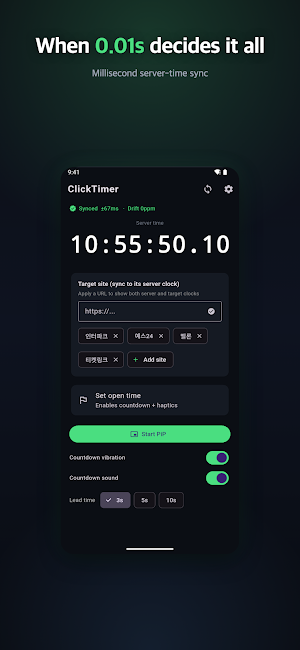
Millisecond server-time sync. The must-have timer for ticketing & sign-ups.
- Downloads
- 72+
- on Google Play
- Price
- Free
- In-app purchases
- Updated
- Aug 11
- 2026 · v1.2.4
Screenshots

About ClickTimer - Ticketing Timer
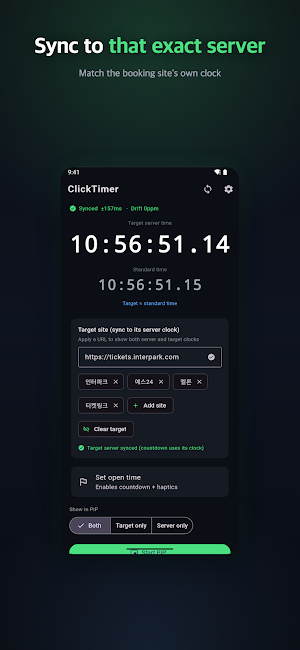
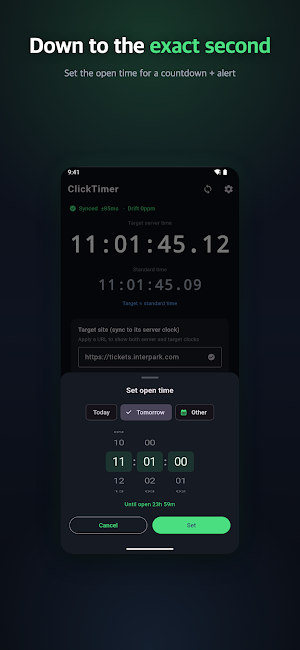
One second before a ticket sale opens, if your phone's clock is even slightly off from the sale server's clock, your whole timing is thrown off. ClickTimer exists to solve exactly that problem. Instead of trusting your phone's own clock, it shows you the real server time, synced down to the millisecond, so you know the exact moment the countdown hits zero.
WHAT MAKES CLICKTIMER DIFFERENT
Millisecond-precise sync. ClickTimer uses NTP-based synchronization to measure the gap between your phone's clock and real server time, then corrects for it continuously. The display runs in milliseconds, not seconds, because in ticketing, course sign-ups, and first-come-first-served drops, a few hundred milliseconds decide who gets through.
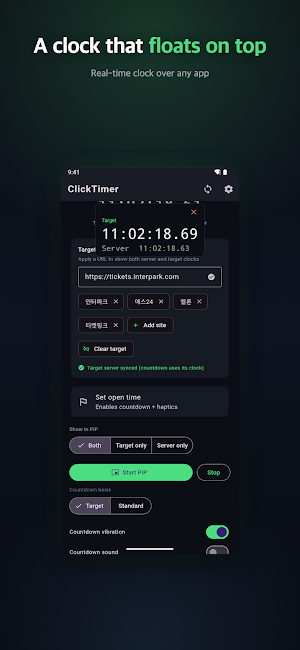
Never lose track of the countdown. Dynamic Island and Lock Screen Live Activities keep the countdown visible even while you're using another app or your phone is locked, so you're never caught off guard checking a different screen.
EVERYTHING YOU NEED FOR THE DROP
- Millisecond-accurate server-time countdown, powered by NTP synchronization
- Set your own target time for any sale, sign-up, or event
- Dynamic Island and Lock Screen live countdown display
- Reaction test and click compensation: measures your average tap delay over five tries and fires the GO signal that much earlier, so your actual click lands closer to the exact target time
- Millisecond (0.001s) precision display mode
- A clean interface with no ads blocking the countdown itself
HOW PEOPLE USE IT
Enter the sale's start time ahead of schedule, then open ClickTimer a few minutes before it begins. It shows a live countdown synced to real server time, and tells you the instant the clock hits zero. Run the reaction test once beforehand, and every future countdown automatically compensates for your personal tap delay, so your click lands closer to the true target moment. People use it for concert and event ticketing, university course registration, limited sneaker and merchandise drops, and any first-come-first-served signup where timing decides the outcome.
FREQUENTLY ASKED QUESTIONS
Why can't I just trust my phone's clock? A phone's system clock can drift from a sale server's clock by anywhere from a few hundred milliseconds to several seconds, depending on your carrier or Wi-Fi network. That small drift is exactly what ruins split-second timing. ClickTimer measures and corrects for that gap in real time, so the problem disappears.
How does the reaction test work? Tap along with five on-screen prompts, and ClickTimer calculates your average reaction delay. From then on, every countdown fires its GO signal that much earlier, so your actual tap lands right at the target time instead of slightly after it.
Do I need an internet connection? An initial connection is required to sync with server time. Once synced, the countdown keeps running accurately for a short period even without a live connection.
Does it work on phones without Dynamic Island? Yes. Dynamic Island and Lock Screen display are bonus features on supported devices, while the core millisecond countdown and sync work identically on every device.
CLICKTIMER PRO (LIFETIME, ONE-TIME PURCHASE)
The core timer works fully with no purchase required. Pro is a single one-time purchase that unlocks Dynamic Island and Lock Screen display, the reaction test with click compensation, and the millisecond precision display mode, for good. It is not a subscription, and there is no account to create.
WHAT MAKES CLICKTIMER DIFFERENT
Millisecond-precise sync. ClickTimer uses NTP-based synchronization to measure the gap between your phone's clock and real server time, then corrects for it continuously. The display runs in milliseconds, not seconds, because in ticketing, course sign-ups, and first-come-first-served drops, a few hundred milliseconds decide who gets through.
Never lose track of the countdown. Dynamic Island and Lock Screen Live Activities keep the countdown visible even while you're using another app or your phone is locked, so you're never caught off guard checking a different screen.
EVERYTHING YOU NEED FOR THE DROP
- Millisecond-accurate server-time countdown, powered by NTP synchronization
- Set your own target time for any sale, sign-up, or event
- Dynamic Island and Lock Screen live countdown display
- Reaction test and click compensation: measures your average tap delay over five tries and fires the GO signal that much earlier, so your actual click lands closer to the exact target time
- Millisecond (0.001s) precision display mode
- A clean interface with no ads blocking the countdown itself
HOW PEOPLE USE IT
Enter the sale's start time ahead of schedule, then open ClickTimer a few minutes before it begins. It shows a live countdown synced to real server time, and tells you the instant the clock hits zero. Run the reaction test once beforehand, and every future countdown automatically compensates for your personal tap delay, so your click lands closer to the true target moment. People use it for concert and event ticketing, university course registration, limited sneaker and merchandise drops, and any first-come-first-served signup where timing decides the outcome.
FREQUENTLY ASKED QUESTIONS
Why can't I just trust my phone's clock? A phone's system clock can drift from a sale server's clock by anywhere from a few hundred milliseconds to several seconds, depending on your carrier or Wi-Fi network. That small drift is exactly what ruins split-second timing. ClickTimer measures and corrects for that gap in real time, so the problem disappears.
How does the reaction test work? Tap along with five on-screen prompts, and ClickTimer calculates your average reaction delay. From then on, every countdown fires its GO signal that much earlier, so your actual tap lands right at the target time instead of slightly after it.
Do I need an internet connection? An initial connection is required to sync with server time. Once synced, the countdown keeps running accurately for a short period even without a live connection.
Does it work on phones without Dynamic Island? Yes. Dynamic Island and Lock Screen display are bonus features on supported devices, while the core millisecond countdown and sync work identically on every device.
CLICKTIMER PRO (LIFETIME, ONE-TIME PURCHASE)
The core timer works fully with no purchase required. Pro is a single one-time purchase that unlocks Dynamic Island and Lock Screen display, the reaction test with click compensation, and the millisecond precision display mode, for good. It is not a subscription, and there is no account to create.
What’s new
Version 1.2.4 · Updated August 11, 2026
Countdown accuracy fix after deep sleep, PiP timezone fix, and improved ad delivery with a new mediation partner.
Alternatives to ClickTimer - Ticketing Timer
Looking for apps like ClickTimer - Ticketing Timer? Here are 6 similar Android apps on Google Play. All of them are free to download.
-
TapPilot - Auto Clicker Tapper
-
Unbitten: Stop Nail Biting
-
Spectrum: Audio Analyzer & RTA
-
Vidpress: Video Compressor
-
Resono: Tinnitus Relief Sounds
-
Quit Sugar: Sugar No Tracker
| App | Rating | Price | Installs | Last updated | Compare |
|---|---|---|---|---|---|
| ClickTimer - Ticketing Timer | – | Free | 50+ | Aug 11, 2026 | |
| TapPilot - Auto Clicker Tapper | – | Free | 500+ | Aug 21, 2026 | Compare |
| Unbitten: Stop Nail Biting | – | Free | 100+ | Aug 21, 2026 | Compare |
| Spectrum: Audio Analyzer & RTA | – | Free | 1,000+ | – | Compare |
| Vidpress: Video Compressor | – | Free | 50+ | Aug 21, 2026 | Compare |
| Resono: Tinnitus Relief Sounds | – | Free | 50+ | – | Compare |
| Quit Sugar: Sugar No Tracker | – | Free | 100+ | Aug 27, 2026 | Compare |
Similar apps on Google Play
- TapPilot - Auto Clicker Tapper
- Unbitten: Stop Nail Biting
- Spectrum: Audio Analyzer & RTA
- Vidpress: Video Compressor
- Resono: Tinnitus Relief Sounds
- Quit Sugar: Sugar No Tracker
- Quit Caffeine: Decaf Tracker
- NoiseProof: dB Meter & Log
- HoldOn: Panic Attack Relief
- Tingle: ASMR Sounds & Triggers
- Zoothe: Pet Calming Sounds
- SnoreWise: Snore Recorder
- Mossu - Plant Care Reminder
- DryWave: Water Eject & Clean
- Bloomly: Habit Tracker Garden
- Daily TOPIK - Learn Korean
- Salat Light: Prayer Times
- Intonaire - Tuner & Metronome
- MoneyLeaf: Expense Tracker
- 연애도감 : AI 연애 시뮬레이션·미연시 게임
- Nyangle: Cozy Cat Block Puzzle
- Lumen - Daily Bible Offline
- LiftLog: Workout & Gym Tracker
- 데일리 JLPT - 일본어 단어·문법·회화·한자
- Daily Bible - Verse & Devotion