

TapPilot - Auto Clicker Tapper
HEDVION Tools In-app purchases Contains ads
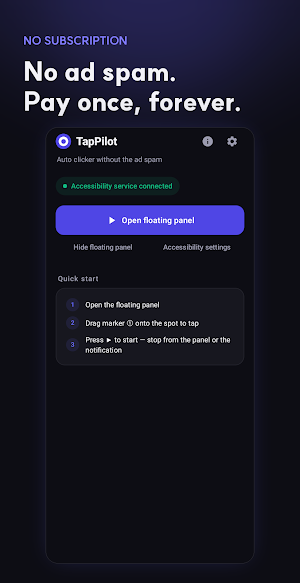
Auto clicker & tapper for clicks, swipes & macros. Light ads, pay once.
- Downloads
- 456+
- on Google Play
- Price
- Free
- In-app purchases
- Updated
- Aug 21
- 2026 · v0.1.3
Screenshots

About TapPilot - Auto Clicker Tapper
TapPilot is an auto clicker built for the moment you're tired of pressing the same button by hand. Drop a marker anywhere on the screen, set how fast and how many times, and let the app take over the tapping while you do something else.
WHAT IT'S GOOD FOR
- Game grinding: farming resources, tapping through idle-game buttons, or clearing repetitive stages
- Daily check-ins and login rewards that just need the same tap every time
- Long forms, surveys, or apps that require repeated confirmation taps
- Testing your own app or game by simulating rapid, repeated touches
HOW IT WORKS
- Single-point auto click: drop one marker where you want it, set the interval, hit start
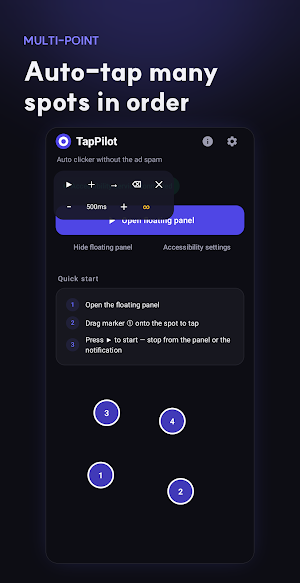
- Multi-point sequences: chain several tap locations together and TapPilot fires them in order
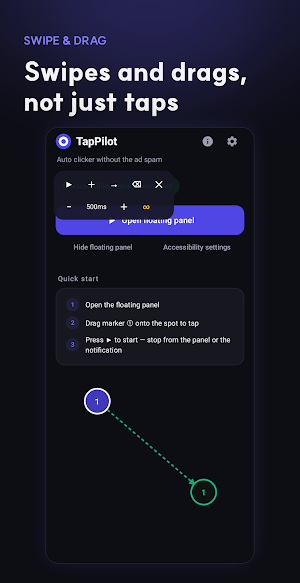
- Swipe and drag gestures: automate scrolling, sliders, and swipe-based interactions, not just taps
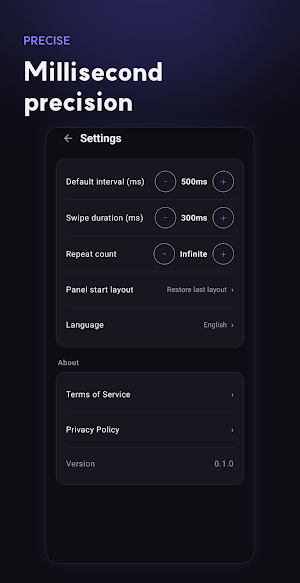
- Millisecond-level interval control: anywhere from a slow, deliberate pace to extremely rapid tapping
- Repeat count: run forever until you stop it, or set an exact number of repetitions
- Floating control panel: start, pause, and stop from a small overlay that sits on top of whatever app you're using
- Notification bar controls: trigger start and stop without even opening the floating panel
WHY PEOPLE PICK TAPPILOT
TapPilot runs on Android's accessibility service to simulate taps and swipes at the exact coordinates you choose. It doesn't read what's on your screen, doesn't collect what you're doing, and doesn't need an account. The Basic tier includes light banner ads and an occasional interstitial with a cooldown between them, never something that interrupts you mid-tap. Pro removes ads entirely and unlocks unlimited tap counts, faster minimum intervals, and more markers per sequence, all for a single one-time payment rather than a recurring subscription.
FREQUENTLY ASKED QUESTIONS
Do I need to root my phone to use TapPilot?
No. TapPilot works through Android's built-in accessibility service, so no root access is required for any feature.
Is Pro a subscription?
No. Pro is a one-time purchase. Pay once and every Pro feature, including anything unlocked later, stays yours with no recurring charge.
Will this get me banned from a game?
TapPilot only taps and swipes at the exact spots you set up yourself, the same way your finger would. That said, some games and apps have their own rules against automation in their terms of service, so use it responsibly and check the rules of whatever you're automating.
Does TapPilot read or record what's on my screen?
No. The accessibility service is used purely to deliver taps and swipes to the coordinates you specify. Screen content is never read, logged, or transmitted anywhere.
Can I automate more than just simple taps?
Yes. Beyond single taps, you can chain multi-point sequences and automate swipe or drag gestures, useful for scrolling feeds, adjusting sliders, or navigating multi-step flows.
What happens if I switch apps while TapPilot is running?
The floating panel and notification controls stay active on top of whatever app is in front, so you can start, check, or stop a running sequence without switching back to TapPilot itself.
Can I use it for more than games?
Yes. Anything that needs the same tap repeated over and over works well, from repetitive form fields to daily check-in buttons to your own app's manual QA testing.
TapPilot handles the repetitive tapping so your thumb doesn't have to.
WHAT IT'S GOOD FOR
- Game grinding: farming resources, tapping through idle-game buttons, or clearing repetitive stages
- Daily check-ins and login rewards that just need the same tap every time
- Long forms, surveys, or apps that require repeated confirmation taps
- Testing your own app or game by simulating rapid, repeated touches
HOW IT WORKS
- Single-point auto click: drop one marker where you want it, set the interval, hit start
- Multi-point sequences: chain several tap locations together and TapPilot fires them in order
- Swipe and drag gestures: automate scrolling, sliders, and swipe-based interactions, not just taps
- Millisecond-level interval control: anywhere from a slow, deliberate pace to extremely rapid tapping
- Repeat count: run forever until you stop it, or set an exact number of repetitions
- Floating control panel: start, pause, and stop from a small overlay that sits on top of whatever app you're using
- Notification bar controls: trigger start and stop without even opening the floating panel
WHY PEOPLE PICK TAPPILOT
TapPilot runs on Android's accessibility service to simulate taps and swipes at the exact coordinates you choose. It doesn't read what's on your screen, doesn't collect what you're doing, and doesn't need an account. The Basic tier includes light banner ads and an occasional interstitial with a cooldown between them, never something that interrupts you mid-tap. Pro removes ads entirely and unlocks unlimited tap counts, faster minimum intervals, and more markers per sequence, all for a single one-time payment rather than a recurring subscription.
FREQUENTLY ASKED QUESTIONS
Do I need to root my phone to use TapPilot?
No. TapPilot works through Android's built-in accessibility service, so no root access is required for any feature.
Is Pro a subscription?
No. Pro is a one-time purchase. Pay once and every Pro feature, including anything unlocked later, stays yours with no recurring charge.
Will this get me banned from a game?
TapPilot only taps and swipes at the exact spots you set up yourself, the same way your finger would. That said, some games and apps have their own rules against automation in their terms of service, so use it responsibly and check the rules of whatever you're automating.
Does TapPilot read or record what's on my screen?
No. The accessibility service is used purely to deliver taps and swipes to the coordinates you specify. Screen content is never read, logged, or transmitted anywhere.
Can I automate more than just simple taps?
Yes. Beyond single taps, you can chain multi-point sequences and automate swipe or drag gestures, useful for scrolling feeds, adjusting sliders, or navigating multi-step flows.
What happens if I switch apps while TapPilot is running?
The floating panel and notification controls stay active on top of whatever app is in front, so you can start, check, or stop a running sequence without switching back to TapPilot itself.
Can I use it for more than games?
Yes. Anything that needs the same tap repeated over and over works well, from repetitive form fields to daily check-in buttons to your own app's manual QA testing.
TapPilot handles the repetitive tapping so your thumb doesn't have to.
What’s new
Version 0.1.3 · Updated August 21, 2026
Performance and stability improvements.
Alternatives to TapPilot - Auto Clicker Tapper
Looking for apps like TapPilot - Auto Clicker Tapper? Here are 6 similar Android apps on Google Play. All of them are free to download.
-
Unbitten: Stop Nail Biting
-
Spectrum: Audio Analyzer & RTA
-
Vidpress: Video Compressor
-
Resono: Tinnitus Relief Sounds
-
Quit Sugar: Sugar No Tracker
-
Quit Caffeine: Decaf Tracker
| App | Rating | Price | Installs | Last updated | Compare |
|---|---|---|---|---|---|
| TapPilot - Auto Clicker Tapper | – | Free | 100+ | Aug 21, 2026 | |
| Unbitten: Stop Nail Biting | – | Free | 50+ | – | Compare |
| Spectrum: Audio Analyzer & RTA | – | Free | 1,000+ | Aug 11, 2026 | Compare |
| Vidpress: Video Compressor | – | Free | 50+ | Aug 21, 2026 | Compare |
| Resono: Tinnitus Relief Sounds | – | Free | 50+ | – | Compare |
| Quit Sugar: Sugar No Tracker | – | Free | 50+ | – | Compare |
| Quit Caffeine: Decaf Tracker | – | Free | 50+ | – | Compare |
Similar apps on Google Play
- Unbitten: Stop Nail Biting
- Spectrum: Audio Analyzer & RTA
- Vidpress: Video Compressor
- Resono: Tinnitus Relief Sounds
- Quit Sugar: Sugar No Tracker
- Quit Caffeine: Decaf Tracker
- NoiseProof: dB Meter & Log
- HoldOn: Panic Attack Relief
- Tingle: ASMR Sounds & Triggers
- Zoothe: Pet Calming Sounds
- SnoreWise: Snore Recorder
- Mossu - Plant Care Reminder
- DryWave: Water Eject & Clean
- Bloomly: Habit Tracker Garden
- Daily TOPIK - Learn Korean
- Salat Light: Prayer Times
- Intonaire - Tuner & Metronome
- MoneyLeaf: Expense Tracker
- 연애도감 : AI 연애 시뮬레이션·미연시 게임
- ClickTimer - Ticketing Timer
- Nyangle: Cozy Cat Block Puzzle
- Lumen - Daily Bible Offline
- LiftLog: Workout & Gym Tracker
- 데일리 JLPT - 일본어 단어·문법·회화·한자
- Daily Bible - Verse & Devotion